
Live Draw Screen
For merchants who broadcast their prize draws live on YouTube, Facebook Live, Twitch, or TikTok, Quantum Competitions provides a dedicated fullscreen Live Draw Console and synchronized real-time public watcher.
The Live Draw Console
Section titled “The Live Draw Console”When a competition has closed, open the console by clicking the Launch Live Draw action button on the competition edit screen:
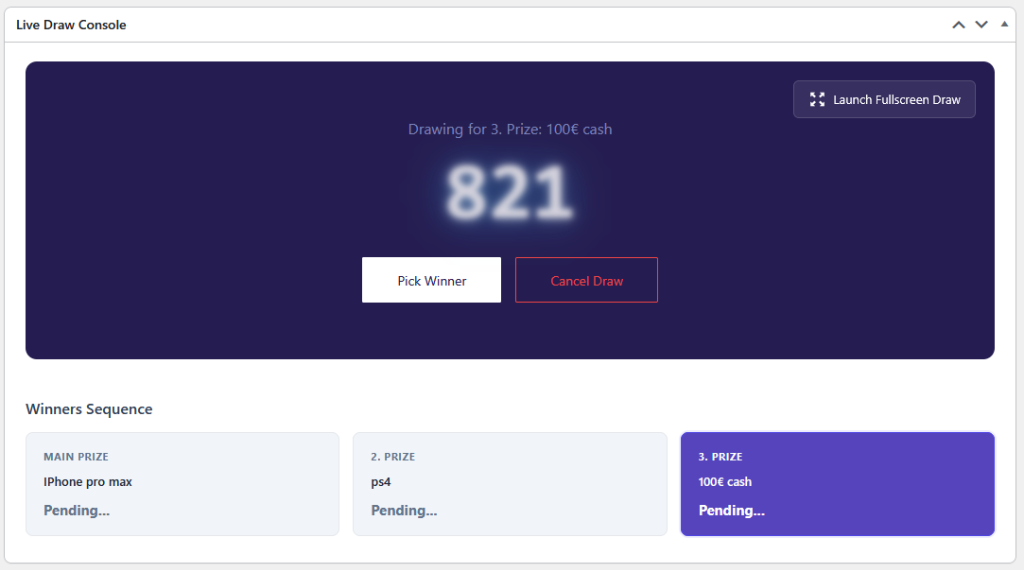
Control Toolbar & Security Lock
Section titled “Control Toolbar & Security Lock”To prevent accidental triggers before going live on camera, the machine initializes in a locked state:
- Open Live Draw: Unlocks the controls and primes the ticket pool for spinning.
- Lock Console: Instantly locks the console again between draw rounds.
- Launch Fullscreen Draw: Toggles a clean, distraction-free fullscreen presentation mode ideal for OBS window capture or projector displays.
Drawing Workflow
Section titled “Drawing Workflow”- Click Start Draw (or hit
Spacebar): The digital tumbler begins spinning through eligible ticket numbers with audio effects and dynamic acceleration. - Click Pick Winner: The spinning sequence smoothly decelerates, landing on the winning ticket number.
- Confetti & Winner Reveal: Celebratory confetti bursts across the screen via
canvas-confetti, revealing the winner’s ticket number and name. - Cancel Draw: If an operational issue occurs prior to confirming, the host can reset the spin safely.
Multi-Tier Winners Sequence
Section titled “Multi-Tier Winners Sequence”For competitions configured with multiple winners (_lottery_num_winners > 1):
- The console renders a dedicated Winners Sequence list on the right sidebar.
- Each slot highlights its rank (
1st Prize,2nd Prize,3rd Prize) and specific prize name. - The system steps through each prize tier one-by-one, marking completed draws as
Drawnand automatically advancing to the nextPendingprize.
Verifiable Quantum Signatures
Section titled “Verifiable Quantum Signatures”When quantum randomization is active, each drawn winner is certified with a cryptographic signature:
- A verifiable signature string is logged (e.g.
_lottery_winner_signature_1). - Displayed directly below the drawn winner slot:
Quantum Signature: 7b3f9a1c8e2d405b...
- Clicking the badge opens the public verification ledger on
https://wpgenie.org/verify/{signature}, proving live on stream that the result was mathematically genuine and tamper-proof.
Real-Time Public Frontend Watcher
Section titled “Real-Time Public Frontend Watcher”While the host operates the admin console, customers visiting the competition page can watch the draw live in real time:
- Instant JSON Synchronization: As the admin console changes states (idle → spinning → winner revealed), state data is written to a lightweight public cache (
/uploads/competitions-live-draws/product-{id}.json). - Frontend Watcher Template: Single product pages automatically display the interactive live draw card (
html-live-draw-watcher.php). - Page Builder Integrations: Dedicated Live Draw widgets are available for Elementor and Gutenberg.
- Viewer States:
Waiting for Host...: Stream viewers see a pulsating standby badge until the draw starts.Drawing in Progress...: Numbers cycle live on the user’s screen in sync with the host.Winner Found!: Confetti and winner announcements trigger synchronously in the viewer’s browser.All Winners Drawn!: Displays the finalized winner podium.