
Managing Competitions
The Competitions admin panel (WP Admin > Competitions) is the central mission control dashboard for your entire competition business. It gives store administrators immediate visibility into active ticket sales, participant quotas, instant prize claims, and competition statuses.
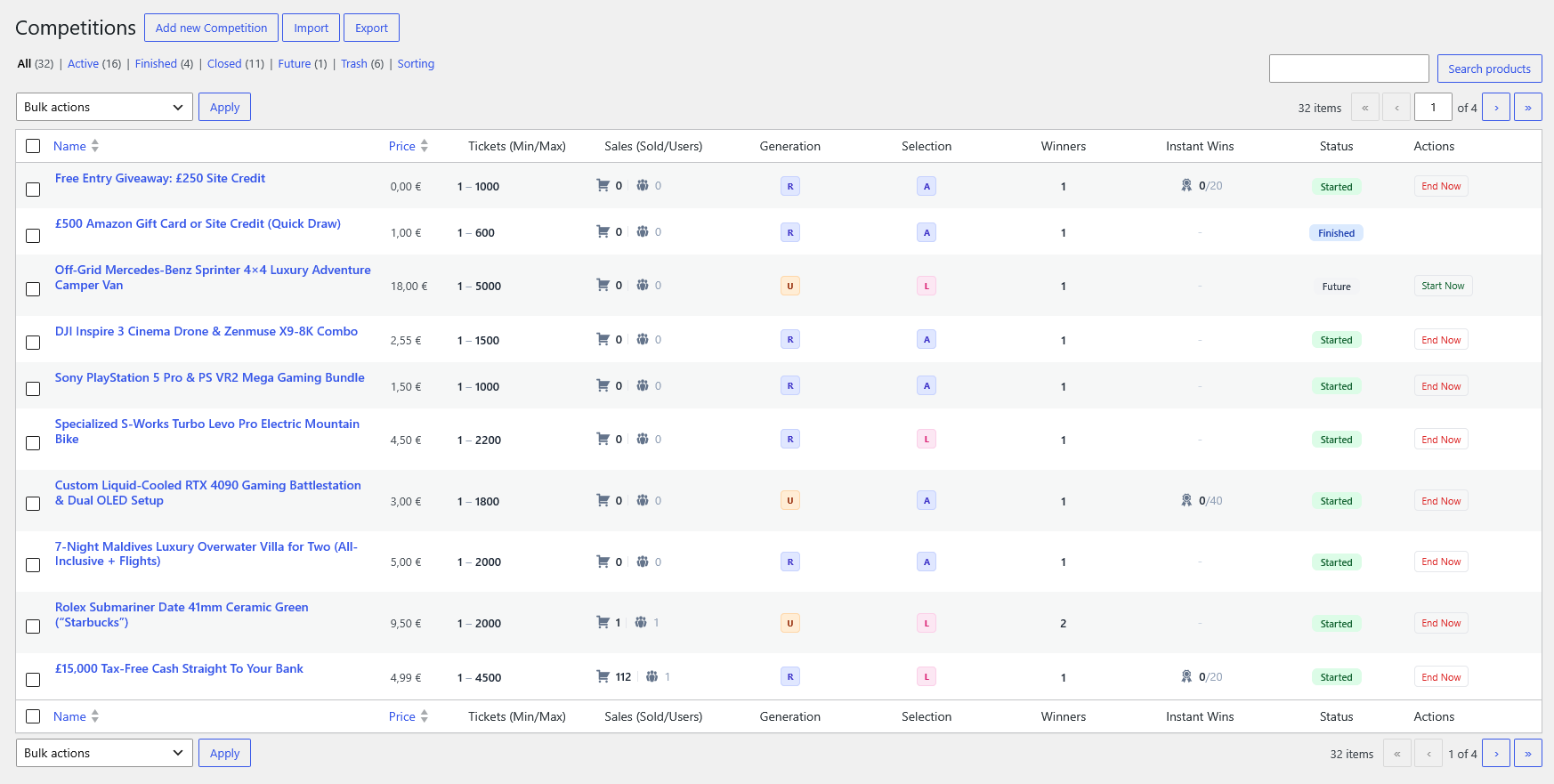
Dashboard Table Columns
Section titled “Dashboard Table Columns”| Column | Description |
|---|---|
| Name | Competition title and featured image. Hovering reveals quick row actions (Edit, Quick Edit, Trash, View, Duplicate). |
| Price | Regular ticket price and active promotional/sale pricing. Free draws display 0,00 €. |
| Tickets (Min/Max) | The minimum threshold required for a successful draw and the maximum total ticket inventory (e.g. 1 – 1000). |
| Sales (Sold/Users) | Real-time entry counters: • 🛒 Sold: Total count of purchased tickets. • 👥 Users: Unique registered customers who have entered. |
| Generation | Ticket numbering mechanism badge: • R (Random): Ticket numbers are generated and assigned automatically.• U (User Pick): Entrants choose specific ticket numbers via the interactive visual grid. |
| Selection | Entry selector mode badge: • A (Automatic): Standard quantity input.• L (Lucky Dip): Quick 1-click randomized ticket bundle buttons enabled. |
| Winners | Total number of winning positions / prize tiers allocated to this draw (e.g. 1, 2, 5). |
| Instant Wins | Instant prize claim counter (e.g. 0/20 indicates 0 claimed out of 20 total allocated instant prizes). Displays - for standard draws without instant wins. |
| Status | Visual lifecycle badge: • Started (Green): Live, active, and accepting entries.• Finished (Blue): Draw concluded and winners picked.• Future (Gray): Scheduled to open automatically at a future date/time. |
| Actions | Immediate one-click operational controls: • End Now: Manually closes an active competition immediately.• Start Now: Manually launches a future competition ahead of schedule. |
Lifecycle Status Filters
Section titled “Lifecycle Status Filters”Use the top view tabs to quickly segment your competitions:
- All: Displays all published, private, and scheduled competitions.
- Active: Lists only currently open draws accepting ticket purchases.
- Finished: Historical record of completed draws where winners have already been generated.
- Closed: Competitions that reached their end date or maximum ticket limit, awaiting manual or automated winner drawing.
- Future: Upcoming scheduled competitions. Visitors cannot buy tickets until the scheduled start date/time.
- Trash: Deleted competitions that can be permanently purged or restored.
Drag-and-Drop Sorting
Section titled “Drag-and-Drop Sorting”Clicking the Sorting tab switches the admin table into custom arrangement mode:
- Drag and drop competition rows vertically into your preferred order.
- The custom sequence is saved automatically.
- This order directly determines the display priority on your storefront Competition Base Page, Elementor grids, and WooCommerce catalog archives.
One-Click Action Buttons
Section titled “One-Click Action Buttons”End Now: Useful when you want to conclude ticket sales immediately (e.g. for an impromptu live stream draw). Clicking this updates the competition closing time to the current timestamp, closes the ticket cart, and queues the competition for winner selection.Start Now: Allows launching scheduled competitions ahead of their defined start time without manually re-editing the product schedule fields.
Backup, Import & Export
Section titled “Backup, Import & Export”At the top of the Competitions screen, two dedicated tools facilitate bulk operations:
- Export: Downloads all competition product configurations, rules, questions, and prize tiers into a portable CSV/JSON format.
- Import: Bulk-creates new competitions from prepared spreadsheet files, ideal for high-volume operators launching dozens of weekly competitions.