
Badges & Countdown Timers
Visual indicators create urgency and clarity for shoppers across your catalog.
Badge Settings & Configuration
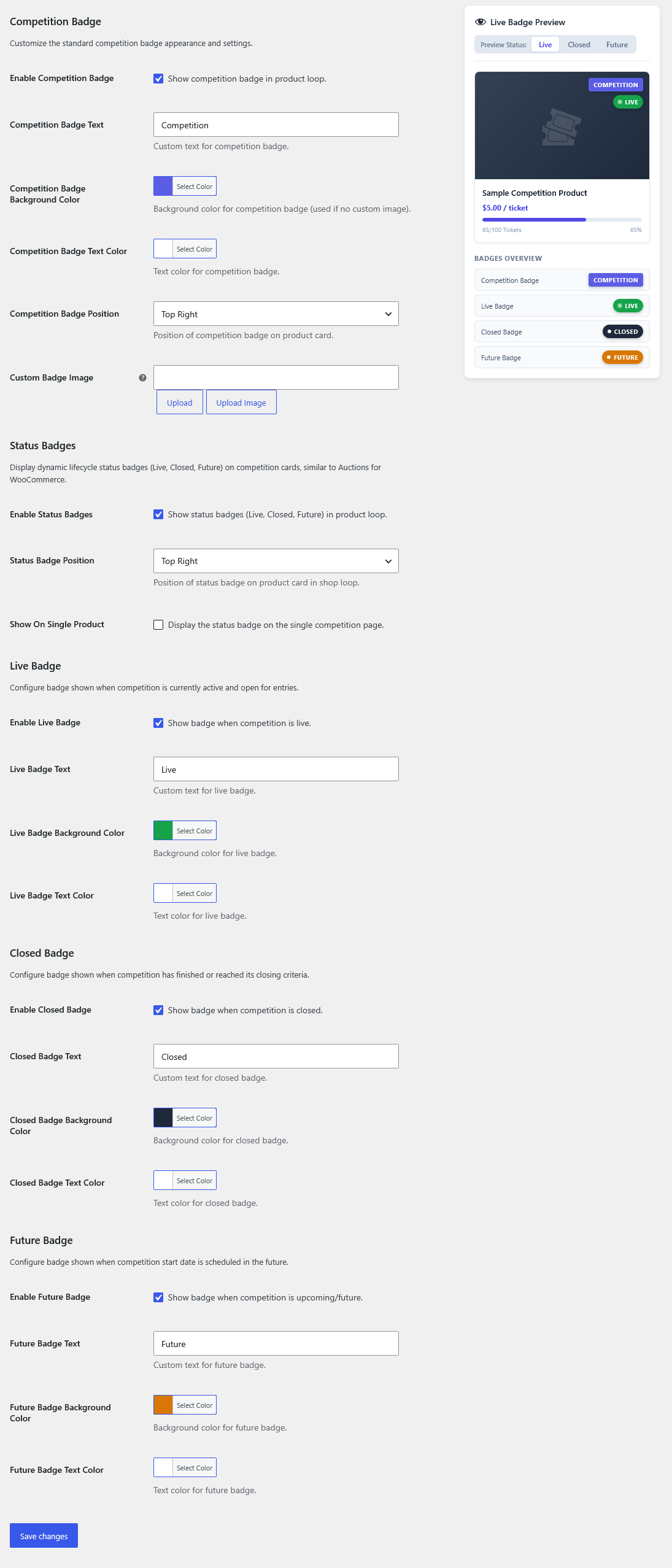
Section titled “Badge Settings & Configuration”Navigate to Competitions > Settings > Badges to customize badges displayed on product catalog loops and single competition pages.
Competition Badge
Section titled “Competition Badge”Highlights that an item in your store loop is an active competition:
- Enable Competition Badge: Checkbox to toggle the badge in the product loop.
- Competition Badge Text: Custom label (e.g.,
Competition,Prize Draw). - Background & Text Color: Color pickers to match your store branding.
- Competition Badge Position: Dropdown positioning (
Top Left,Top Right). - Custom Badge Image: Upload or link a custom graphic image to replace standard CSS pill badges.
Status Badges Lifecycle
Section titled “Status Badges Lifecycle”Display dynamic lifecycle status badges based on draw status:
- Enable Status Badges: Toggles lifecycle badges in the product loop.
- Status Badge Position: Placement dropdown (
Top Left,Top Right). - Show On Single Product: Toggle to display the active status badge on the single competition product page in addition to archive loops.
Lifecycle Badge States
Section titled “Lifecycle Badge States”- Live Badge: Shown when tickets are actively on sale. Configurable text (default
Live), background color (default emerald green), and text color. - Closed Badge: Shown when sales have concluded, the draw date arrived, or tickets sold out. Configurable text (default
Closed), background color (default dark slate), and text color. - Future Badge: Shown when a competition has an upcoming scheduled start date. Configurable text (default
Future), background color (default orange), and text color.
Live Badge Preview Sidebar
Section titled “Live Badge Preview Sidebar”The settings page includes an interactive Live Badge Preview dock on the right:
- Interactive State Toggles: Switch between Live, Closed, and Future to preview how product cards look in each state before saving.
- Badges Overview: Displays sample rendered pills for each active badge type.
Countdown Timers
Section titled “Countdown Timers”In Competitions > Settings > Display:
- Countdown Type: Choose between Digital Flip Clock or Compact Inline Countdown.
- Zero Action: Configure what happens when the countdown hits zero (instantly lock purchase buttons and switch to closed state via AJAX).
Progress Bars
Section titled “Progress Bars”- Shows percentage of tickets sold (e.g.
340 / 500 Sold - 68%). - Supports custom progress bar accent colors, striped animations, and urgency color shifts as tickets near sold-out status.