
Instant Reveal Animations
To maximize buyer excitement and viral social sharing, Quantum Competitions includes four gamified HTML5/CSS3 reveal animation engines that activate on the WooCommerce Order Received / Thank You page.
Available Animation Modes
Section titled “Available Animation Modes”The reveal animation can be configured per competition via the Instant prize reveal animation (_lottery_reveal_mode) dropdown in Card 4: Instant Wins:
1. Flip Card
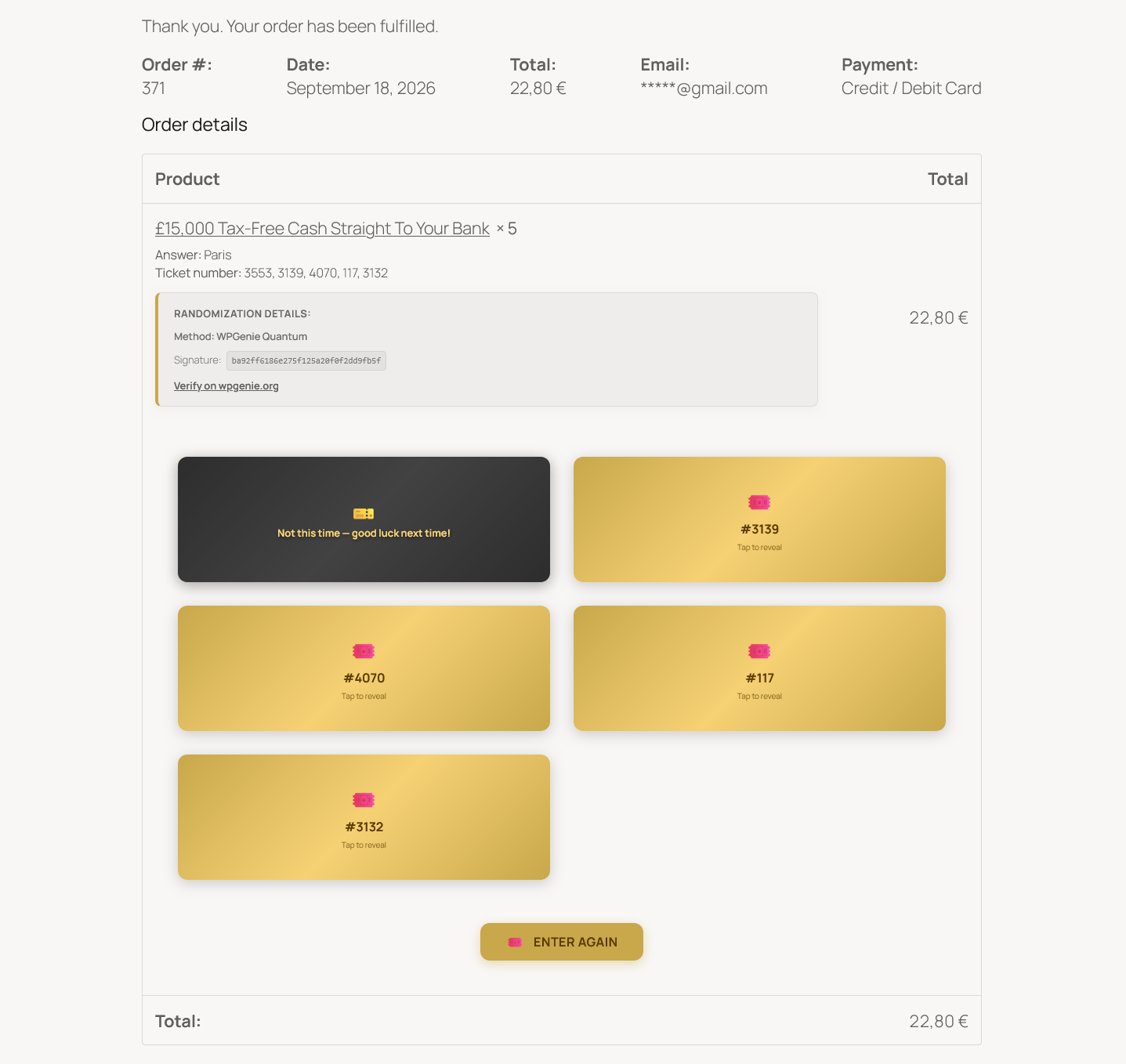
Section titled “1. Flip Card”- Mechanics: Renders a responsive grid of golden ticket cards representing every ticket in the order. Clicking or tapping a card triggers a smooth 3D flip animation.
- States: Unflipped cards display the ticket number and a Tap to reveal hint. Upon flipping, winning cards reveal the prize graphic and celebratory badge, while standard entries transition to an elegant dark card stating Not this time — good luck next time!.
2. Scratch Card (Canvas)
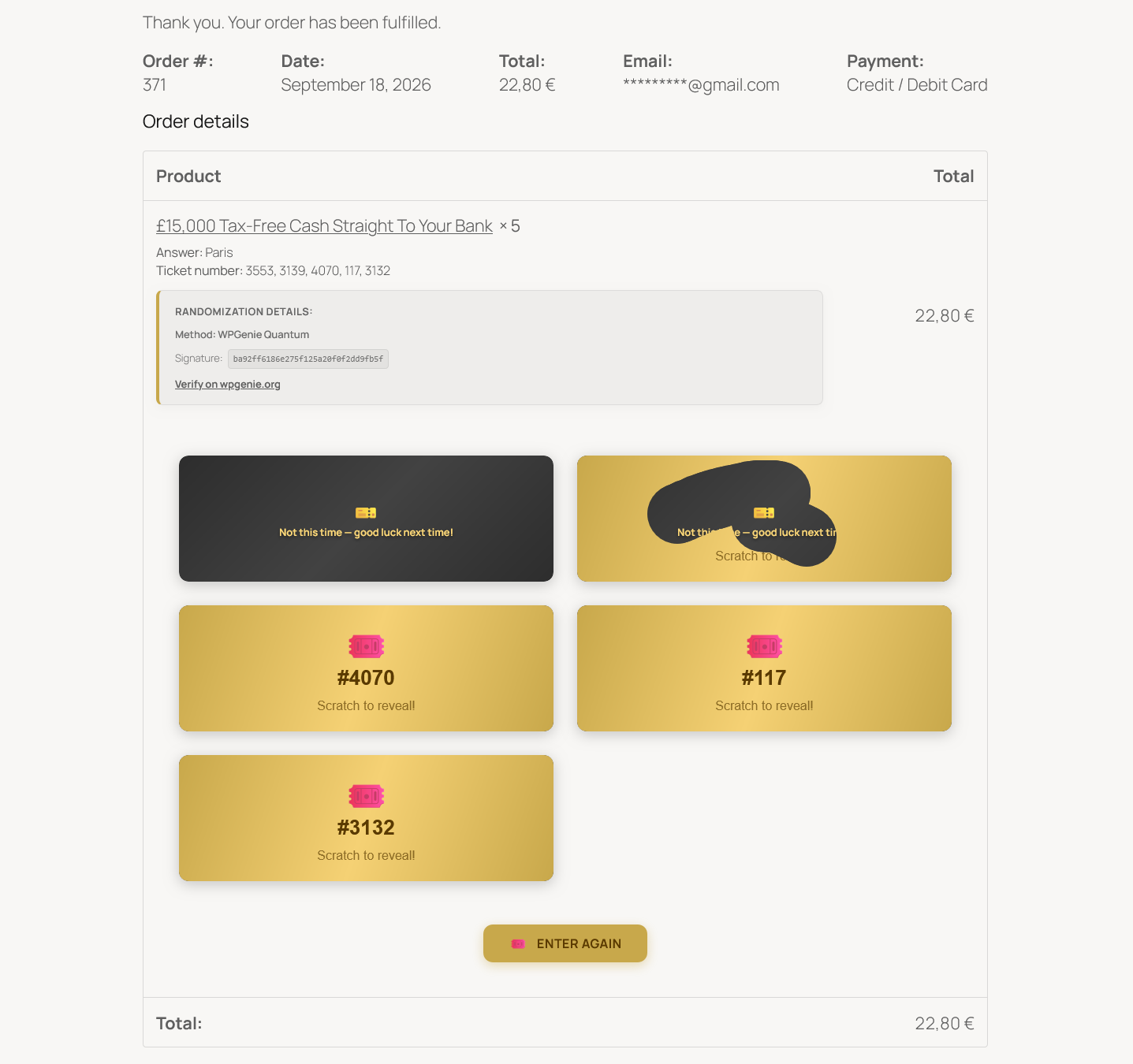
Section titled “2. Scratch Card (Canvas)”- Mechanics: Built on an interactive HTML5
<canvas>layer that simulates real metallic scratch lottery tickets. - States: Customers swipe with their mouse cursor or drag their finger on touchscreens to scratch off the golden mask, dynamically unveiling the win status and prize underneath.
3. Case Opening (CS:GO / Mystery Box)
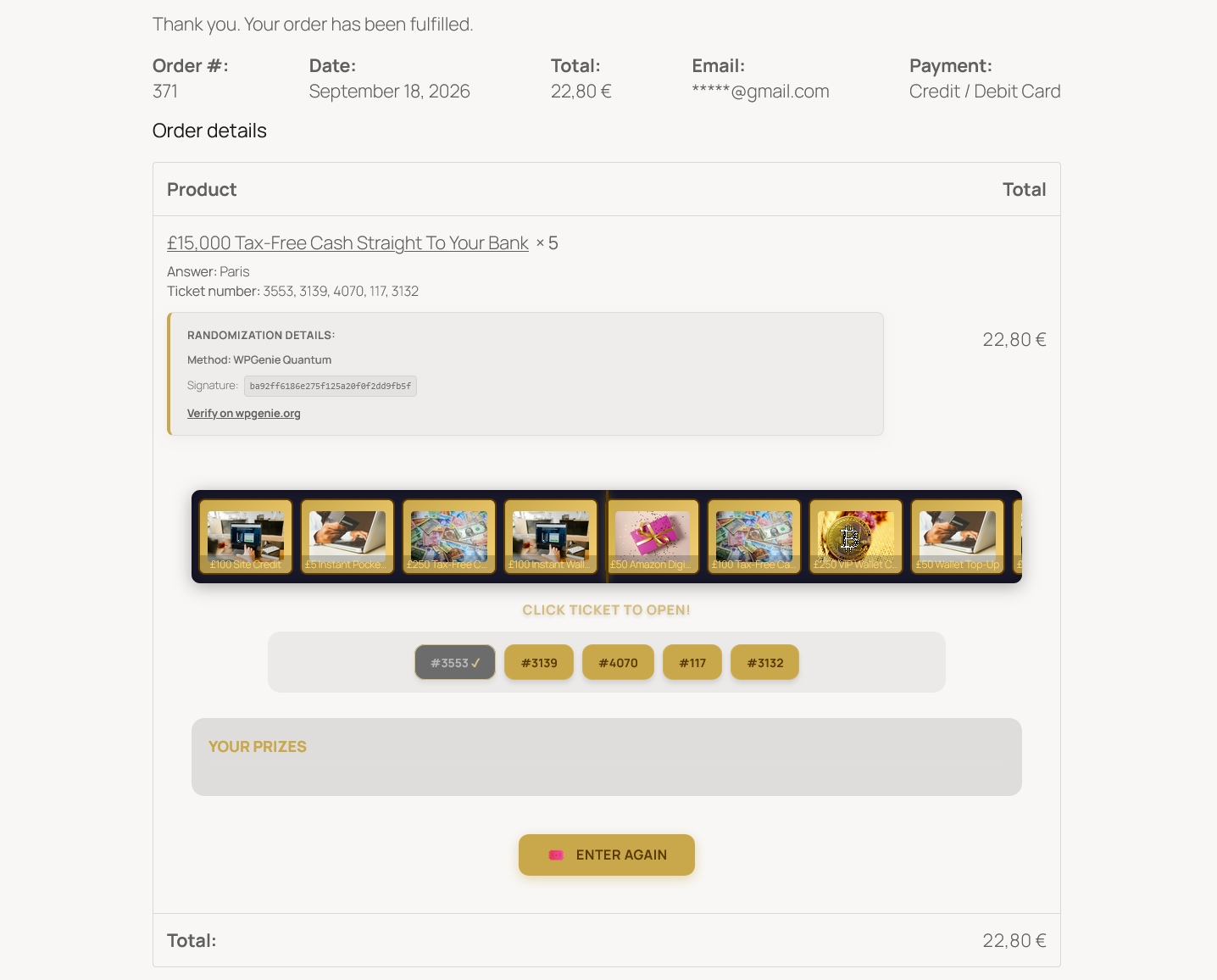
Section titled “3. Case Opening (CS:GO / Mystery Box)”- Mechanics: Features a high-suspense horizontal roller carousel cycling through available competition prizes and consolation entries.
- States: A ticket bar below the carousel displays all purchased tickets (
#3553 ✓,#3139,#4070,#117,#3132). Clicking an active ticket launches the carousel, which decelerates with physics easing until the target prize aligns directly under the center needle indicator.
4. Spin the Wheel
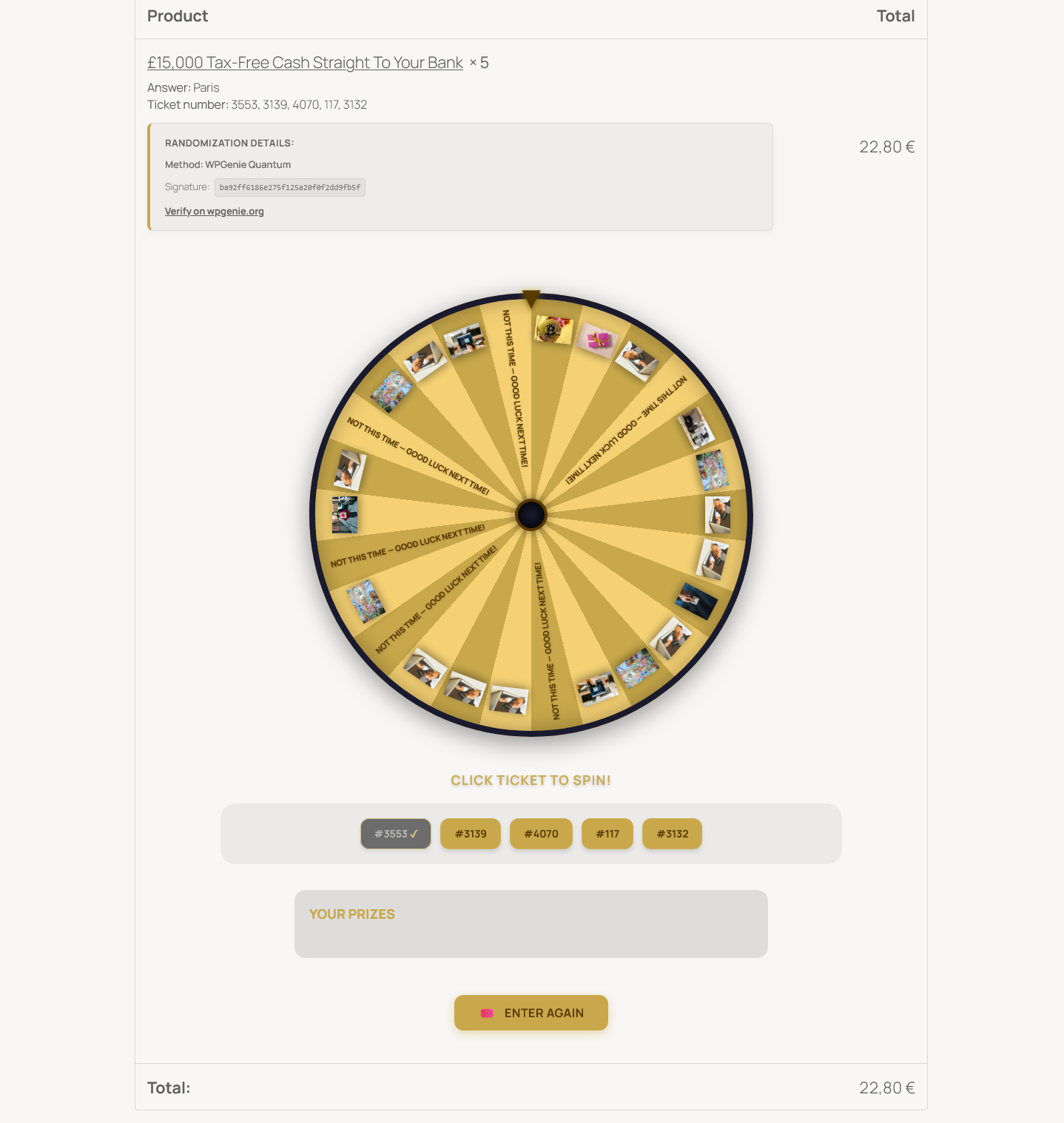
Section titled “4. Spin the Wheel”- Mechanics: An interactive carnival-style fortune wheel partitioned into multi-tier prize segments and consolation slices.
- States: Customers click ticket buttons in the selector row to trigger a spin. The wheel spins dynamically with pointer deflection ticks before halting on the result. Won prizes are collected in the Your Prizes drawer below.
5. None (Plain Text)
Section titled “5. None (Plain Text)”- Renders a clean text notice in the order item details without interactive animations, recommended for lightweight or purely utility checkout flows.
Order Receipt Experience
Section titled “Order Receipt Experience”All four interactive reveal animations integrate seamlessly into the WooCommerce Thank You / Order Received template:
- Order Metadata: Displays Order #, date, billing email, payment method, and purchased ticket list.
- Cryptographic Audit: When Quantum Randomization is enabled, the Randomization Details card appears above the reveal interface, displaying the engine method, SHA256 signature, and direct verification link to
wpgenie.org/verify/. - Re-engagement: A prominent ENTER AGAIN call-to-action button is displayed below the reveal viewport, directing customers back to enter additional competitions immediately.
Global Customizer & Settings
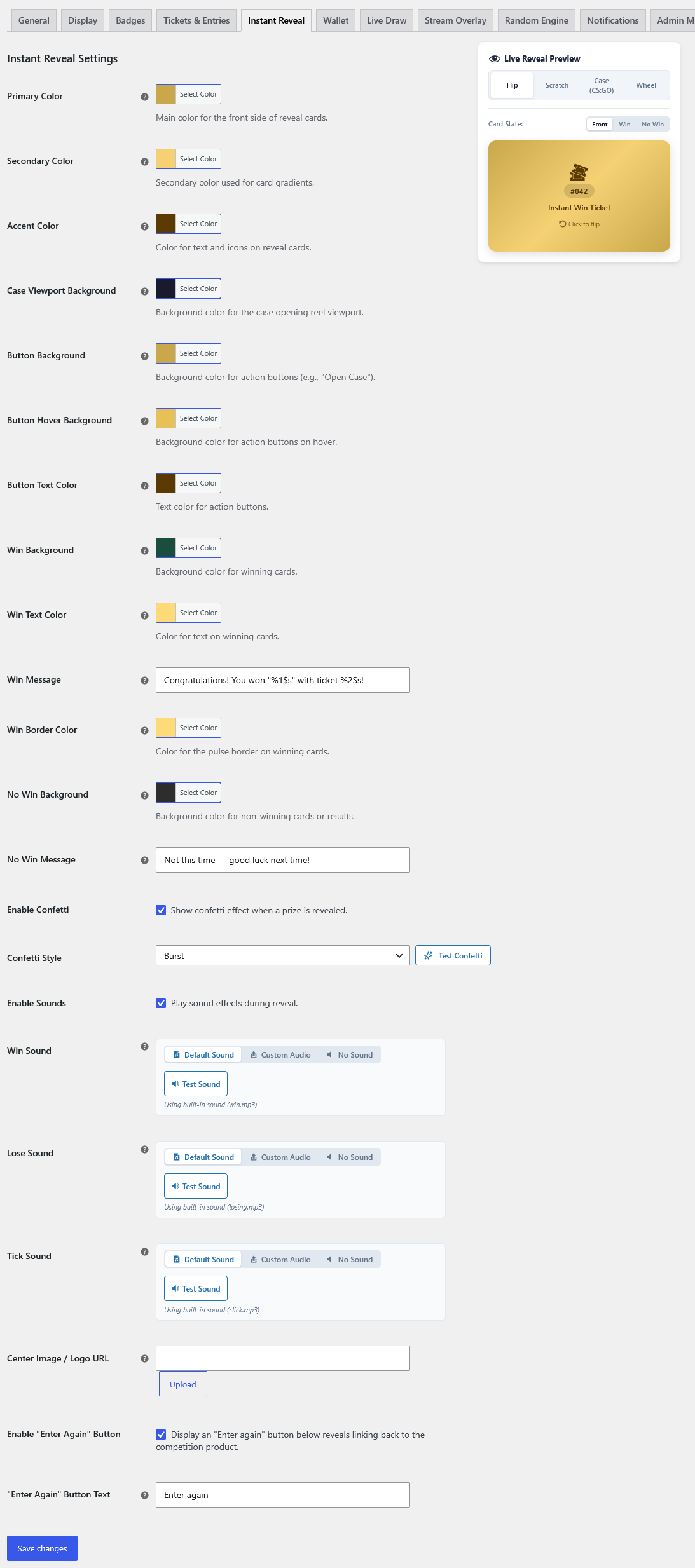
Section titled “Global Customizer & Settings”Store owners can customize visual themes, sound effects, particle confetti, and call-to-action buttons under Competitions > Settings > Instant Reveal:
Live Interactive Preview
Section titled “Live Interactive Preview”The settings page features a sticky real-time preview panel (#qcw-preview-reveal-card):
- Mode Switcher Tabs: Instantly test
Flip,Scratch,Case (CSGO), orWheelengines without navigating away. - Card State Toggles: Switch between
Front(unrevealed),Win(celebratory), andNo Win(consolation) states to verify colors and contrast. - Interactive Testing: Drag on the preview card to test HTML5 canvas scratch responsiveness directly.
Visual Styling & Color Controls
Section titled “Visual Styling & Color Controls”Fine-tune every visual component using native WordPress color pickers:
- Primary Color: Main base color for card fronts and primary surfaces.
- Secondary Color: Accent shade used for subtle background gradients.
- Accent Color: Ticket badges, numbers, icons, and text highlights.
- Case Viewport Background: Dark canvas backdrop for the CS:GO horizontal reel.
- Action Buttons: Granular control over Button Background, Button Hover Background, and Button Text Color.
- Win State Styling: Customizable Win Background, Win Text Color, and Win Border Color (controls the pulsating win glow).
- No-Win State Styling: Background color for non-winning cards or consolation results.
Confetti Particle Effects
Section titled “Confetti Particle Effects”- Enable Confetti: Toggle celebratory particle bursts on winning reveals.
- Confetti Style: Select from particle styles (e.g.
Burst,Cannons). - Test Confetti: Click the Test Confetti button to preview the animation directly in the admin dashboard.
Audio & Sound Effects
Section titled “Audio & Sound Effects”Engage players with auditory feedback throughout the reveal:
- Enable Sounds: Master toggle to play sound effects during ticket reveals.
- Win Sound: Celebratory fanfare. Choose Default Sound, upload Custom Audio, or select No Sound.
- Lose Sound: Subtle consolation tone (
losing.mp3). Choose Default, Custom Audio, or Mute. - Tick Sound: Dynamic mechanical click (
tick.mp3) played as the CS:GO carousel or Wheel spins past prize segments. - Test Sound Buttons: Click Test Sound under each audio option to audit volume levels before deploying.
Messaging & Custom Placeholders
Section titled “Messaging & Custom Placeholders”- Win Message: Notification text shown when an instant win is uncovered. Supports
%1$s(prize name) and%2$s(ticket number).- Example:
Congratulations! You won "%1$s" with ticket #%2$s!
- Example:
- No-Win Message: Friendly text displayed for standard entries.
- Example:
Not this time — good luck next time!
- Example:
Branding & Re-engagement
Section titled “Branding & Re-engagement”- Center Image / Logo URL: Upload an official brand logo or badge displayed on card faces and wheel hubs via the WordPress Media Library.
- Enable “Enter Again” Button: Renders a prominent CTA button below the reveal container linking directly back to the competition product.
- “Enter Again” Button Text: Customize the CTA label (e.g.,
Enter againorPlay Another Ticket).