
Schedule, Extensions & Relisting
Accurate time management is handled through start and closing dates combined with automated cron events.
Setting Dates
Section titled “Setting Dates”- Competition from date: When users can start buying tickets. Before this time, the product displays a “Future Competition” badge with an opening countdown.
- Competition to date: The closing deadline. Once reached, tickets can no longer be added to the cart, and orders pending payment cannot claim tickets past the cutoff.
Post-Closing Action Buttons
Section titled “Post-Closing Action Buttons”Once a competition reaches its scheduled end date or finishes, the dates panel in WP Admin dynamically displays two action buttons directly below Competition to date:
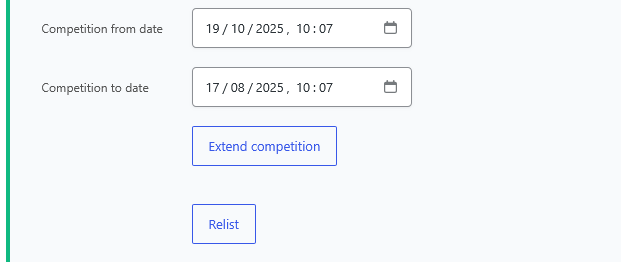
- Extend competition: Reveals an input field to prolong the existing competition deadline.
- Relist: Expands fields to schedule a fresh round and choose participant log retention.
Extending a Competition
Section titled “Extending a Competition”If minimum ticket sales have not been met or you wish to prolong ticket sales without resetting participant entries:
- Open the finished competition in WordPress Admin.
- Click the Extend competition button.
- The Extend Date picker dynamically expands beneath the button:
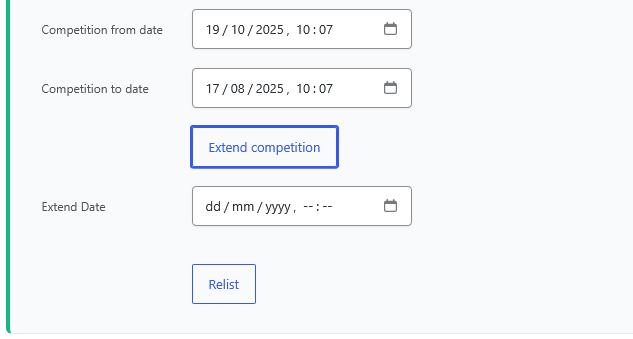
- Pick the new extended closing date and time (
dd / mm / yyyy , -- : --). - Click Update to save the product.
- The countdown timer on the frontend instantly reflects the updated deadline, and ticket purchases resume seamlessly.
Manual Relisting
Section titled “Manual Relisting”To reset and launch a brand new cycle of a finished competition manually:
- Open the finished competition in WordPress Admin.
- Click the Relist button.
- The relisting controls dynamically expand:
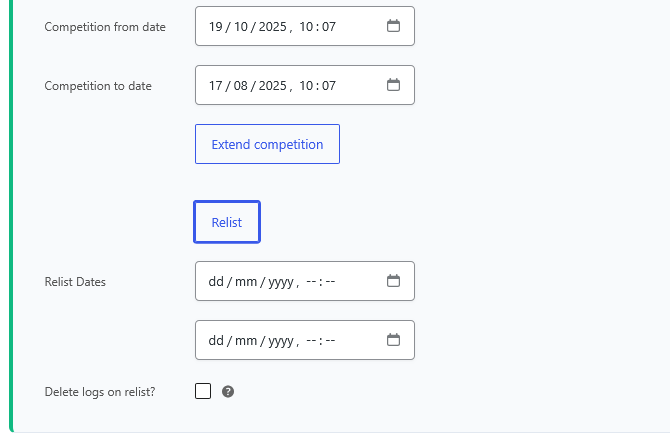
- Define the new Relist Dates:
- First field: New competition start timestamp (
From). - Second field: New competition closing timestamp (
To).
- First field: New competition start timestamp (
- Choose log retention in Delete logs on relist?:
- Checked: Clears previous entries, ticket allocation logs, and past winners, resetting ticket numbers cleanly for the new participants.
- Unchecked: Retains previous participant records in the database while resetting active ticket counters.
- Click Update to relaunch the competition.
Automatic Relist
Section titled “Automatic Relist”For evergreen, daily, or recurring prize draws, Quantum Competitions includes an automated relisting engine that re-launches the competition as soon as it finishes.
Configuration Options
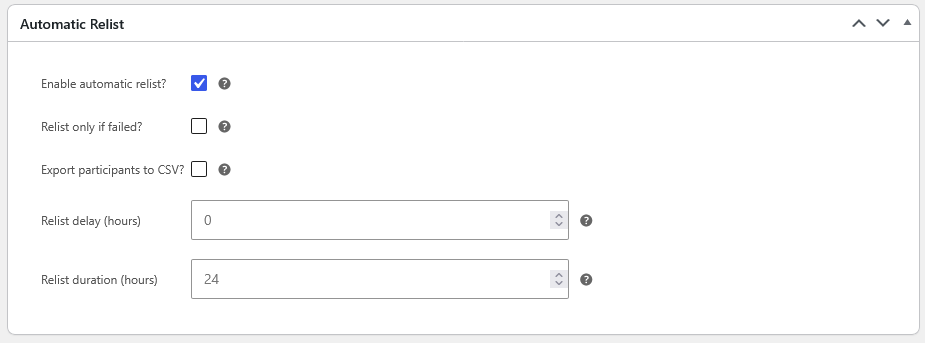
Section titled “Configuration Options”In the competition edit screen, locate the Automatic Relist metabox:
| Option | Meta Key | Description |
|---|---|---|
| Enable automatic relist? | _lottery_automatic_relist |
Activates the automated relisting cycle upon competition completion. |
| Relist only if failed? | _lottery_automatic_relist_fail |
When checked, the competition will only relist if it failed to reach the minimum ticket sales quota (_min_tickets). If a winner was drawn, it remains closed. |
| Export participants to CSV? | _lottery_automatic_relist_save |
Automatically generates and saves an export of participant entry data and ticket numbers before resetting the competition for the new round. |
| Relist delay (hours) | _lottery_relist_time |
Cooldown period between the end of the previous competition and the start of the relisted draw (e.g., 0 for instant restart, 12 or 24 for next-day launches). |
| Relist duration (hours) | _lottery_relist_duration |
The duration (in hours) of the newly generated competition cycle (e.g., 24 for daily competitions, 168 for weekly draws). |
What Happens During Automatic Relisting
Section titled “What Happens During Automatic Relisting”When the background cron triggers an automatic relist:
- Participant Backup: If enabled, exports previous round participants to CSV.
- New Schedule: Sets the new start date (
_lottery_dates_from) to the current timestamp (or after the configured delay) and the end date (_lottery_dates_to) according to the defined duration in hours. - Stock & Ticket Reset: Restores ticket inventory back to
_max_ticketswithinstockstatus. - Draw Cleansing: Resets previous winner assignments, instant win claims, and live stream temporary cache data.
- Audit History: Records the action in
_lottery_relisted_historypost meta for record-keeping.