
Quantum Random Engine & Verification
Ensuring provable fairness and transparency is essential for building player trust and meeting competition compliance standards. Quantum Competitions includes three random number generation engines configured in Competitions > Settings > Random Engine:
1. Wpgenie.org Quantum Randomizer (Recommended)
Section titled “1. Wpgenie.org Quantum Randomizer (Recommended)”- Overview: Powered by ANU Quantum technology and provided as a cloud service by wpgenie.
- Cost: Free to use for all licensed plugin users.
- Public Audit Trail & Signature:
- For every winner drawn, a unique cryptographic signature is recorded.
- If Show Signature in Frontend is enabled, the quantum signature and generation method are displayed on the product page.
- If WPGenie Verify Link is enabled, a public verification link to
wpgenie.orgis displayed allowing anyone to independently verify the authenticity and timestamp of the draw. (Note: On staging/local domains, verification audit data is retained for 1 week).
2. ANU Quantum Numbers (Direct API)
Section titled “2. ANU Quantum Numbers (Direct API)”- Overview: Directly connects to the Australian National University (ANU) Quantum Numbers API (
api.quantumnumbers.anu.edu.au). - Technology: Uses real-time physical quantum vacuum fluctuation measurements in an optical field to generate true quantum randomness.
- Requirements: Enter your ANU QRNG API Key in settings.
3. PHP random_int() (Server-side)
Section titled “3. PHP random_int() (Server-side)”- Overview: Uses your server’s native Cryptographically Secure Pseudo-Random Number Generator (CSPRNG).
- Speed: Zero latency, entirely offline, unaffected by network outages or third-party API limits.
- Trade-off: Secure and mathematically unbiased, but lacks external 3rd-party cryptographic certificates.
Using Quantum Randomness for Ticket Numbers
Section titled “Using Quantum Randomness for Ticket Numbers”By default, the external Quantum APIs (WPGenie Quantum or ANU) are reserved for drawing winners. In Automatic Random Allocation mode, ticket numbers are allocated at checkout using the local server CSPRNG (random_int()) for instant execution.
Enabling Use for Ticket Numbers routes ticket number generation through the external Quantum engine as well:
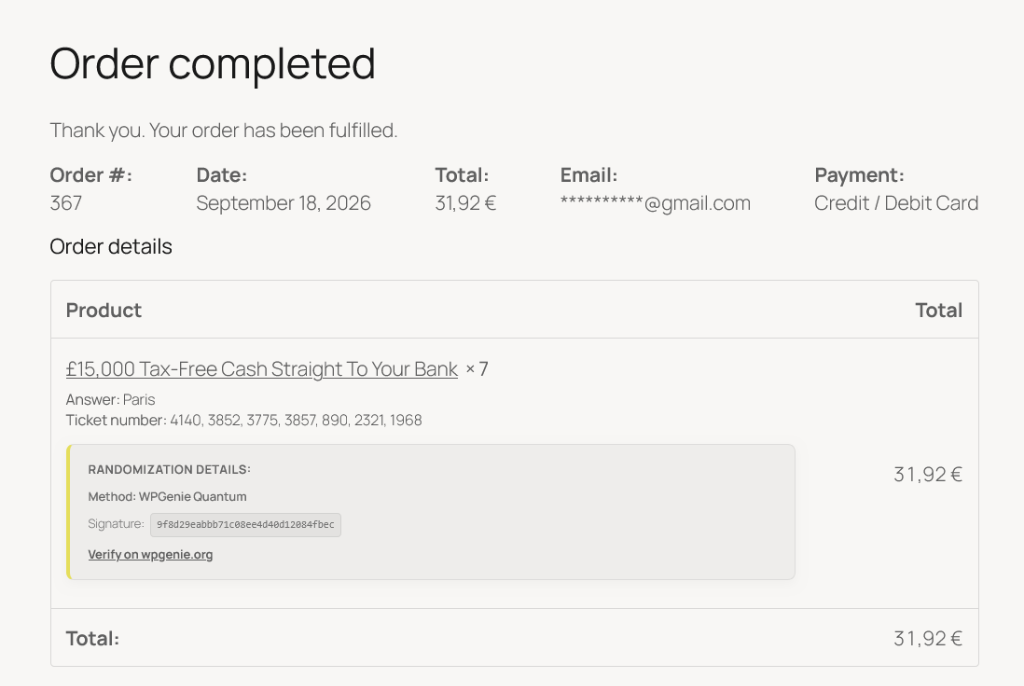
1. Use for Ticket Numbers (qcw_random_engine_for_tickets)
Section titled “1. Use for Ticket Numbers (qcw_random_engine_for_tickets)”- Quantum Ticket Batches: When customers purchase tickets in an Automatic Random competition, ticket numbers (e.g.
4140, 3852, 3775, 3857...) are selected via a live API request to the chosen Quantum engine (QCW_Random::generate_batch). - Cryptographic Batch Verification: The API returns a cryptographically signed batch hash along with the selected numbers, permanently saving
_qcw_tickets_signature_batch_[id]and_qcw_tickets_method_batch_[id]to the WooCommerce order.
2. Show Info to User (qcw_random_show_info_to_user)
Section titled “2. Show Info to User (qcw_random_show_info_to_user)”- Customer Receipt Display: When active, the template
order-item-lottery-batch-info.phpoutputs the RANDOMIZATION DETAILS container directly beneath the ticket numbers on the Order Received (Thank You) page and under My Account > Orders > View Order. - Audit Elements: Shows the generation method (WPGenie Quantum), the master batch signature hash, and a direct link to independently verify the signature on
wpgenie.org. - Payment Safeguards: If Hide ticket number until order is paid is active, quantum batch info is withheld until payment is confirmed (won’t display for pending, on-hold, failed, or cancelled orders).
- Admin Audit: Store administrators can view and verify batch signatures at any time inside the WooCommerce order edit screen.
3. Public Verification Certificate (wpgenie.org/verify/)
Section titled “3. Public Verification Certificate (wpgenie.org/verify/)”Clicking Verify on wpgenie.org takes the customer or auditor to the public cryptographic verification certificate:
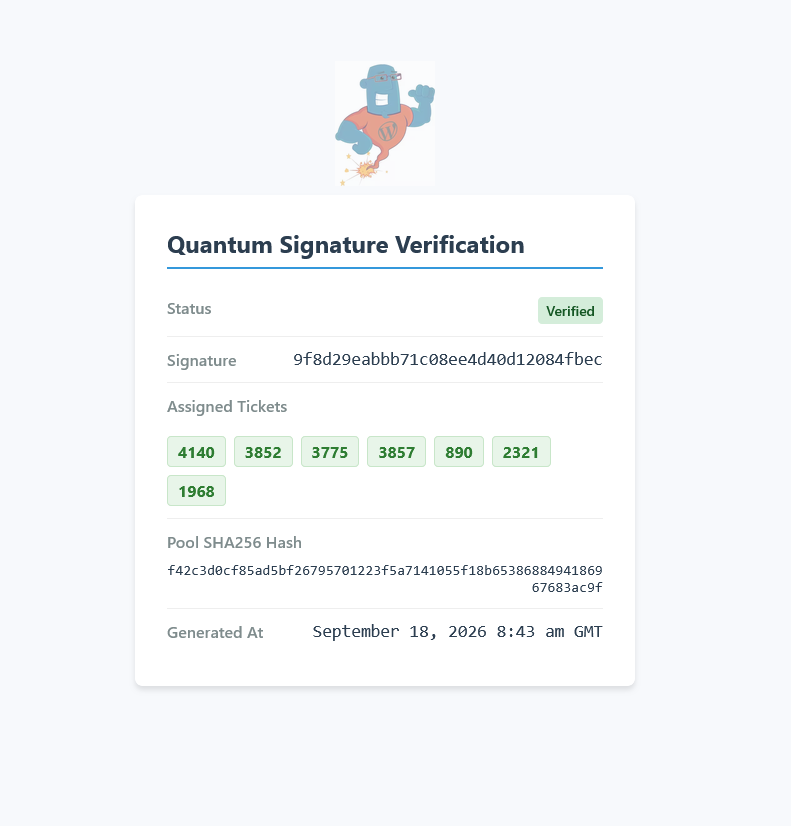
This hosted public certificate guarantees total draw integrity:
- Verification Status: Displays an official Verified status confirming the numbers were produced by physical quantum hardware fluctuations.
- Matching Signature: Authenticates the exact signature hash (
9f8d29eabb71c08ee4d40d12084fbec) issued on the customer’s order receipt. - Assigned Tickets: Lists all ticket numbers allocated in the batch (e.g.
4140,3852,3775,3857,890,2321,1968). - Pool SHA256 Hash: Displays a cryptographic checksum of the entire available ticket inventory at the moment of allocation, proving no numbers were removed or manipulated.
- UTC Timestamp: An immutable server timestamp recording the exact minute and second of quantum generation.
Settings Reference
Section titled “Settings Reference”Located in Competitions > Settings > Random Engine:
| Setting | Meta / Option Key | Description | Default |
|---|---|---|---|
| Generation Method | qcw_random_engine |
Choose between Wpgenie.org Quantum Randomizer, ANU Quantum Numbers, or PHP random_int. |
wpgenie |
| ANU API Key | qcw_random_anu_api_key |
Required only when connecting directly to the ANU Quantum Numbers API. | None |
| Show Signature in Frontend | qcw_show_signature_frontend |
Displays the quantum signature and generation method on the product page after the winner draw. | yes |
| WPGenie Verify Link | qcw_wpgenie_verify_link |
Shows a clickable link to wpgenie.org to verify the authenticity and timestamp of the drawn winner. | yes |
| Use for Ticket Numbers | qcw_random_engine_for_tickets |
Use the selected random engine to generate ticket numbers during checkout. (Uses external API during order processing). | no |
| Show Info to User | qcw_random_show_info_to_user |
Show randomization details (method, signature, verify link) to the customer in their order details. | no |