
Drawing Winners
Quantum Competitions provides three distinct winner selection workflows configured via the Draw Type (_lottery_draw_type) selector on every competition product.
Whether you run hands-off automated raffles, review participant logs before drawing, or host broadcast-quality live events on social media, you can choose the optimal draw mode for your business model.
The Three Draw Types Compared
Section titled “The Three Draw Types Compared”| Draw Mode | Best For | Winner Determination | Broadcast & Suspend Controls |
|---|---|---|---|
| Automatic | High-volume sites, hourly/daily draws, digital vouchers, set-and-forget raffles. | Instantly triggered by cron (simple_lottery_cron) or sellout without admin intervention. |
No manual broadcast; instant email dispatch and results publication. |
| Manual | External draws (physical lottery balls, mechanical drums, TV broadcasts, live events) where the plugin only records and displays the outcome. | The plugin does not pick the number. Admin conducts the draw externally and enters the winning ticket, description, and proof photo. | No algorithmic draw; full admin control over entered results and proof media. |
| Live Draw | Community streaming (Facebook, YouTube, TikTok, Twitch) and in-person stage galas. | Conducted live using the visual Live Draw Console with rolling reels and confetti. | Interactive controls (Start, Pick Winner, Cancel/Redraw, Fullscreen Mode). |
1. Automatic Winner Selection
Section titled “1. Automatic Winner Selection”When a competition’s Draw Type is set to Automatic:
- Closing Trigger: As soon as the scheduled end date passes, or when the maximum ticket threshold is met (if Close competition when max tickets sold is enabled), ticket sales close immediately.
- Quantum Random Engine Execution: The background cron routine (
simple_lottery_cron) evaluates eligible paid entries and requests a true random number from the configured Quantum engine. - Winner Allocation: The winning ticket is matched to the customer order, recorded into
wc_lottery_log, and stamped with a verifiable cryptographic signature. - Instant Dispatch: The winner receives the Competition Won email, non-winning participants receive the consolation email, and the public single product page displays the winner badge.
2. Manual Winner Selection
Section titled “2. Manual Winner Selection”When set to Manual, Quantum Competitions does not perform the random draw. Instead, the plugin simply closes ticket sales on schedule and gives the store administrator dedicated fields to input the results of an externally conducted draw.
Typical Manual Draw Scenarios
Section titled “Typical Manual Draw Scenarios”- Physical Raffle Drums / Lottery Balls: In-person draws at events or charity galas using numbered physical balls or tickets.
- External Certified Draw Engines: Draws conducted through independent government-regulated lottery systems or TV broadcasts.
- Offline Community Events: Events where a guest or celebrity physically pulls the winning ticket out of a container.
Step-by-Step Workflow
Section titled “Step-by-Step Workflow”- Ticket Sales Close: Once the scheduled end date passes or maximum tickets sell out, ticket purchases stop automatically.
- Conduct the External Draw: The merchant conducts the draw outside WordPress (e.g., using physical balls, a mechanical machine, or an independent draw auditor).
- Open WP Admin: The administrator opens the closed competition in Competitions > All Competitions.
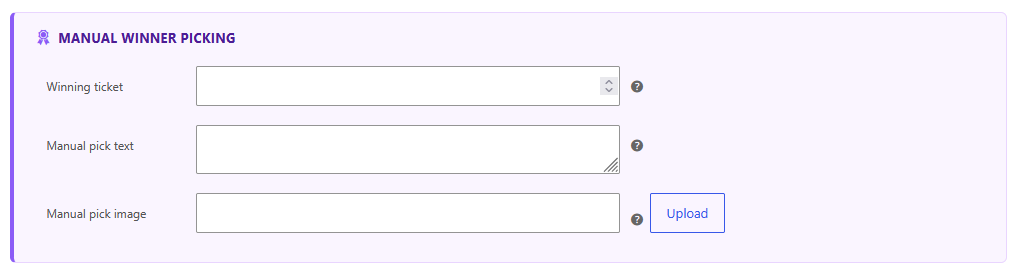
- Manual Winner Picking Card: Inside the competition product data panel, the Manual Winner Picking card appears with three fields:
- Winning ticket (
_lottery_manualy_winner_1): Enter the exact ticket number that won. If the competition has multiple winners configured, a separate field will appear for each rank (e.g. Winning ticket #1, Winning ticket #2). - Manual pick text (
_lottery_manualy_pick_text): Provide a clear written or HTML explanation describing how the draw was conducted, who supervised it, or links to external video recordings. - Manual pick image (
_lottery_manualy_pick_image): Click Upload to select or upload photographic proof from the WordPress Media Library (e.g., a photo of the drawn physical ball, a signed auditor sheet, or a screenshot).
- Winning ticket (
- Save Changes: Click Update to save the product.
Frontend Transparency & Winner Display
Section titled “Frontend Transparency & Winner Display”Once saved:
- The plugin queries
wc_lottery_pn_logto identify which customer purchased the entered ticket number. - The winning customer’s profile and order are linked to the prize.
- Standard winner transactional emails are dispatched.
- On the single competition page, the winner announcement is rendered along with the Manual pick text and the Manual pick image, providing complete public transparency and visual proof to all entrants.
3. Live Draw Console
Section titled “3. Live Draw Console”The Live Draw mode is built specifically for merchants who broadcast their winner selection live to their audience on social media (Facebook Live, YouTube, Twitch, TikTok, Instagram) or project the draw onto a large screen at live events.
Setting Up a Live Draw
Section titled “Setting Up a Live Draw”- In the competition product data panel under General, set Draw Type to
Live. - A new field, Live Draw Date (
_lottery_live_draw_date), will appear. Select the scheduled broadcast date and time. - On the frontend, the competition product page displays a prominent countdown alerting participants when the live stream begins.
- Once the competition closes, the interactive Live Draw Console (
qcw-live-draw-console) metabox unlocks inside the WordPress admin product edit screen.
How the Live Draw Console Works
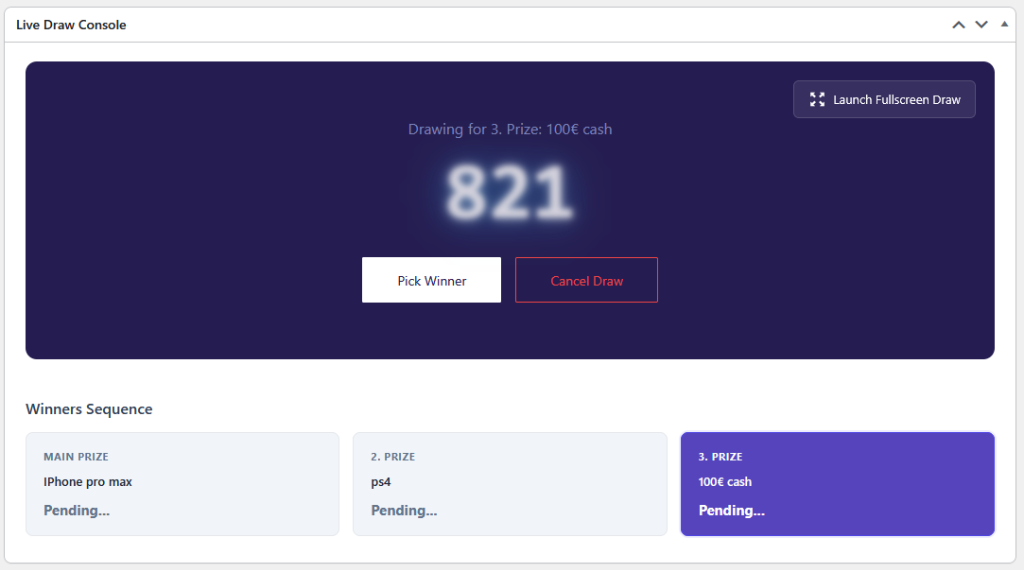
Section titled “How the Live Draw Console Works”The console provides an interactive control center simulating a physical lottery ball machine or electronic draw drum:
A. Console Locking & Session Security
Section titled “A. Console Locking & Session Security”To prevent accidental clicks before your broadcast starts, the console opens in a locked state:
- Click Open Live Draw (
#open-live-draw) to unlock the host controls for the stream. - Once unlocked, the Start Draw, Pick Winner, and Cancel Draw buttons become active.
B. The Spinning Number Drum
Section titled “B. The Spinning Number Drum”When you click Start Draw, the large digital display activates:
- Numbers rapidly roll through the pool of valid purchased tickets, creating suspense for the viewing audience.
- The rolling animation runs at high framerate with subtle visual blur effects.
C. Picking the Verified Winner
Section titled “C. Picking the Verified Winner”When you click Pick Winner:
- The console sends a secure AJAX call to the server to fetch the winning ticket from the Quantum Random Engine.
- The spinning reel decelerates and locks onto the exact winning ticket number.
- A burst of celebratory confetti explodes across the screen.
- The winning entrant’s name and ticket number are revealed.
D. Cancel & Redraw Support
Section titled “D. Cancel & Redraw Support”If a redraw is legally required (for example, if a drawn entrant failed to answer a phone verification within the allotted broadcast time, or if rules permit a re-spin):
- Click Cancel Draw (
#cancel-live-draw) to reset the current prize slot and initiate a fresh spin.
E. Cinematic Fullscreen Mode
Section titled “E. Cinematic Fullscreen Mode”Click the Launch Fullscreen Draw button in the top right corner of the console:
- Expands the draw interface into a distraction-free, 1080p/4K fullscreen window.
- Hides all WordPress admin sidebars, notices, and toolbars.
- Ideal for OBS Studio Window Capture or connecting a laptop directly to a stage projector via HDMI.
Multi-Prize “Winners Sequence”
Section titled “Multi-Prize “Winners Sequence””For competitions featuring multiple runner-up prizes (e.g. 1st Prize: iPhone, 2nd Prize: PS5, 3rd Prize: €100 Cash), the Live Draw Console automatically organizes a Winners Sequence:
- Sequential Progression: By default, the console directs the host to draw runner-up prizes first (e.g. 3rd Prize $\rightarrow$ 2nd Prize $\rightarrow$ Grand Prize) to build climax and viewer retention throughout your stream.
- Active Prize Highlighting: The active prize being drawn is highlighted in vivid purple (
Drawing for 3. Prize: 100€ cash), while pending prizes displayPending.... - Cryptographic Proofs: As each winner is confirmed, the prize card permanently locks in the winner’s name alongside their unique Quantum Signature (verifiable at
wpgenie.org/verify/[signature]).
Practical Use Cases for Live Draws
Section titled “Practical Use Cases for Live Draws”1. Social Media Streaming (Facebook Live & YouTube)
Section titled “1. Social Media Streaming (Facebook Live & YouTube)”- Format: The host shares their screen via OBS Studio while appearing on webcam.
- Viewer Trust: Audiences see the interactive spinning reel stop in real time. Because the Quantum signature is displayed instantly, viewers have mathematical proof that the host did not manipulate the outcome.
2. Multi-Tier Prize Galas
Section titled “2. Multi-Tier Prize Galas”- Format: Competitions with 5–10 runner-up prizes.
- Strategy: Start the broadcast by drawing the smaller runner-up prizes (free tickets, cash, merchandise). This keeps entrants tuned into the livestream until the main grand prize is drawn at the conclusion.
3. In-Person Charity & Corporate Events
Section titled “3. In-Person Charity & Corporate Events”- Format: Fundraisers, car shows, sporting clubs, or corporate galas.
- Strategy: Plug your laptop into the event venue’s projector or giant LED screen, hit Launch Fullscreen Draw, and let an event attendee or host press Pick Winner from a wireless presenter mouse or keyboard.
Performance: Zero Server Crash Architecture
Section titled “Performance: Zero Server Crash Architecture”Live draws frequently draw hundreds or thousands of simultaneous viewers to your website at the exact moment of the draw. Traditional polling plugins make heavy database queries that can crash WordPress servers during streams.
Quantum Competitions solves this through Static JSON Synchronization:
- When the admin host interacts with the Live Draw Console, the plugin writes the current draw state to a lightweight, static JSON file in your WordPress uploads directory:
/wp-content/uploads/competitions-live-draws/product-[ID].json
- Frontend watchers and OBS browser overlays poll this static file every second.
- Result: Thousands of concurrent viewers can watch the live draw state update with virtually zero database queries and zero CPU load.