
Bulk Discount Tiers
Tiered volume discounts incentivize customers to purchase multiple tickets in a single transaction, significantly accelerating ticket sellouts and increasing Average Order Value (AOV).
Quantum Competitions includes a native bulk pricing engine that calculates discounted rates in real time and presents interactive quick-selection buttons on the frontend.
Admin Configuration: Bulk Ticket Discounts
Section titled “Admin Configuration: Bulk Ticket Discounts”Bulk discount rules are configured on individual competition product screens inside WordPress Admin.
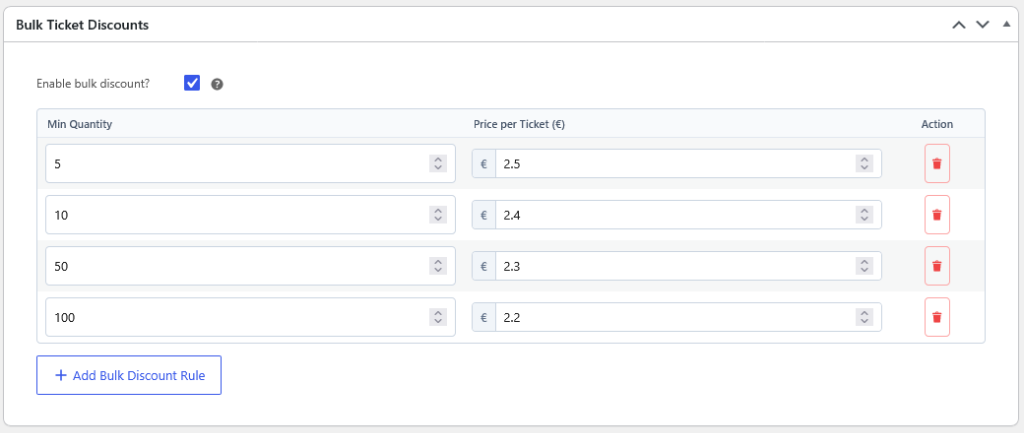
Setting Up Discount Tiers
Section titled “Setting Up Discount Tiers”- In WP Admin, navigate to Competitions > All Competitions and open your competition.
- Scroll to the Bulk Ticket Discounts metabox.
- Check Enable bulk discount? (
_lottery_enable_bulk_discount). - The discount rules table appears. Click + Add Bulk Discount Rule to add rows.
- For each tier, define:
- Min Quantity: The minimum number of tickets required to trigger this discounted rate (e.g.,
5,10,50,100). - Price per Ticket (€): The bespoke unit cost applied when the threshold is reached.
- Min Quantity: The minimum number of tickets required to trigger this discounted rate (e.g.,
- Click Update to save the product.
Example Tier Structure
Section titled “Example Tier Structure”| Tier Threshold | Unit Price per Ticket | Total Bundle Price | Savings |
|---|---|---|---|
| Standard (1–4 Tickets) | €3.00 | €3.00 – €12.00 | Base Price |
| Buy 5+ Tickets | €2.50 | €12.50 | Save 16.7% |
| Buy 10+ Tickets | €2.40 | €24.00 | Save 20.0% |
| Buy 50+ Tickets | €2.30 | €115.00 | Save 23.3% |
| Buy 100+ Tickets | €2.20 | €220.00 | Save 26.7% |
Frontend Customer Experience
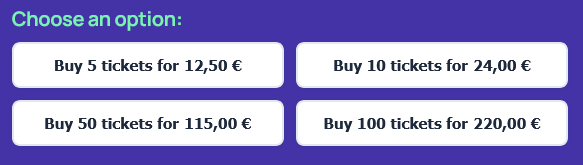
Section titled “Frontend Customer Experience”On the single competition page, Quantum Competitions automatically renders interactive quick-selection buttons above the Add to Cart button:
1-Click Bundle Selection
Section titled “1-Click Bundle Selection”- Total Price Calculation: Each button automatically calculates and displays the final bundle cost (e.g., Buy 10 tickets for 24,00 €), eliminating mental math for buyers.
- Instant Quantity Update: Clicking any preset instantly sets the ticket quantity selector and updates cart subtotal calculations.
- Responsive Layout: Buttons dynamically stack into clean 2-column or 4-column grids across mobile, tablet, and desktop screens.
Page Builders & Template Customization
Section titled “Page Builders & Template Customization”Elementor Widget
Section titled “Elementor Widget”When using Elementor Pro Theme Builder to design your single product template, drag the Competition Bulk Discounts widget into your layout:
- Fully customizable button typography, background colors, padding, and border radius.
- Independent active and hover states to match your store’s palette.
Block Editor (Gutenberg)
Section titled “Block Editor (Gutenberg)”In modern block themes and Full Site Editing (FSE), insert the Competition Bulk Discounts block (qcw/single-bulk-discounts).
Theme Template Overrides
Section titled “Theme Template Overrides”For developers building bespoke layouts, override the template in your child theme:
wp-content/themes/your-theme/woocommerce/single-product/add-to-cart/bulk-discount.phpCart Calculation & Gateway Integration
Section titled “Cart Calculation & Gateway Integration”- Dynamic Cart Pricing: When a customer adds tickets to the cart, the plugin verifies the quantity against configured tiers (
public/class-qcw-public-cart.php) and adjusts the line item price before payment. - Coupon Compatibility: Bulk discount pricing harmonizes with standard WooCommerce coupon codes and store credits.