If you run a WooCommerce lottery, raffle, or competition site, you are probably aware that responsible gaming tools aren’t just a good practice: they’re becoming essential. Around the world, many regulators now require online gaming sites to offer player protection features like spending limits and self-exclusion. Even in regions where it’s not yet legally required, payment processors and regulators closely watch sites that accept money for chance-based games.
Spending Limits for WooCommerce is our newest plugin designed specifically for lottery and competition site owners. It’s a great addition to our WooCommerce Lottery and WooCommerce Pick Ticket Number Mod plugins. While those plugins handle ticket sales, draws, and winner selection, Spending Limits adds the critical layer of player protection that both modern regulations and responsible operators demand.
In this article, we’ll explain what responsible gaming really means, why spending limits are becoming a must-have for WooCommerce lottery sites, and how our plugin works seamlessly with your existing lottery setup. You’ll learn how users can control their own spending, discover the key features that help meet regulatory requirements, and see why implementing these tools now keeps both your players and your business safe as gaming rules continue to tighten worldwide.
Table of Contents
Responsible gaming & player protection tools
Responsible gaming is about keeping gaming fun, safe, and under control. It means giving players the tools and information they need to make smart choices, understand the risks, and avoid harm. This includes simple features like setting deposit or time limits, taking breaks through self-exclusion, getting reminders about time spent playing, and seeing clear information about odds and potential losses. These tools help people stick to personal boundaries, such as a budget or session length, even when emotions run high.
Player protection tools, often called responsible gaming or safer gaming features, are designed to help players stay in control of their gaming and reduce the risk of harm. By letting users set limits on how much time and money they spend, these tools help prevent issues before they start. An important part of how these tools work is that limits are set by the player but enforced by the platform. Players can lower their limits whenever they want, but increasing or removing them comes with safeguards. This “one-way valve” approach helps stop impulsive decisions, especially in moments of frustration or when it feels tempting to chase losses. For WooCommerce lottery, raffle, or competition sites, adding these tools is essential. Features like self-exclusion or deposit limits not only protect your players but also help your site meet gaming regulations.
How to implement player protection tools on your WooCommerce site?
Adding player protection tools to a WooCommerce site helps promote responsible gaming, prevent excessive play, and stay compliant with gaming regulations. This is especially important for sites selling lottery tickets, raffle entries, or competition access. Features like self-exclusion and deposit limits give players the ability to stay in control and reduce the risk of harm.
If you run lottery, raffle, or competition sites using plugins like WooCommerce Lottery or Pick Ticket Number Mod, you’ll need a dedicated extension to provide these important safeguards. That’s where Spending Limits for WooCommerce comes in, giving you the tools to protect your players and meet compliance requirements.
Spending Limits for WooCommerce plugin
Spending Limits for WooCommerce is a specialized plugin designed to add responsible gaming controls to WooCommerce stores, with particular focus on lottery, raffle, competition, and other chance-based commerce sites. The plugin enables users to set their own spending restrictions and voluntarily lock themselves out of making purchases, creating the self-regulation framework that modern gaming regulations increasingly require.
From the user’s perspective, the plugin adds a dedicated section to the WooCommerce My Account page where users can manage their spending controls.
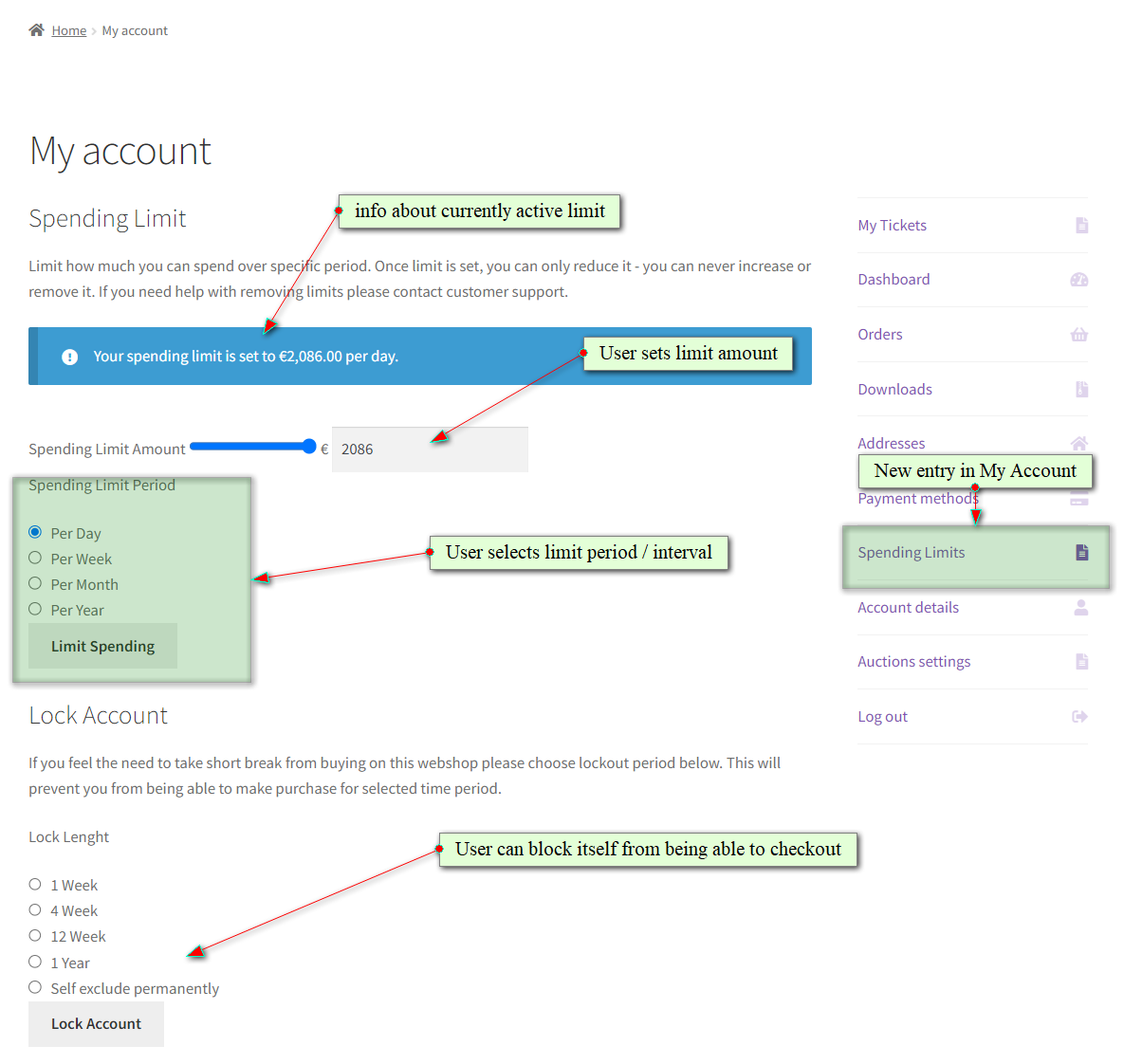
Users can set maximum spending amounts for four time periods: daily, weekly, monthly, or yearly. Once a user reaches their self-imposed limit for any active period, the plugin blocks checkout until that period resets.
Users can also initiate self-exclusion locks: voluntary account freezes that prevent any purchases for predetermined durations: 1 week, 4 weeks, 12 weeks, 1 year, or permanently. During a self-exclusion period, the user cannot make any purchases.
Users can extend their exclusion periods or reduce their spending limits at any time, but they cannot shorten lock periods, increase spending caps, or remove limits without administrator approval. This prevents impulsive decisions during moments of frustration or regret.
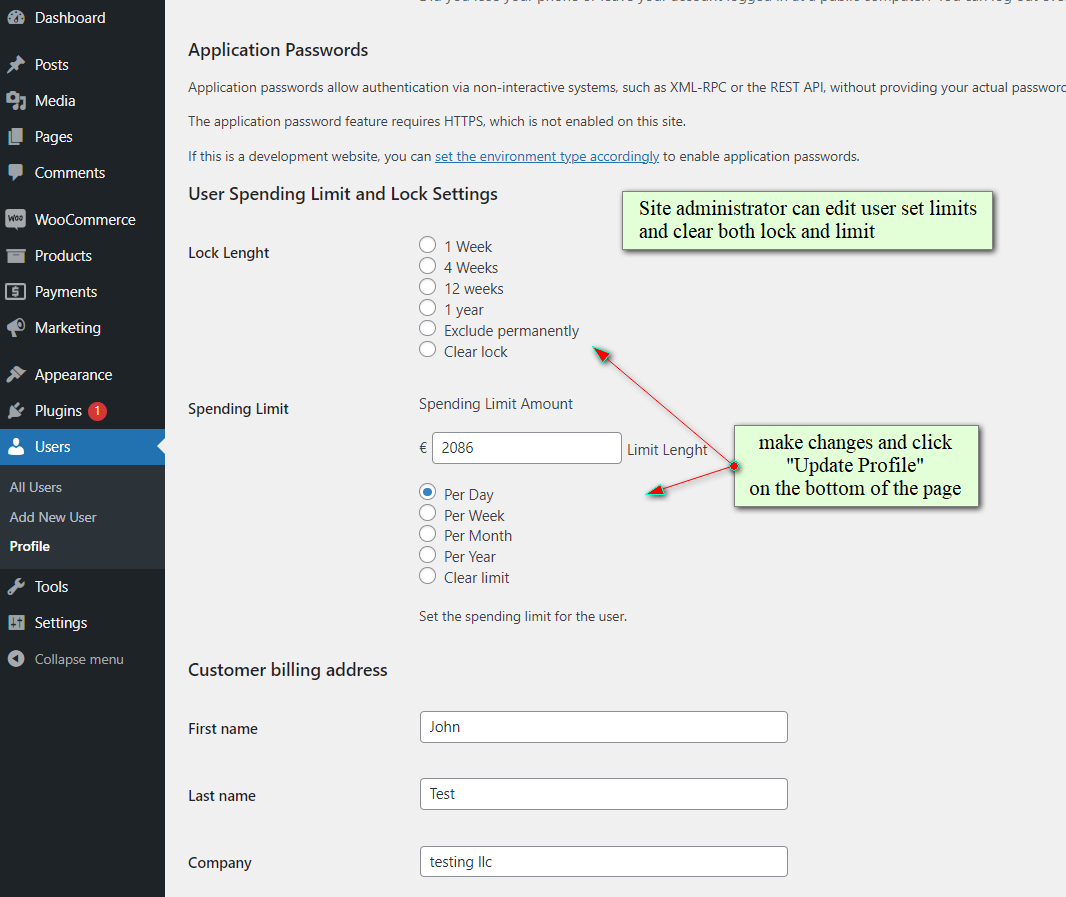
Only admins can shorten lock length, increase spending limit or remove limits
PRO version features
Spending Limits for WooCommerce plugin is available in both a free version and a premium version with advanced features:
- Custom limit periods: Configure limits by custom number of weeks or days beyond standard intervals
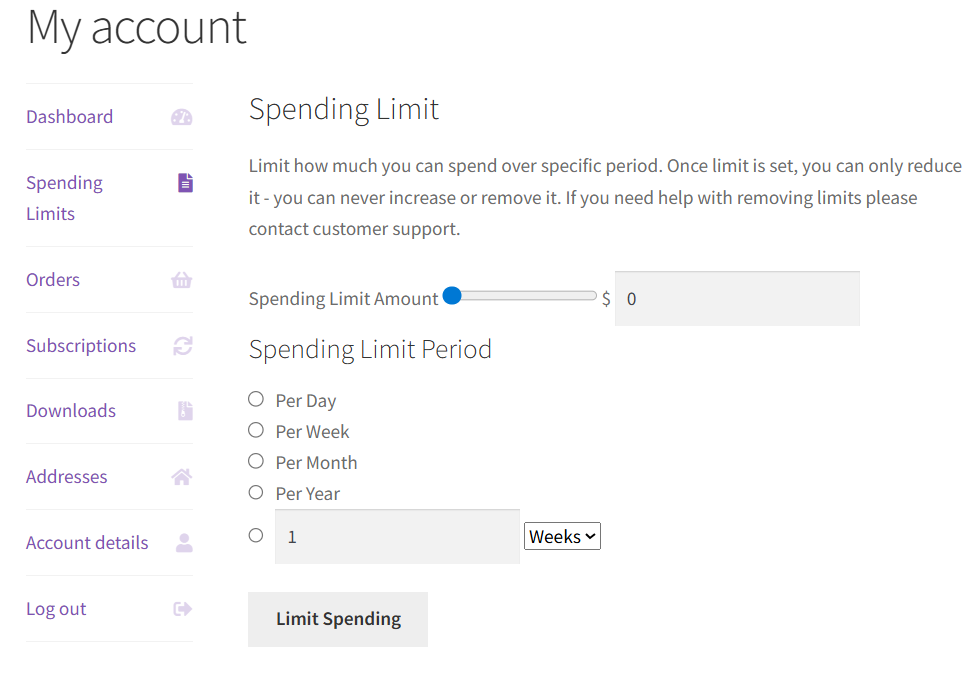
- Global spending limits: Administrators can set spending limits and time period limits for all users site-wide
- Customizable messaging: Administrators can configure custom notifications when limits are reached.
- User override option: Allow users to set their own limits (higher or lower than defaults)
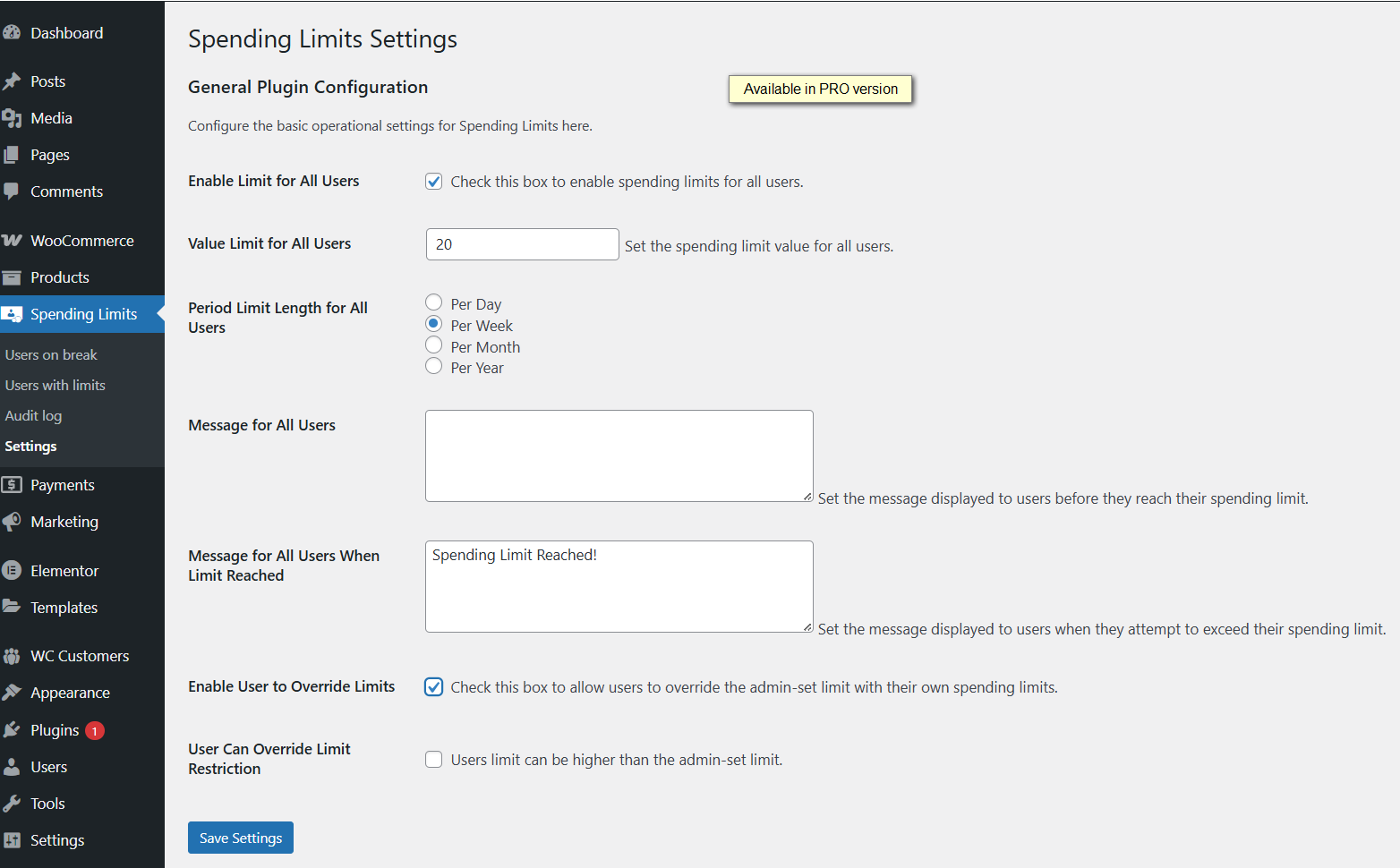
WP dashboard – Spending Limits Settings (PRO version)
- Reports pages where you can see list of users with active limits and locked out users. Along these reports there is audit log page. All pages have option to export data to CSV and date range filter.

User management dashboard: View lists of users on break and their current spending limits and Audit log with searchable history of all limit and lock changes (PRO version)
- Premium support: Direct access to our ticket support system at https://wpgenie.org/support/
You can check video tutorial to see how PRO version of plugin works:
Conclusion
Adding responsible gaming features to your WooCommerce lottery or raffle site is easier than you might think. With Spending Limits for WooCommerce, you can set up powerful player protection tools in just a few minutes.
Give your users control over their spending, promote safer play, and make sure your site stays compliant with gaming regulations. Installing Spending Limits for WooCommerce helps protect your users, build trust, and future-proof your site.
What Users Are Saying
⭐⭐⭐⭐⭐ Excellent addition to WooCommerce
I’m currently using this free version, this plugin is excellent and a great addition to a Woo based shop that might sell addictive items (competitions, gambling, or even energy drinks etc!) and to have the option to lock or limit users spend makes it look like an ethical practice at the very least. Also, I have to thank Marko at WPGenie, I asked if I could modify this plugin via my child-theme, within 48hrs they modified the plugin so it could, making it very customisable. So now seriously considering the Pro version as I wasn’t expecting such great support on a free plugin (although to be fair it was a feature request to benefit all!).Don’t hesitate to try this, a couple clicks to install and it works well.
By EXo on wordpress.org
FAQ
Does this plugin help meet gaming compliance requirements?
Yes, Spending Limits for WooCommerce provides the core player protection features that gaming regulators and payment processors typically require: user-set spending limits and self-exclusion tools.
Will this plugin work with my existing WooCommerce lottery or raffle plugin?
Yes, Spending Limits for WooCommerce works with any WooCommerce product type, including lottery tickets, raffle entries, and competition entries. It integrates seamlessly with WooCommerce Lottery, Pick Ticket Number Mod, and other similar plugins without requiring any special configuration.
How do spending limits reduce chargebacks?
When users set their own spending limits, they’re less likely to overspend and later dispute charges. The audit log (available in PRO version) also provides evidence that users voluntarily set their limits, which can help defend against chargeback claims of unauthorized purchases.
What happens when a user reaches their spending limit?
When a user reaches their self-set limit, they cannot complete checkout. They’ll see a clear message explaining that they’ve reached their limit and when it will reset. Only administrators can override these limits, preventing impulsive decisions during emotional moments.
Can users increase their limits?
No, users can only reduce their limits. Administrators can increase limits when needed. The PRO version (v1.1.6+) includes an option allowing users to override admin-set limits if enabled by the administrator
Can users unlock their own accounts?
No, that is not possible, only Administrators can do that. Users need to contact administrator in order to get help with this.
What is in PRO version?
Option for global spending limit, custom limit period (weeks or days), reports pages where you can see list of users with their limits and locked out users. Along these reports there is audit log page. All pages have option to export data to CSV and date range filter. PRO version also comes with premium support.
Looking for other ways to improve your WooCommerce store? Check the complete list of our plugins that can help you bring your clients the best online shopping experience!