Black Friday and Cyber Monday sales are behind us, and if you’re running a WooCommerce store, you now have customer order data that can be incredibly valuable for your future sales strategies.
You might have sold dozens or even hundreds of different products, with some clear bestsellers while others didn’t sell at all. You may also have many newly registered users, though only some of them actually completed a purchase.
In any case, you’re sitting on valuable data you can use to target customers based on the products they have (or haven’t) ordered.
In this article, we’ll explain the importance of product-based customer segmentation, and also show you use cases for targeting customers based on the product they bought. We’ll also talk about use cases for targeting users without orders and transforming them into customers. The plugin we use for extracting this data is our free Simple Customer CSV Exporter for WooCommerce. We’ll also show you how to use the ‘users without orders’ filter to clean your database from inactive accounts.
Table of Contents
Why Segment Customers by Product They Bought
Let’s start from the beginning: what is customer segmentation? It’s the process of dividing customers into groups based on shared characteristics, allowing businesses to tailor their marketing, features, and promotions to each group more effectively.
There are many ways to segment customers: by age, gender, location, interests, purchase history, brand loyalty, or even their response to marketing campaigns. Important thing to understand is that you don’t need to send every promotion to every person all the time. Instead, you can craft promotions and campaigns that genuinely resonate with your target audience.
Example: If you’re running a sporting goods store, customer segmentation by product means analyzing which customers bought running shoes, which bought table tennis equipment, and which purchased the most expensive bike in your store. Now that you have this data, you can create targeted offers and send promotions based on previous purchases only to those who are likely to be interested.
Use Cases for Targeting Customers Based on Products They Bought
When you filter by a specific product, you get a list of customers who already ordered it. This opens up several targeted campaign opportunities:
Cross-sell complementary products
Customers who bought one product often need related or complementary products in addition to what they’ve already purchased.
Sports store example: For customers who bought running shoes, you could send an email offering high-performance running socks or discount on smart running watches.
Software store example: If someone purchased one of your plugins, they might need specific add-ons, compatible themes, or tools that extend its functionality.
Upsell to premium versions
With a list of customers who bought some product, you can encourage them to buy a more expensive or upgraded version of the product they’ve already bought.
Sports store example: For a customer who bought table tennis paddle, you could send offers for premium equipment. “If you’re playing regularly and want better control and spin, it might be time to upgrade to the Pro Competition Paddle.”
Software store example: If you’re selling plugins, you can send offers like: “Upgrade to Pro and get [specific features]. 20% off for existing customers.”
Product-specific announcements and updates
Only notify people who own the product about new arrivals, major updates or new features. This keeps your communication relevant and avoids annoying customers with updates about products they don’t use.
Sports store example: For a customer who bought winter hiking boots, notify them about new waterproofing spray. “New arrivals: Premium waterproofing spray specifically designed for your [Boot Model].”
Software store example: “Version 3.0 released – new features for [Product Name] users.”
Renewal reminders
For products with annual support or subscriptions, send timely reminders before expiration. Include what they’ll lose if they don’t renew and what new features have been added since purchase.
Sports store example: For a customer who has subscription service, send reminder: “Your protein supplement subscription renews in 7 days. Continue receiving 20% off monthly deliveries.”
Software store example: “Your support expires in 30 days. Renew now to keep receiving updates and priority support.”
Feedback and testimonial requests
Ask only actual users for reviews, testimonials, or product feedback. They can give informed opinions and specific use cases that help improve your product and marketing.
Sports store example: To a customer who bought tennis racket, send an email: “How’s your new racket performing? Share your review and get 10% off your next purchase.”
Software store example: “You’ve been using [Plugin name]. Would you share your experience in a quick 2-minute survey?”
In all these examples, the most important thing is that you’re only contacting people who actually own and use the product, making every campaign highly relevant to the recipient.
By the numbers:
- 6x higher transaction rates with personalized emails
- 760% increase in revenue from segmented campaigns
- 89% of marketers report positive ROI from personalization
Sources: Campaign Monitor, Instapage (2024-2025)
Use Cases for Targeting Customers Without Orders
When you filter for users without orders, you get registered users who showed interest but never completed a purchase. This segment represents untapped potential and offers specific campaign opportunities:
First purchase incentive
These users created an account but haven’t bought anything yet. A targeted discount can be the push they need to make that first purchase.
Sports store example: “Welcome back! Complete your first order and get 15% off. Valid for 48 hours only.”
Software store example: “Ready to get started? Use code FIRST20 for 20% off your first plugin purchase. Expires this Friday.”
Re-engagement reminder
Users registered for a reason but may have forgotten about your store. Remind them what you offer and why they signed up in the first place.
Sports store example: “It’s been a while! Explore our new arrivals in running gear. As a registered member, here’s 10% off your first purchase.”
Software store example: “You registered to learn about WooCommerce solutions. Here’s what we offer: [brief product list]. Ready to improve your store?”
Identify barriers
Understanding why customers didn’t buy helps you improve your offering and remove obstacles that prevent conversions.
Sports store example: “We noticed you browsed our store but didn’t make a purchase. Can you tell us what stopped you? Complete this 2-minute survey and get a $10 discount code.”
Software store example: “Quick question: What’s holding you back from trying [Plugin Name]? Your feedback helps us serve you better.”
Educational nurture sequence
Many customers need to understand the value before they’re ready to buy. You can send helpful content that demonstrates how your products solve real problems.
Sports store example: Send an email series over three weeks. Week 1: “How to choose the right running shoes for your foot type.” Week 2: “5 common running injuries and how proper gear prevents them.” Week 3: “Here’s 15% off to get you started.”
Software store example: Send an email series over five days. Day 1: “See how [Plugin] works in 2 minutes (video).” Day 3: “Top 5 ways our customers use [Plugin].” Day 5: “Special offer just for you – 20% off your first purchase.”
The advantage is that these users who made an account but didn’t order anything already showed interest, and with the right approach, you can convert them into paying customers.
Simple Customer CSV Exporter for WooCommerce
There are many plugins that you can use for customer segmentation, with many different features. The reason we decided to create WPGenie’s Simple Customer CSV Exporter for WooCommerce is that we wanted simple and effective tool for exporting customer data based on products they ordered, so we can use it for our targeted email campaigns. Also, we wanted to identify customers with no orders, because we want our database clean and optimized.
Step-by-Step Guide to Simple Customer CSV Exporter
Let’s look at how to efficiently filter customers by specific ordered products or customers who have never placed an order.
Step 1: Install the Plugin
Go to your WordPress dashboard → Plugins → Add New. Search for “Simple Customer CSV Exporter for WooCommerce,” then click Install Now and Activate.
Simple Customer CSV Exporter for WooCommerce plugin is free for download.
Step 2: Access the Simple Customer CSV Exporter
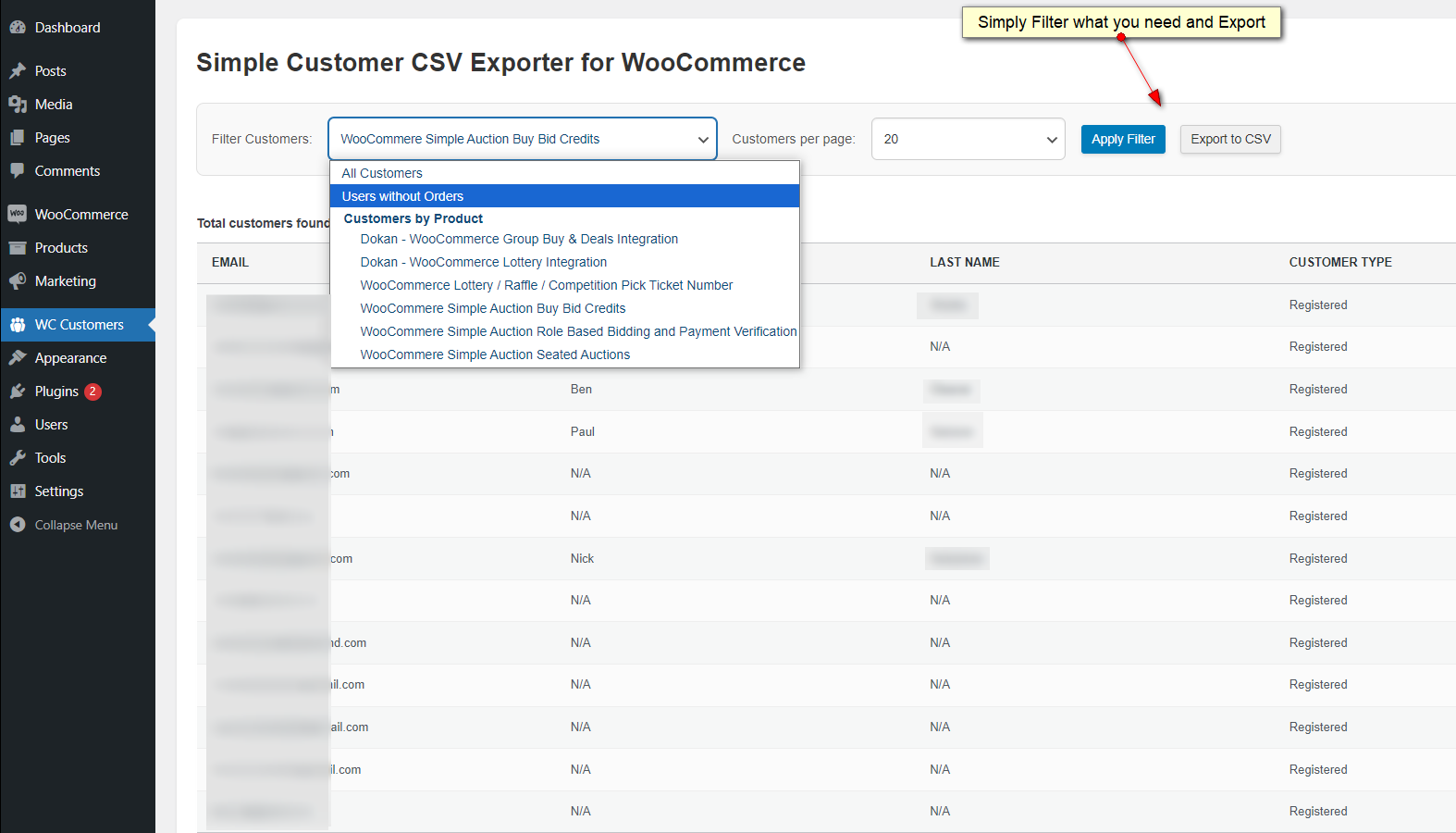
After activation, go to WC Customers in your WordPress admin menu. You’ll see that our plugin has simple, user-friendly interface, so you’ll filter your customers with no problem.
You can list All Customers, choose to list Users without Orders, or filter Customers by Product.
Step 3: Export to CSV
After filtering customers by specific ordered products, or after identifying customers with no orders, just click Export to CSV.
Your data will be delivered in clean CSV format, ideal for product announcements and updates and other forms of targeted email campaigns.
Check video tutorial to see how easy it is:
How To Bulk Delete Users Without Orders in WooCommerce
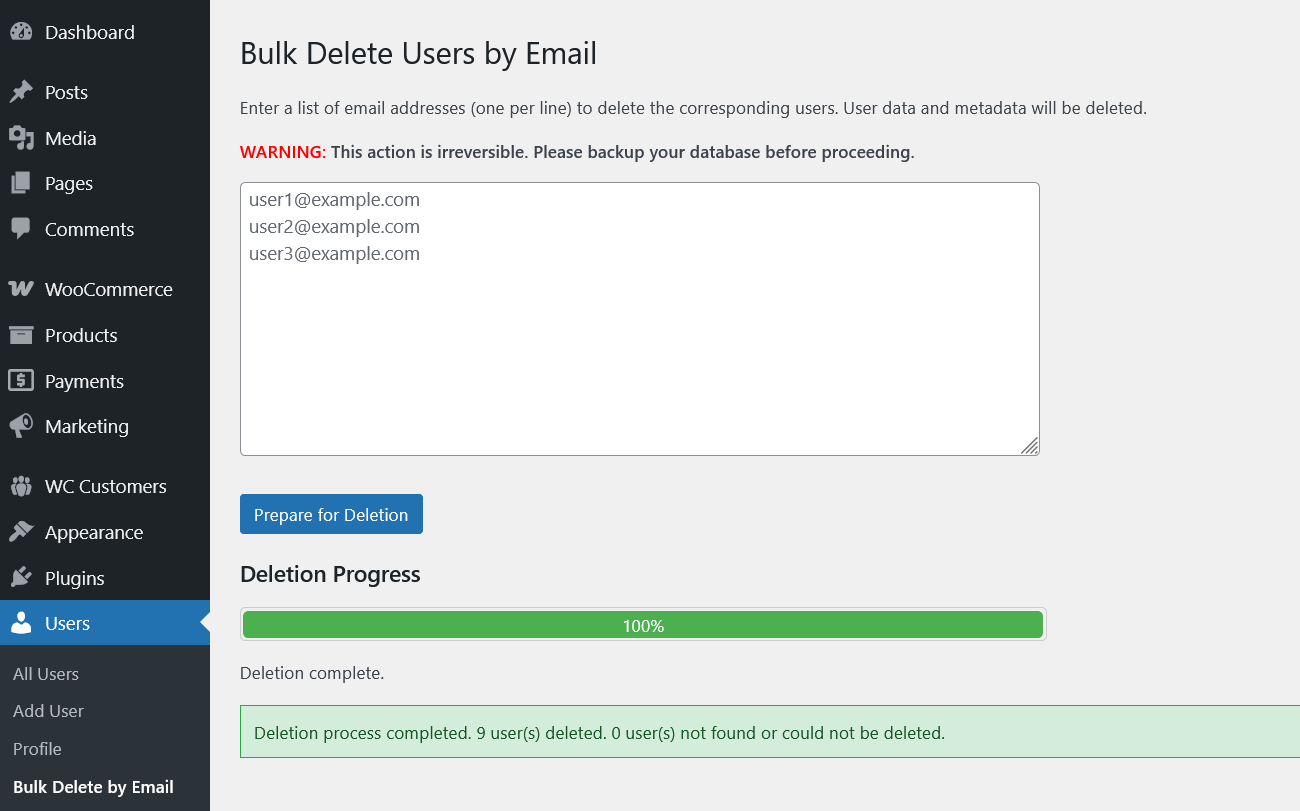
If you want to clean your database, the easiest way is to create a list of customers with no orders, and then delete them with WPGenie’s Bulk Delete Users by E-mail plugin. It’s a free plugin available at WordPress.org, check this article to get all the information you need: How to Bulk Delete Users by Email Address
Conclusion
The entire point of targeting customers based on products they bought is to create messaging and offers that resonate with your audience, rather than guessing about their preferences and needs.
With WPGenie’s free Simple Customer CSV Exporter for WooCommerce, you can export customers order data in a few minutes, making it easier to send relevant promotions and recommendations.
Try it: pick your best-selling product from Black Friday, export those customers, and send one targeted email this week.
Check other free plugins on WordPress.org: WPGenie at WordPress.org
Looking for other ways to improve your WooCommerce store? Check the complete list of our plugins that can help you bring your clients the best online shopping experience!