Want to encourage your customers to subscribe? This tutorial shows you the easiest way to add free gifts to WooCommerce subscriptions.
In recent years subscriptions have become a standard part of how consumers shop online. In 2025, nearly every product category, from food and beauty to health and tech, has integrated some form of subscription. Numbers look great: the rapid expansion of online shopping is expected to drive the growth of the subscription e-commerce market in the coming years. It will grow to $3.48 trillion in 2029 at a compound annual growth rate (CAGR) of 59.5%.
If you’re offering subscriptions in your WooCommerce store, you know that customers love them, but they also think carefully before deciding to subscribe. Whether it’s a monthly coffee delivery, a membership box, or access to premium content, starting a subscription sometimes takes a little nudge.
One effective way to make a subscription more valuable and enticing for customers is by including a gift. It could be a free product with their first subscription order, making subscribing feel more rewarding. Or it could be a small surprise added to a renewal order to show long-term subscribers you appreciate their loyalty.
In this article, we’ll explain why subscription gifts work, explore the available ways to add free gifts to WooCommerce Subscriptions, and show you the easiest way to set everything up using our Subscription Gifts for WooCommerce add-on.
Table of Contents
Why Add Free Gifts to WooCommerce Subscriptions?
With subscriptions, customers are committing to ongoing payments and a possible long-term relationship with your brand. So why not reward that commitment with special “thank you” perk for new subscribers? And why not reward your subscribers during renewals?
Free gifts aren’t just fun: they boost conversions, build loyalty, and even give your brand more visibility. A case study tested free gifts on subscription renewals and found that customers who received a gift converted at an 85% higher rate than those who didn’t. They were 85% more likely to keep their subscription active rather than skip or cancel the upcoming order.
How to Add Free Gifts to WooCommerce Subscriptions
So, if you’re using the WooCommerce Subscriptions plugin for your store, you may be asking how to reward subscribers with free products. The answer is that free gift functionality typically requires a combination of coupons and specific plugins, or custom code.
Coupon + Free Gift Plugin
The most common method is combining WooCommerce coupons with free gift plugins like “Free Gifts for WooCommerce” or “Buy One Get One Free.”
You create a coupon that makes a specific product free, then use an auto-apply coupon plugin to trigger it when someone purchases a subscription. This method only works for the first subscription order, not renewals.
Custom Code
You can also attempt custom code by hooking into subscription renewal events, but this requires a developer and ongoing maintenance every time WooCommerce or Subscriptions updates.
Both of these solutions have limitations, and that’s why we created Subscription Gifts for WooCommerce.
Overview of the Subscription Gifts for WooCommerce plugin
Subscription Gifts for WooCommerce is a WooCommerce Subscriptions add-on that lets you reward loyal subscribers by easily adding free gifts to their subscription at signup, and with PRO version you can also add free gifts to subscription renewal.
Like with all of our plugins, we try to make it simple and effective. Subscription Gifts for WooCommerce is trivial to use and setup, and in few clicks you’ll be able to add any type of product as a free gift to user with active subscription.
Step-by-Step Guide to Subscription Gifts for WooCommerce
Let’s look at how to efficiently add gifts to subscription:
Step 1: Install the Plugin
Option 1: Install directly from WordPress dashboard
Go to your WordPress dashboard → Plugins → Add New. Search for “Subscription Gifts for WooCommerce,” then click Install Now and Activate.
Option 2: Upload manually
Download the plugin from WordPress.org, then go to your WordPress dashboard → Plugins → Add New → Upload Plugin. Choose the downloaded .zip file, click Install Now and Activate.
Important note: You also need to have WooCommerce Subscriptions plugin installed!
Step 2: Create Simple Subscription Product and Gift Products
Before adding a gift to subscription, you need to:
- Create Simple Subscription product, and then choose the subscription price, billing interval and period
- Create products that are going to serve as gifts (or you can choose among existing products in your store)
Step 3: Add a gift to subscription
With Subscription Gifts for WooCommerce, adding a gift to subscription is really easy.
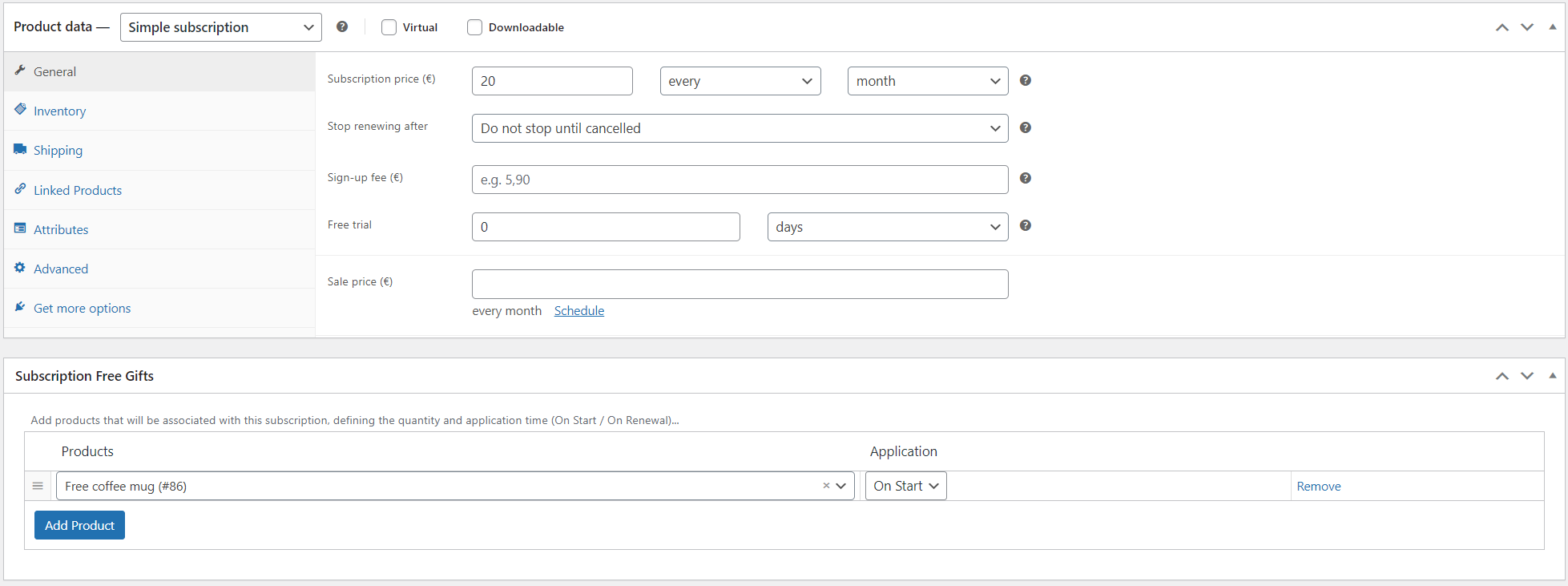
In WP Edit Product screen, scroll to the Subscription Free Gifts panel. All you have to do is select which products to add as gifts. Free version of Subscription Gifts for WooCommerce enables you to add a free gift on subscription start.
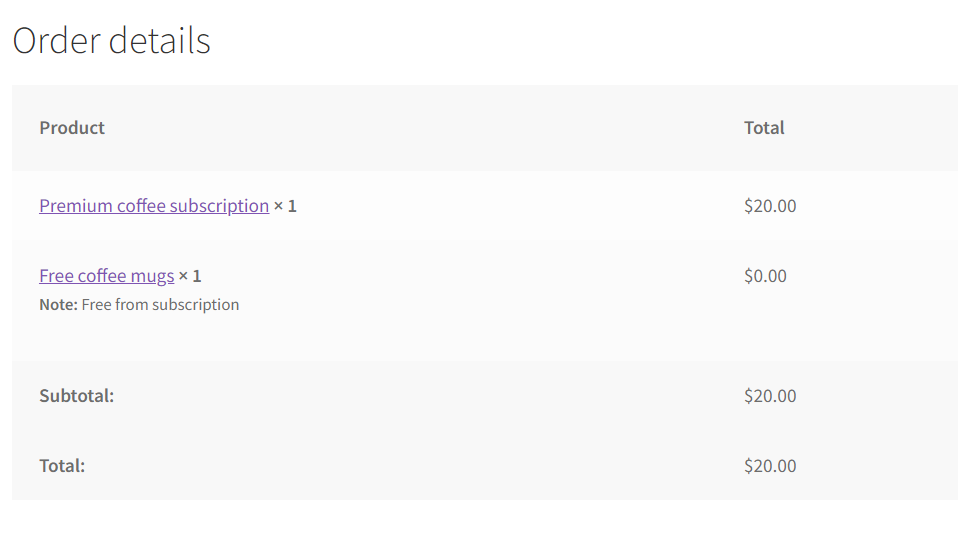
Your customers will see their free gift in order details after placing order.
PRO version features
For store owners who need more advanced functionality, the PRO version includes:
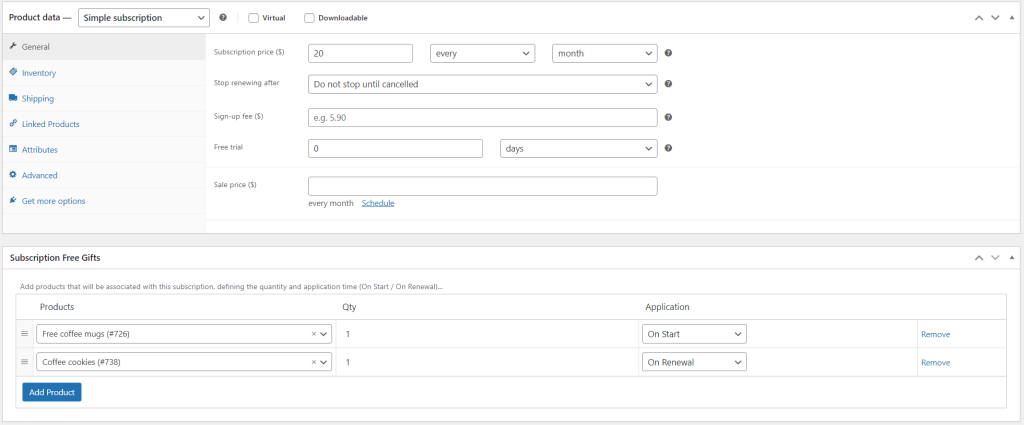
- The ability to add free gifts both at subscription signup, renewals, or both
- Control over the quantity of gifted products included in a subscription
- Premium support: Direct access to our ticket support system at https://wpgenie.org/support/
Conclusion
Adding free gifts to WooCommerce Subscriptions doesn’t have to involve coupon setups or custom code. With our Subscription Gifts for WooCommerce, you can reward new subscribers and retain long-term customers with automatic gift products.
Ready to increase signups and reduce churn? Get the Subscription Gifts for WooCommerce from our store and get started!
FAQ
-
Does this plugin work with WooCommerce Subscriptions only?
Yes, Subscription Gifts for WooCommerce is a WooCommerce Subscriptions addon.
-
With Subscription Gifts for WooCommerce, can you set different gifts for first order vs. renewals? (Like free mug on signup, free sample pack on first renewal?)
Yes, with PRO version you can set different products as gifts for first order vs. renewals.
-
What product types work as gifts: just simple products, or also grouped products, lottery product etc.?
Subscription Gifts for WooCommerce works with any WooCommerce product type: simple, variable, grouped, virtual, downloadable, and even specialized product types like our Simple Lottery plugin products
-
Does this plugin handle gift inventory?
No, the plugin uses WooCommerce’s standard inventory. If a gift product is out of stock, the subscription purchase will be blocked.
Set up low stock notifications (WooCommerce → Settings → Products → Inventory) so you’re alerted before running out, or disable stock management for gift products entirely so they’re always available. -
What’s the difference between free and PRO versions?
PRO version has all features of the free version, plus option to add gift both on start and on renewal, option to choose quantity for product that is gifted in subscription, and premium support from WPGenie’s developers.
Looking for other ways to improve your WooCommerce store? Check the complete list of our plugins that can help you bring your clients the best online shopping experience!