** Version 2.2.10  **
- Fix: sorting on entry lists
- Fix: security issue

** Version 2.2.9  **
- Fix: additional checks to prevent fatal error during delayed checkouts
- Fix: Google Pay and Apple Pay buttons
- Fix: handling late orders
- Fix: warning

** Version 2.2.8  **
- Fix: WooCommerce email previews
- Fix: shortcode issues
- Fix: performance improvement
- Fix: cache for shortcodes
- Add: history tab pagination
- Add: set default number of winners to 1

** Version 2.2.7  **
- Fix: recent_lotteries shortcode added lottery_status="active" attribute

** Version 2.2.6  **
- Fix: my_lotteries shortcode fix
- Fix: check in remove_lottery_from_user_metafield function

** Version 2.2.5  **
- Fix: datepicker JS naming

** Version 2.2.4  **
- Fix: db optimization (indexing)
- Add: always use default datepicker JS

** Version 2.2.3  **
- Fix: draw issue when having more prizes than tickets sold
- Fix: small fix for HPOS compatibility
- Fix: code cleanup

** Version 2.2.2  **
- Fix: performance improvement, removed obsolete add_post_meta lines

** Version 2.2.1  **
- Fix: fatal error in email templates

** Version 2.2.0  **
- Add: lottery related sort for base page
- Add: lottery relates sort in customizer for shop page
- Fix: variables for email actions


WooCommerce Lottery
$29.00
First Ever Lottery / Competition Plugin for WooCommerce
$29.00 / year / domain
(released on 2nd Mar 2016)
- Works with latest WordPress, WooCommerce and Elementor
- Seamless integration into WooCommerce and WordPress
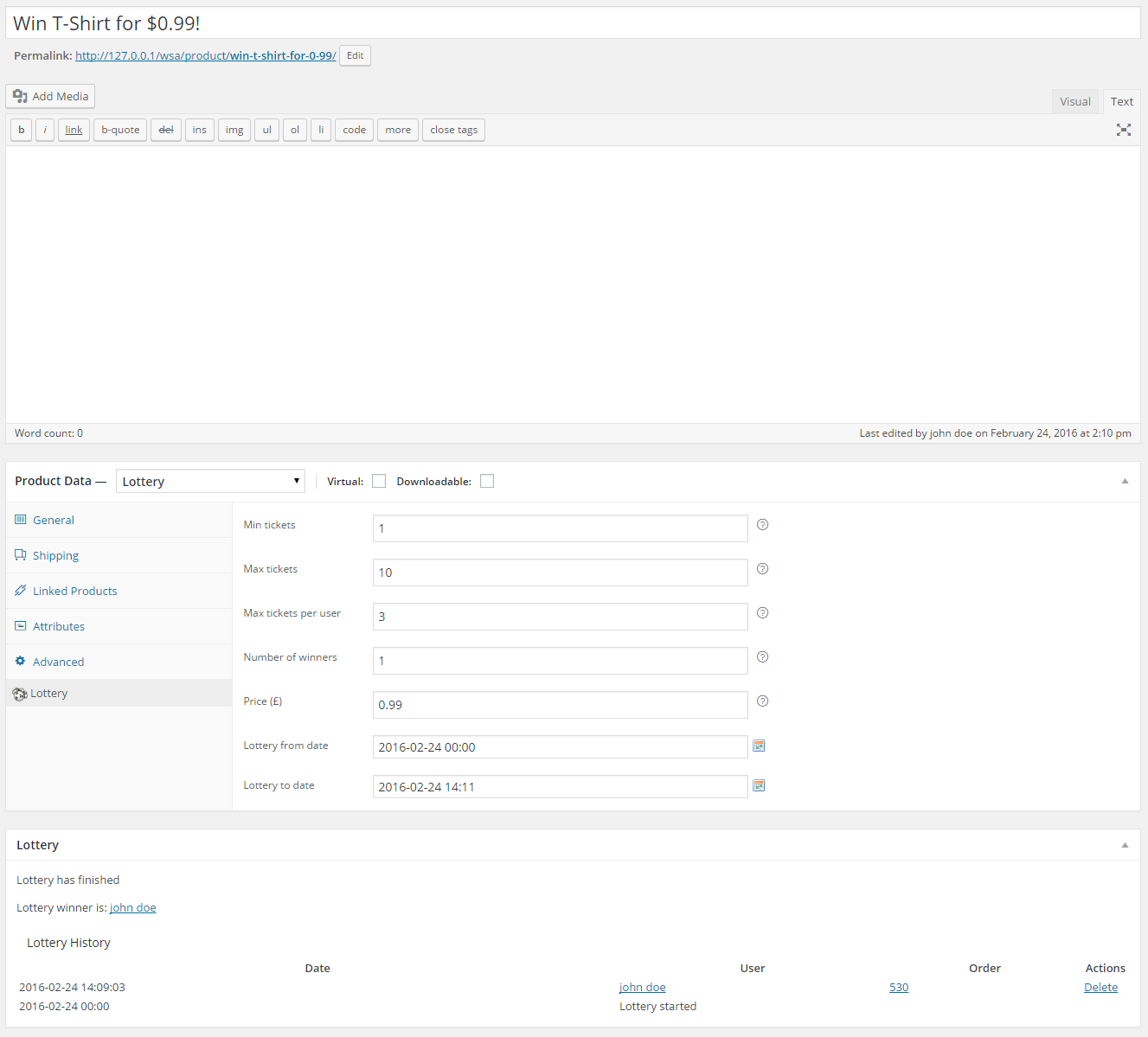
- You get new type of WooCommerce product type – lottery
- Define number of lottery winners – 1 or more
- Login at later stage of checkout (guest checkout)
- Lottery ticket price can be zero, works with TeraWallet / Credit payment gateways
- Winners / users can win single prize or multiple prizes
- Option for refund tickets with single click if lottery has failed
- Option for instantly finish lottery if max number of tickets was sold
- Option for extending lottery end date with all previously sold tickets (ticket rollover for failed lotteries)
- Manually relist lottery and option to delete previous lottery data after relist
- Manually extend lottery end date for failed lotteries (keeps lottery participants)
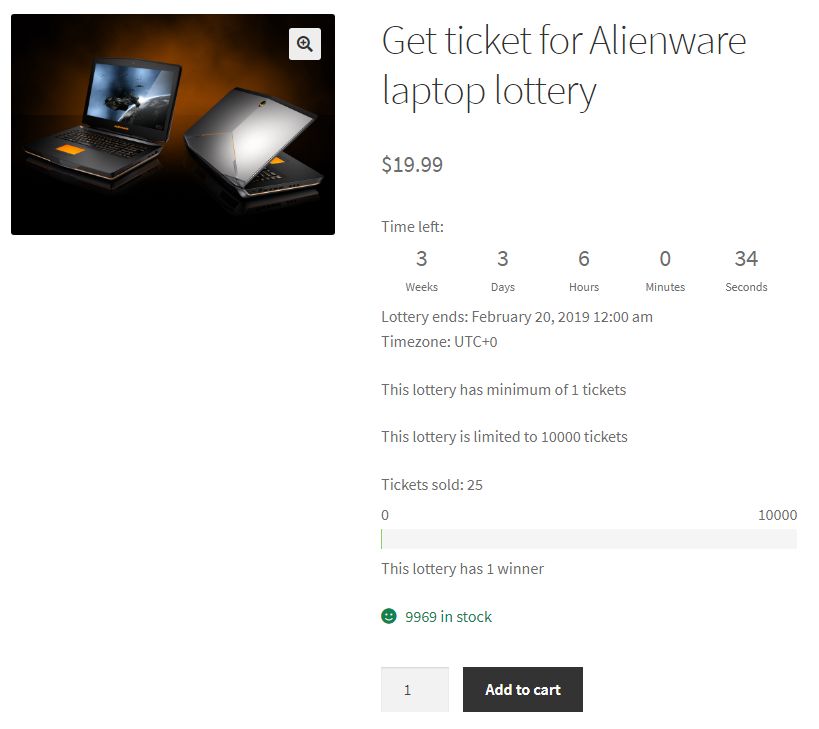
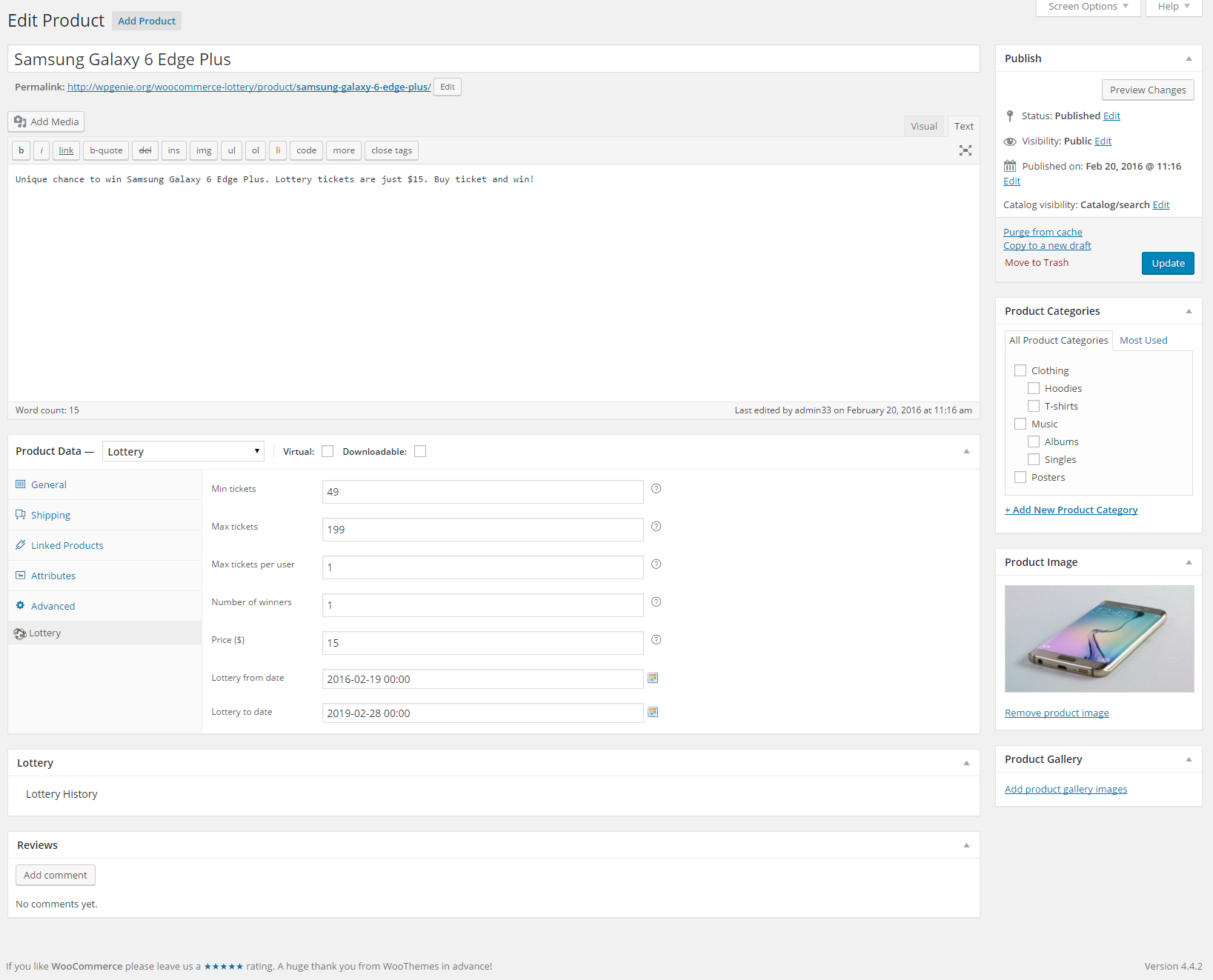
- Define minimum and maximum number of tickets available
- Define max tickets per user, number of winners and multiple wins per user
- Set start and end time for lottery
- Entry lists (see demo) for lotteries
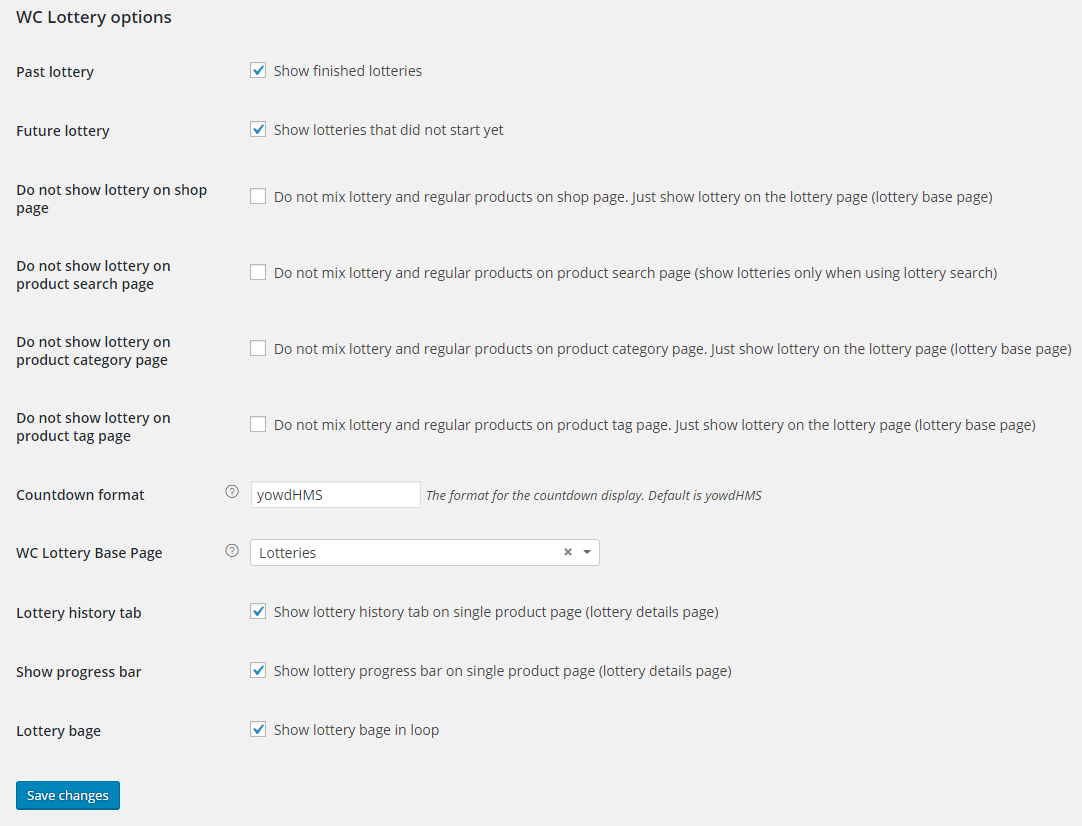
- Easily control how you want to display lotteries – along with other items or on separate page
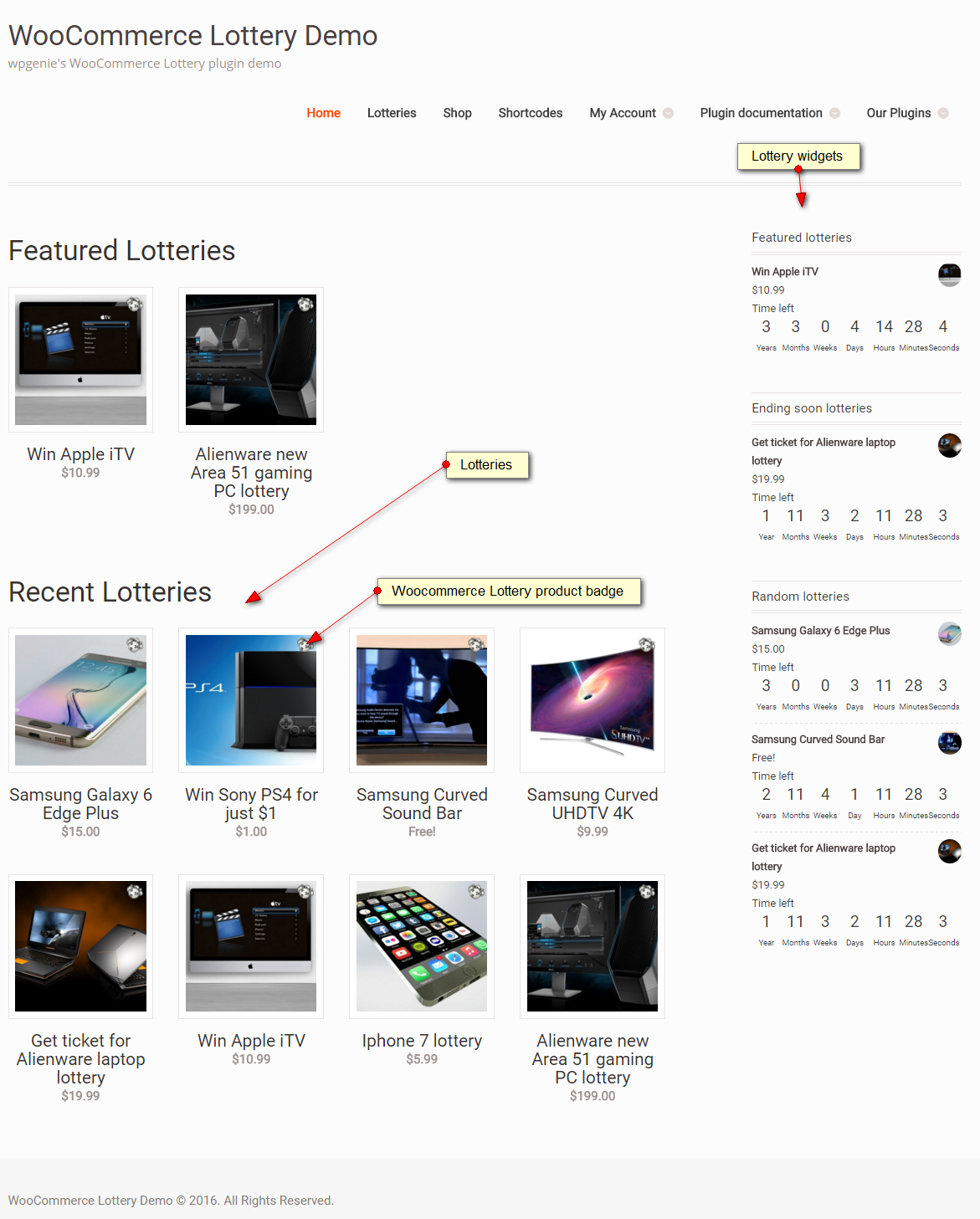
- Widgets with ending soon, future, latest / recent, featured, recently viewed, my lotteries and random lotteries
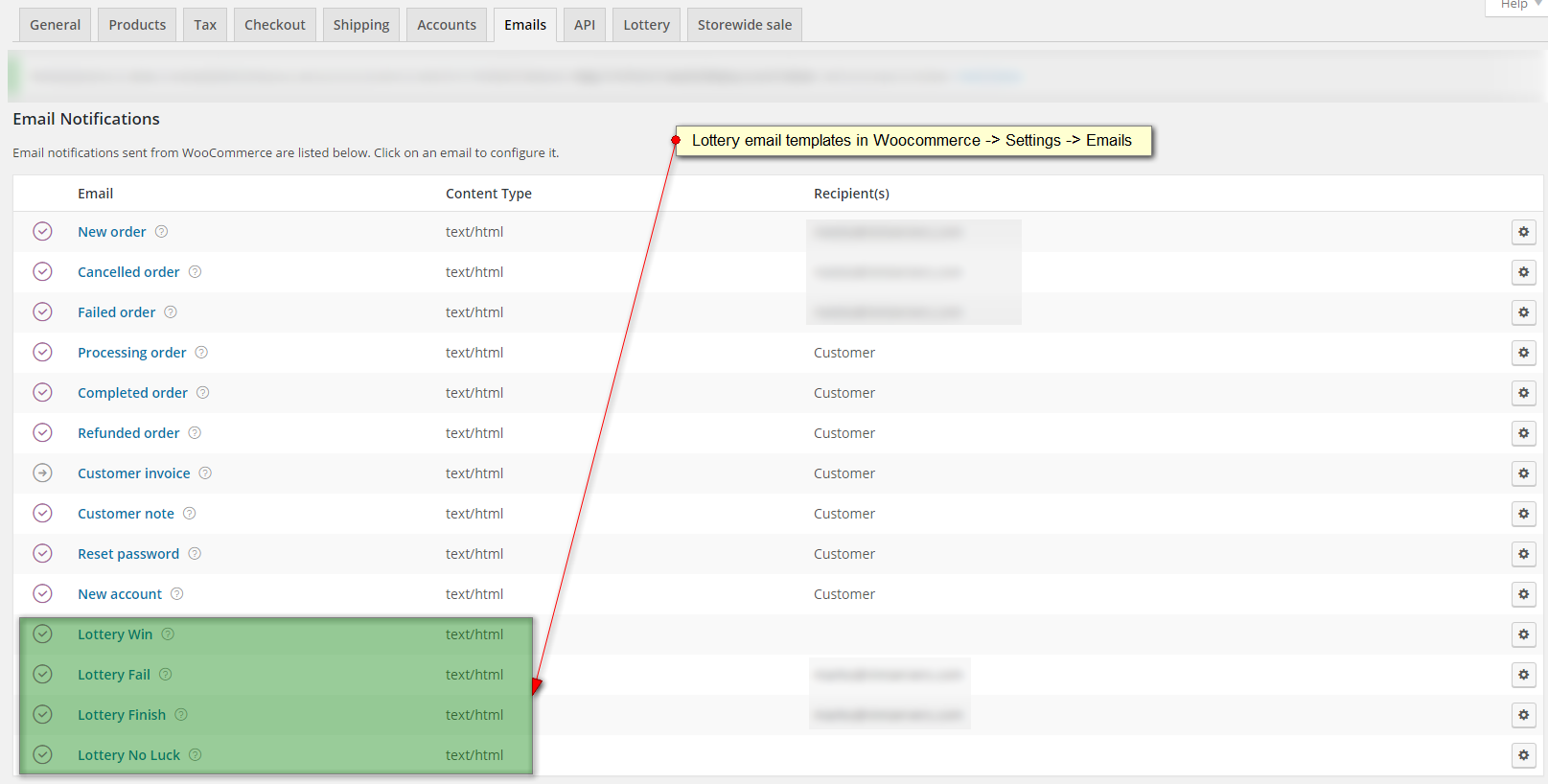
- Email notifications (with editable templates) for lottery win, fail, finish, no luck, lottery fail for customers, lottery extended
- Lottery product has lottery icon (label) on thumbnail
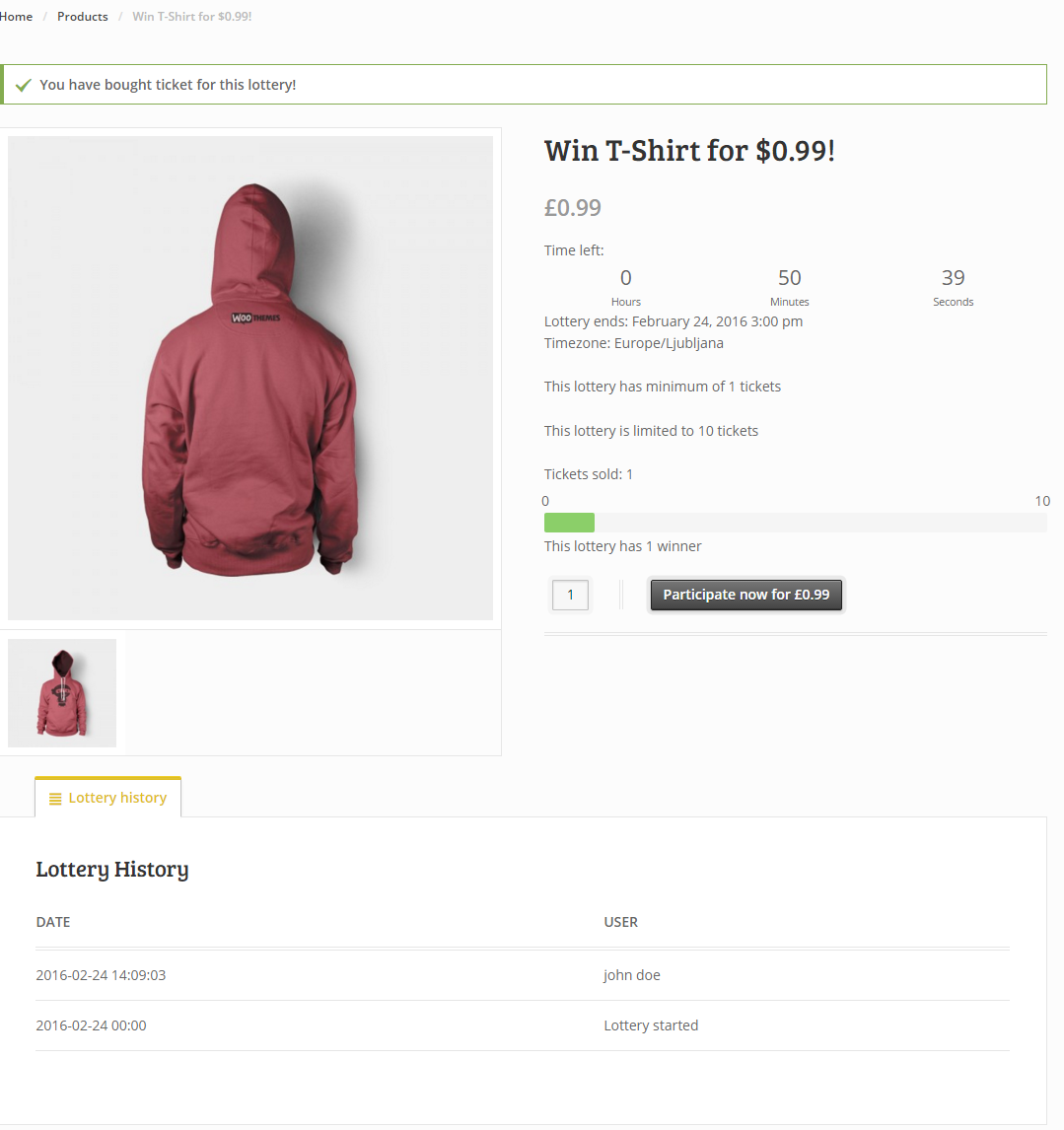
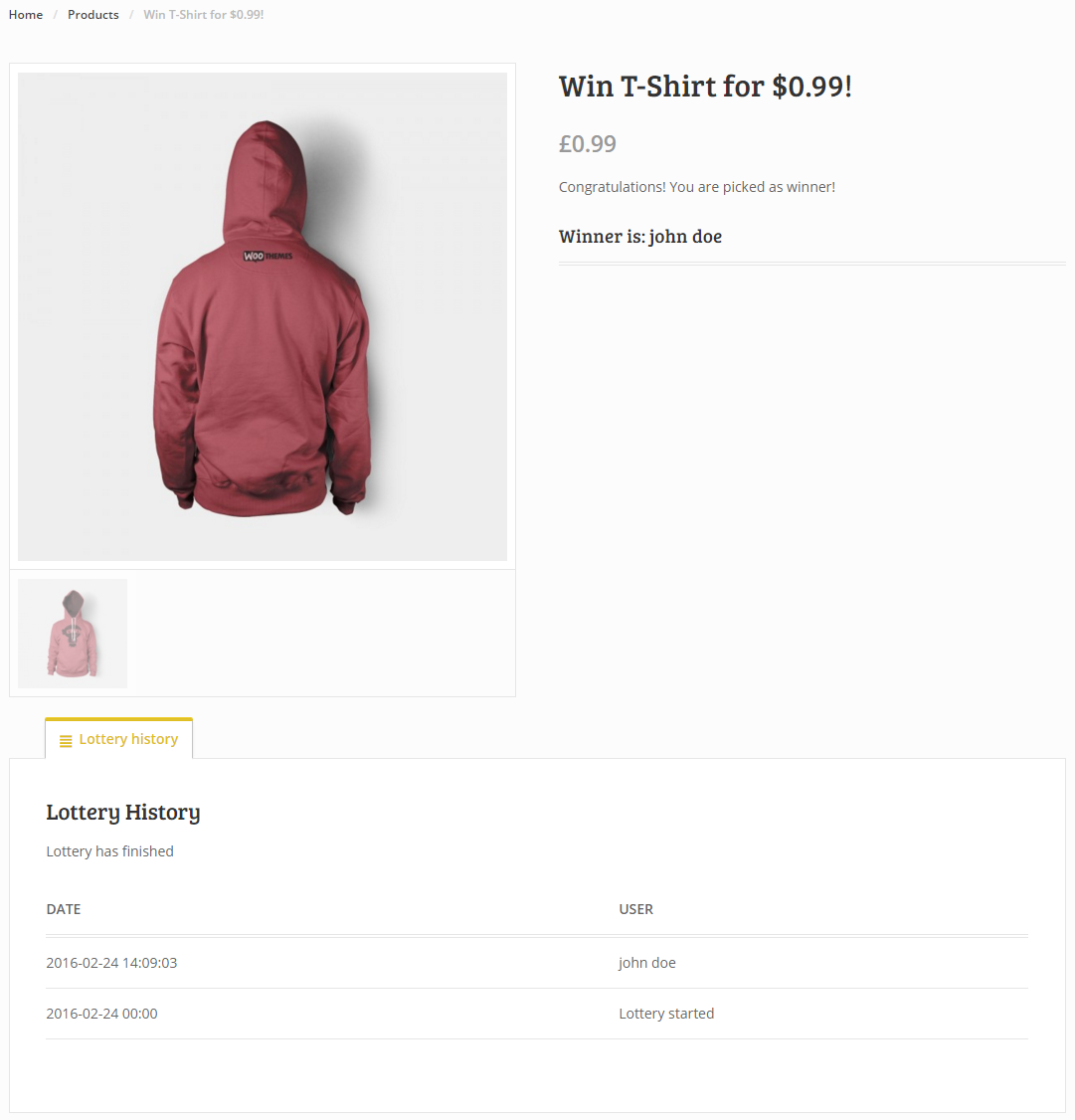
- Product single page has new tab “Lottery History”
- User has “My lotteries” page where one can see active lotteries and won lotteries – page with shortcode [my_lotteries]
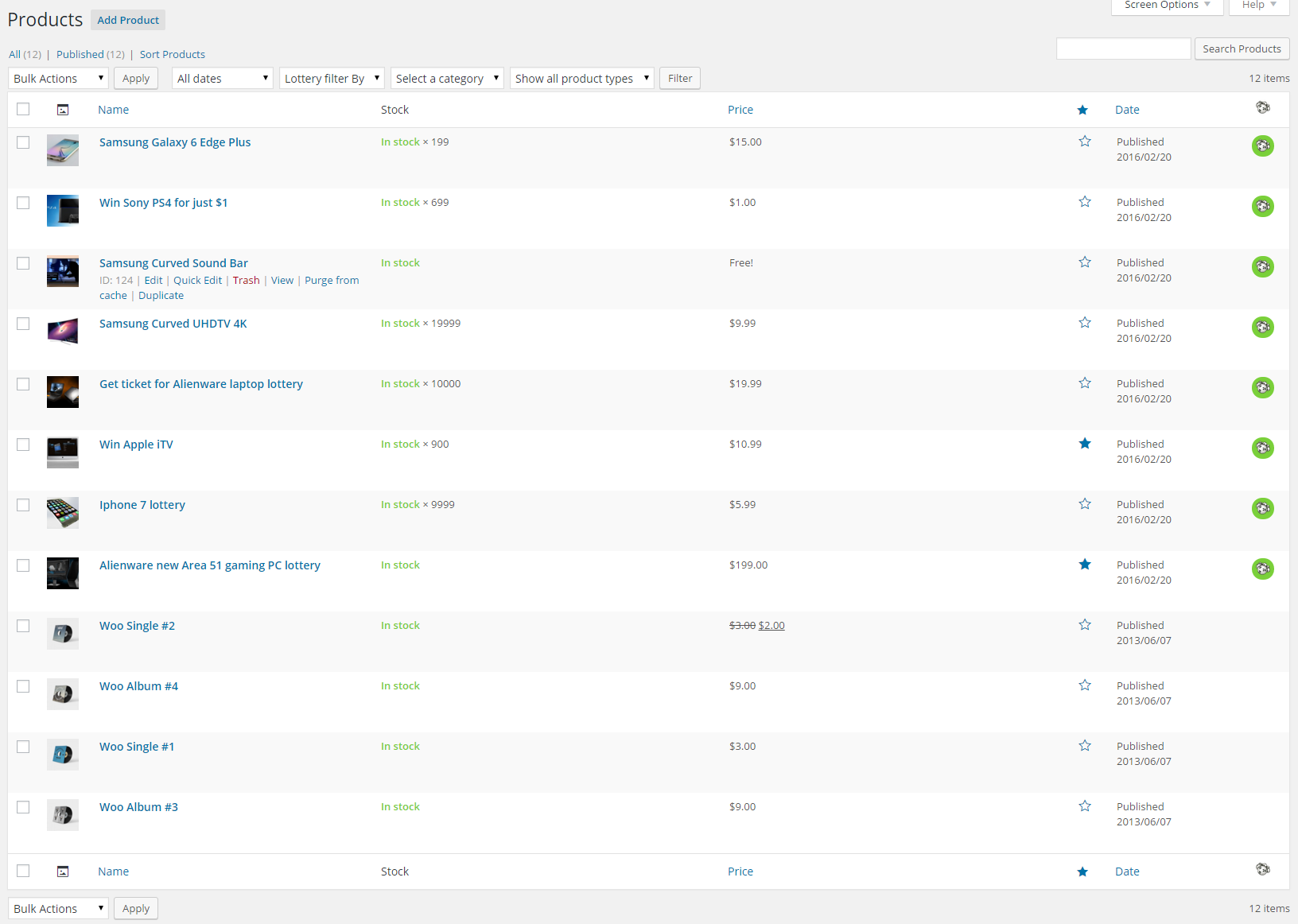
- Lottery filtering in product list (wp-admin)
- Lottery product has icon which describes different lottery status: active, finished, finished and paid, failed (wp-admin)
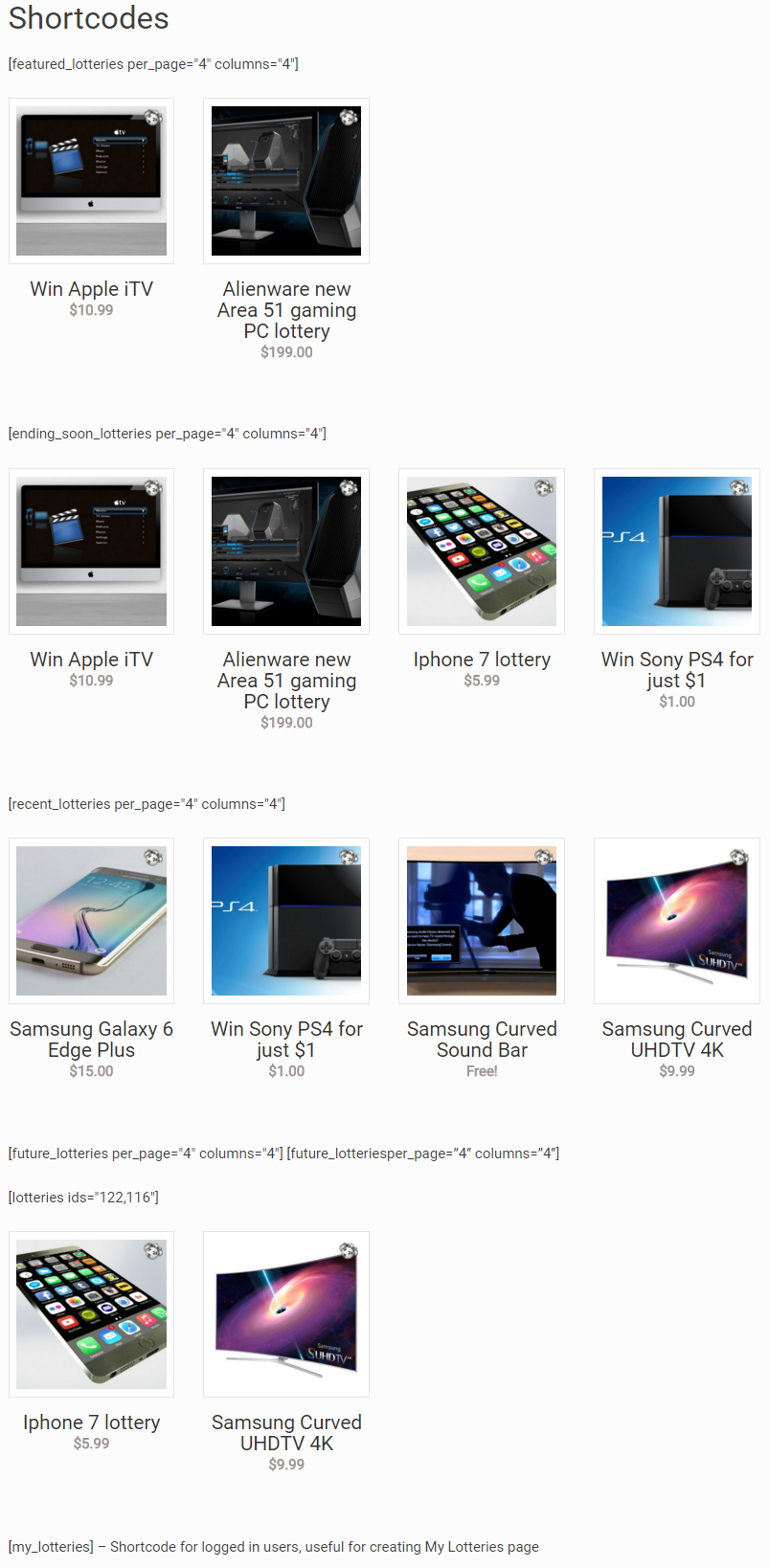
- Plenty of shortcodes including shortcode to show my lotteries for logged in user
- Make lottery from any type of Woocommerce product – simple, virtual or downloadable products
- Manually delete any ticket via Woocommerce order management – deleting order deletes ticket
- WPML compatible, translation files
- Enable users to create and submit their lotteries / competitions / lucky draws and you as site owner can charge a fee (via multivendor plugin like Dokan)
- Cronjobs required – if your host does not support 1 minute cronjobs you can use 3rd party cron service like easycron
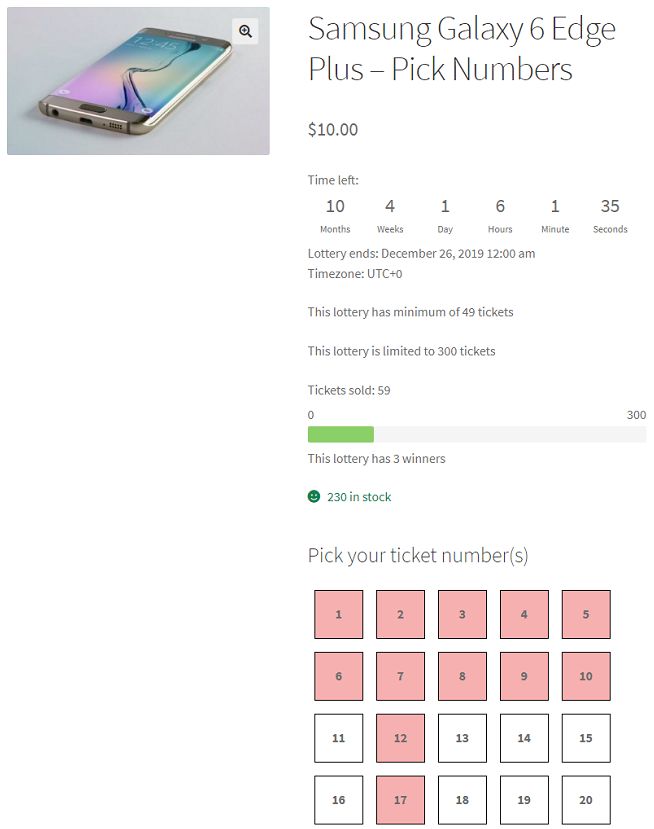
- Pick ticket numbers (ticket number grouping in tabs), manually pick winners and question / answers modification avaliable (for additional fee) – check demo and admin screenshot – please contact us for more details via ticket system or email info@wpgenie.org – features included: ticket number pick (ticket number grouping in tabs) with option to randomly assign numbers without picking each number, question / answers, manually pick winning number(s) – when you want to use 3rd party lottery drawing option like national lottery numbers, service like https://www.random.org/ or your own random number generator
- works with WooCommerce API – read tutorial
The listed price is the fee for 1 year of updates and support for 1 domain/website. If you are a web developer, please contact us for a special coupon code for an additional discount. This add-on cannot be bundled with a theme and sold as part of the theme.
Description
WordPress competitions, lotteries and draws have never been easier!
WooCommerce Lottery / Competition plugin is easy to use but also a powerful solution – website owners get true WordPress lottery and draw solution which is both easy to setup and customize. With our lottery plugin you can setup WooCommerce lottery website and start your lotteries in less than 30 minutes (assuming you have payment processor ready).
Please read documentation and check our WooCommerce Lottery demo (demo runs on latest WordPress, WooCommerce and latest version of WooCommerce Lottery).
How Lottery selects winner when there are no ticket numbers? – Read All About Winners and Drawing Prizes Here
WooCommere Lottery Overview and Features:
- First WooCommerce Lottery plugin – v1.0 released on 2nd March 2016!
- Works with latest WordPress, WooCommerce and Elementor
- Seamless integration into WooCommerce via its hooks
- You get new type of WooCommerce product type – lottery
- Define number of lottery winners – 1 or more
- Login at later stage of checkout (guest checkout)
- Lottery ticket price can be zero, works with TeraWallet / Credit payment gateways
- Winners / users can win single prize or multiple prizes
- Option for refund tickets with single click if lottery has failed
- Option for instantly finish lottery if max number of tickets was sold
- Option for extending lottery end date with all previously sold tickets (ticket rollover for failed lotteries)
- Manually relist lottery and option to delete previous lottery data after relist
- Manually extend lottery end date for failed lotteries (keeps lottery participants)
- Define minimum and maximum number of tickets available
- Define max tickets per user, number of winners and multiple wins per user
- Set start and end time for lottery
- Entry lists (see demo) for lotteries
- Easily control how you want to display lotteries – along with other items or on separate page
- Widgets with ending soon, future, latest / recent, featured, recently viewed, my lotteries and random lotteries
- Email notifications (with editable templates) for lottery win, fail, finish, no luck, lottery fail for customers, lottery extended
- Lottery product has lottery icon (label) on thumbnail
- Product single page has new tab “Lottery History”
- User has “My lotteries” page where one can see active lotteries and won lotteries – page with shortcode [my_lotteries]
- Lottery filtering in product list (wp-admin)
- Lottery product has icon which describes different lottery status: active, finished, finished and paid, failed (wp-admin)
- Plenty of shortcodes including shortcode to show my lotteries for logged in user
- Make lottery from any type of Woocommerce product – simple, virtual or downloadable products
- Manually delete any ticket via Woocommerce order management – deleting order deletes ticket
- WPML compatible, translation files
- Enable users to create and submit their lotteries / competitions / lucky draws and you as site owner can charge a fee (via multivendor plugin like Dokan)
- Cronjobs required – if your host does not support 1 minute cronjobs you can use 3rd party cron service like easycron
- Pick ticket numbers (ticket number grouping in tabs), manually pick winners and question / answers modification avaliable (for additional fee) – check demo and admin screenshot – please contact us for more details via ticket system or email info@wpgenie.org – features included: ticket number pick (ticket number grouping in tabs) with option to randomly assign numbers without picking each number, question / answers, manually pick winning number(s) – when you want to use 3rd party lottery drawing option like national lottery numbers, service like https://www.random.org/ or your own random number generator
- works with WooCommerce API – read tutorial
41 reviews for WooCommerce LotteryReviews from our CodeCanyon profile
You must be logged in to post a review.


praha-print –
professional approach and support! I am very satisfied.
wpcodeus –
This plugin was exactly what I was looking for. Not only that but the code quality is there as well. I’m excited to see what the developers do with this plugin.
armasia –
Very good plugin, but maybe u can working on the integration, or maybe add option for configure timer, etc etc etc. Thank you for ur job, sorry my poor english :p
mvuljevas –
Works like a charm, thank you!
ajakob –
Excellent plugin, works great with woocommerce and quality theme like kleo.
Thanks,
TrumanBurbank –
I first bought the lottery plugin and was a bit disappointed to be fair, tickets not being allocated numbers was a negative but everything else about the plugin worked as expected. I upgraded to the pick number add-on and wasn’t sure what to expect based on some of the comments on here. I was pleasantly surprised and the pick number add-on addressed all of my previous disappointment. The lottery plugin is a good basic plugin that serves the purpose it’s meant to. The pick number add-on makes it perfect, it’s a little expensive but if you want all the functionality that this plugin offers it is a much cheaper option than a web developer. It’s not perfect, it could have a rotating question bank for example but it is well worth it’s money. Stop complaining and pay the man!
I also found a small bug, I notified the author via the support and he fixed it and released an update with 24hours. You can’t really ask for more than that. I will be extending my support period.
galibri –
I was impressed with their demo and wanted to add some more features to it. I bought the both plugin (Lottery with number picking) and it’s working great!
Though I had to code a lot to gain my functions, it’s really awesome.
jester350 –
Bought the plugin based on the demo where the user can pick their own numbers but documentation states ‘Can I manually add winning numbers? Can I enable users to pick ticket numbers? Can I have question – Yes, you will need Pick ticket numbers addon / extension avaliable (for a fee)’
While I disagree with showing this feature in the demo and then hiding the fact it needs an additional plugin in the middle of the documentation, what I can’t let slide is that the additional plugin isn’t listed anywhere to purchase or download.
I’ve raised a ticket and will amend review based on response
Bodyburnout –
Users cannot choose their own numbers. just get one emailed to them.
Really restricted uses. No useful instructions – but maybe that’s just because there’s no features to need instructions for
yazgee –
A great plugin with many features. Just one more feature would have completed this for me.
I would have liked the ability to add a question or quiz after ticket purchase. Then only correct answers would go into the draw to select a winner.
Maybe you could look at adding this soon?
jaysaunter –
Perfect
prentice2 –
So far, so good. The lottery script has worked great!
OlufemiShield –
The Plugin works seamlessly with woocommerce and my support experience was awesome.
jonaslagneryd –
Really great plugin and good support!
webcoop –
There should be an option where it says all of the above.
The plugin is great.
Support is excellent.
Overall magnificent.
Fla-Andy –
The Product is great and really easy to set up and integrate with WooCommerce. However, where it truly stands out is the support, where the team went above and beyond for me. They have answered all my questions, and have even added in some functionality that I needed to ensure my requirements were met. I want to thank the whole team for their hard work, truly well deserved. This product and its extension are a must-have for anyone that wants a Raffle or Lottery competition, easily the most cost-effective way to set up a site that works.
sutterspace –
excellent plugin that comes with great support. highly recommended.
harrylynn17 –
Support is very fast and swift. Thanks!
jordanbergerman –
Great plugin, updated frequently and fantastic customer support. Highly recommend.
mortport72 –
I got the pro version and it’s great. And the support I have gotten to make it fit my theme and wishes has been absolutely superb! I am very happy!!
AlfredoRSantos –
Muito bom ótimo plugin
TommyOSheaWebDesign –
Excellent customer support. Answered my question immediately.
scph35003 –
Fantastic plugin and amazing fast customer service
python-it –
Does everything on the tin. Excellent support – Thanks
mrmsalauddin –
did not work for me what I wanted to do with it…
pwnful –
I’d have to say that this plugin delivers so much for the money and the addons which you can get for it just make it that much more perfect, whenever I’ve had an issue wpgenie has always been on the case and handled it effectively without a doubt best support, best value for money and overall fantastic guy.
PRPrestige –
Started on the left foot but eventually we managed to get along just fine. Once we got our things sorted, the support was topnotch. Even if you encounter small issues with the module, they will fix it as long as you use their ticketing system. Recommended author. I hope that their support will stay the same over time.
Mwingine –
GREAT support, great product.
garyellard –
Great plugin did exactly what I needed to do, needed to tweak the language files to change Lottery to Competition but other than that worked seamlessly
TweedSolutions –
This is an excellent plugin and works very well. I asked a couple of questions to the developer via their support network and received great and prompt replies. Highly recommended if you’re looking for a lottery plugin.
aftabsheikh8 –
GJ
chronicbuilt –
Best Customer Support! Go to customer support before leaving a stupid review (anything less than 5 stars). I bought the extra plugin for $250, and it was worth it. Yeah, it is expensive, but you don’t have to pay for it monthly. Stop complaining and READ the description before you buy. Without the additional plugin, it still works great. Cannot find anything better that does this even in “scripts”. Great clean code and great customer support. Thanks!
matthewbird156 –
By far the best prize draw plugin i have tired. I would highly recommend this plugin along with “WooCommerce Lottery / Competitions Pick Ticket Number Modification” available direct from their site.
I did try other plugins before finding this one and ended up removing the others in favour of this one.
The whole thing works just as you would want it to and the support is very good.
You may not like the price of the additional plugin but if you want quality, support and decent system the expect to pay a good price. Its worth every penny.
demsley –
Really good, Does exactly what we bought it for.
The only downside is that I would like to change the words “Lottery” for “Raffle” it’s a UK thing.
AslanDoma –
What I was looking for.
Fuzzycakez –
very optimized, the best plugin!
roymoody –
Works really well and very flexible – really needs the additional add-on for full functionality and then it’s a really powerful module. Support is also really good!
jackc87 –
Brilliant customer service, quick replies and great plugin. Thanks again
Techpkp –
Thank you for your quick reply and language files.
Awesome service. Recommended.
neil74white –
Amazing set of plugins and the extra customisation we have paid for is incredible, highly recommend buying direct from these guys rather than using the theird party companies that are reselling their license without rewarding the original developers
Thank you for the great work and support over the past few weeks
SDNETWORLD –
I’m on themeforest since 15 years now, and I must admit that the support and the reactivity of the staff is prodigious. Fews personnals tweaks manage in no time! Excellent