Instant-reveal mystery boxes are a highly effective, easy-to-implement gamification strategy that can boost engagement, clear inventory, and drive repeat purchases in your WooCommerce store
Mystery boxes have been extremely popular for the past few years, but as a concept they have a surprisingly long history. Some trace their origin to “grab bags” and “lucky dips” of Victorian-era fairs and markets, while others find their direct cultural ancestor in Japan’s fukubukuro (“lucky bag”) tradition. In any case, it is clear that they have proven to be more than just a passing trend.
What is the secret behind their popularity and longevity? For store owners, they are a powerful marketing engine, and the main reason is one of the perks of human psychology: we love the thrill of not knowing what we’ll get. When customers buy a mystery box, they aren’t just buying a product, they’re buying an experience.
Over their evolution, mystery boxes have come in different forms, from collector boxes of the mid-20th century to the modern mystery box boom that started around 2010, with the explosion of YouTube unboxing videos.
The newest trend blending gamification with retail is the instant-reveal mystery box, where you purchase a box and then immediately after watch a “virtual unboxing” animation (and, on some websites, trade or sell back unwanted digital or physical items).
In this article, we’ll explain what instant-reveal mystery boxes are and what their key benefits are for store owners. We’ll show you how to set up a mystery box in WooCommerce using the Mysterx – Mystery Boxes for WooCommerce plugin, and share a simple way to offer mystery boxes as free gifts to your customers.
Table of Contents
What is an instant-reveal mystery box?
An instant-reveal mystery box is a digital gamified shopping experience where you purchase a box of possible items through an e-commerce website or app at a set price, and you don’t know which one you’ll get until you “open” it digitally.
The instant-reveal mystery box evolved from two major trends over the last decade: video game loot boxes and physical mystery boxes. Instant-reveal mystery boxes essentially merge these two ideas. There’s the instant gratification and high-production-value animations of gaming software, but instead of winning virtual items like video game skins or armor, the customer gets a real product from the store’s catalog, drawn at random from the items in the box. Of course, stores selling digital goods can use the same mechanic to deliver virtual items instead.
Key Benefits for Stores
Here are the main benefits of offering instant-reveal mystery boxes in your store:
Mysterx: An Instant-Reveal Mystery Box Plugin for WooCommerce
If you want to offer instant-reveal mystery boxes in your WooCommerce store, there’s an easy way to do it. You can use WPGenie’s Mysterx – Mystery Boxes for WooCommerce plugin, available in free and PRO versions.
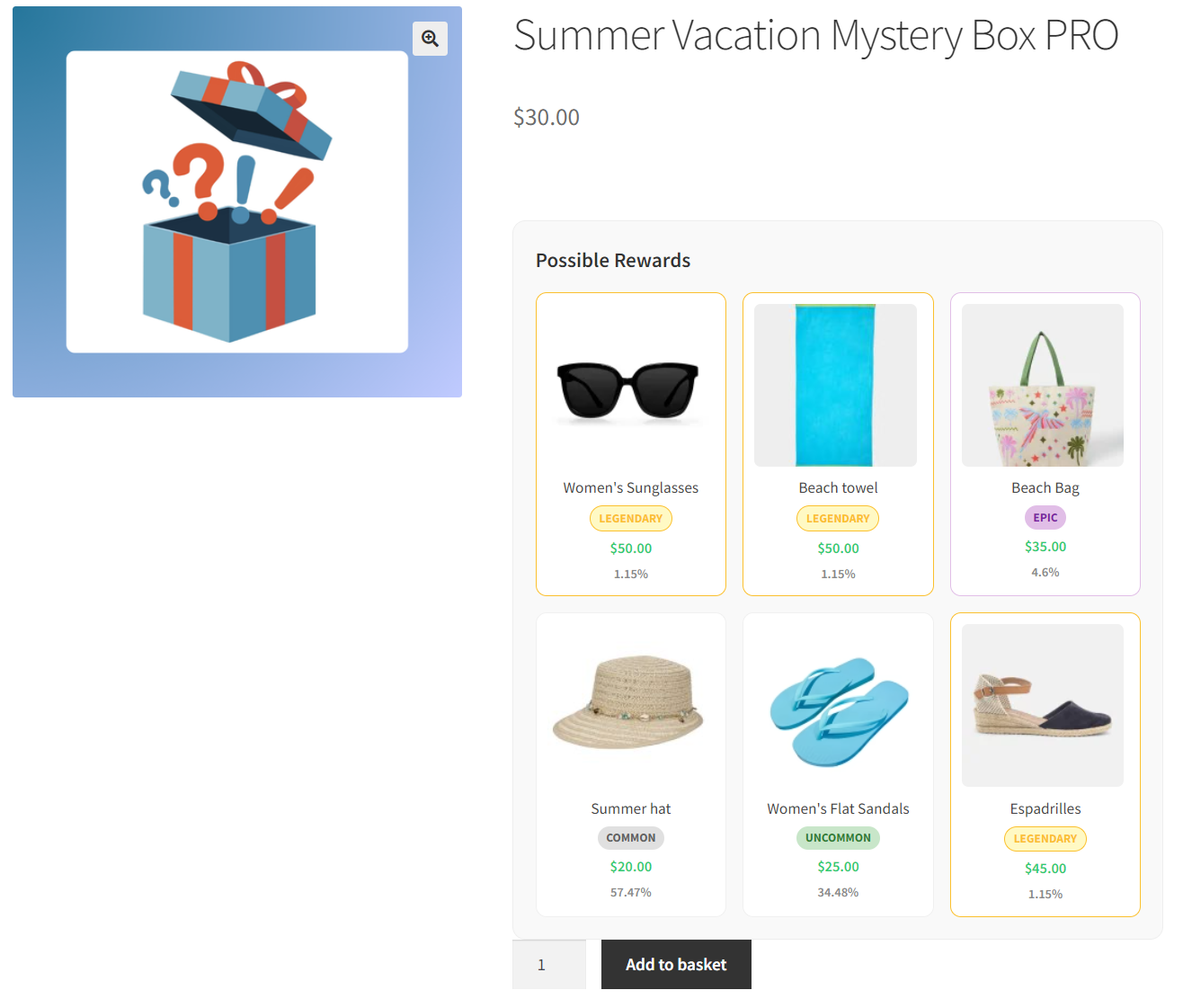
Mysterx lets store owners easily create and sell instant-reveal mystery boxes, each containing a curated selection of products defined by the seller. Customers can see all items in the box before buying, but won’t know which one they’ll get until the on-screen unboxing animation reveals it.
You can use this plugin to:
- Sell instant-reveal mystery boxes or blind boxes as standalone products
- Offer a free mystery box as a thank-you for a purchase (you’ll need a “free gift” plugin)
How Mysterx Works
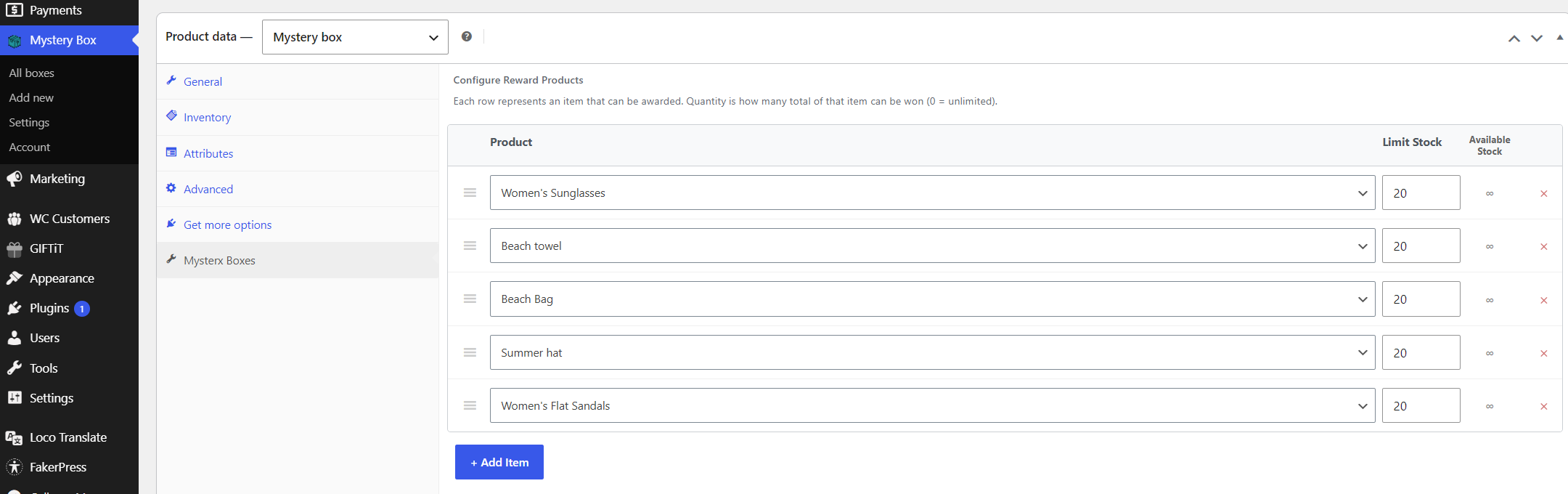
Mysterx – Mystery Boxes for WooCommerce adds a custom ‘Mystery Box’ product type to WooCommerce.
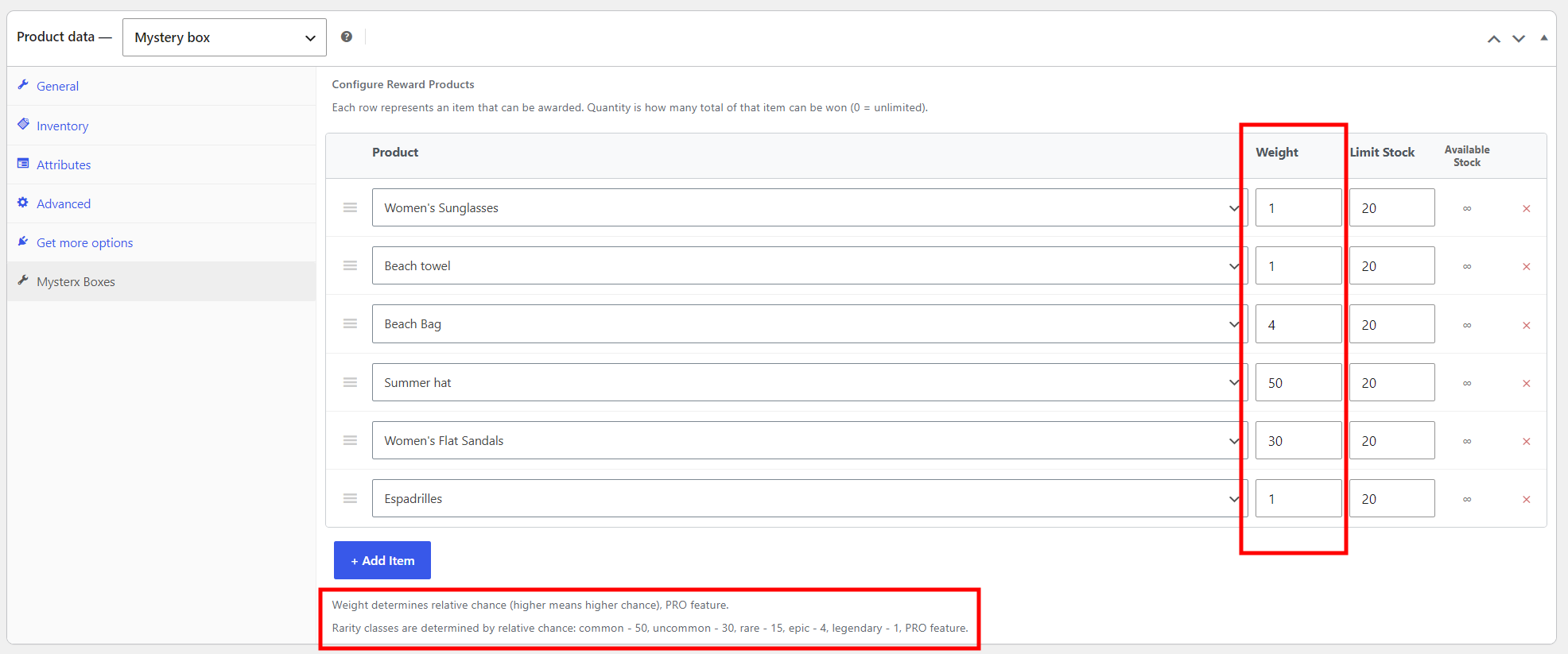
Store owners need to configure each box by defining the box price and then selecting the products they wish to include in the box. They can add as many products as they want to a single box and set stock levels for each item.
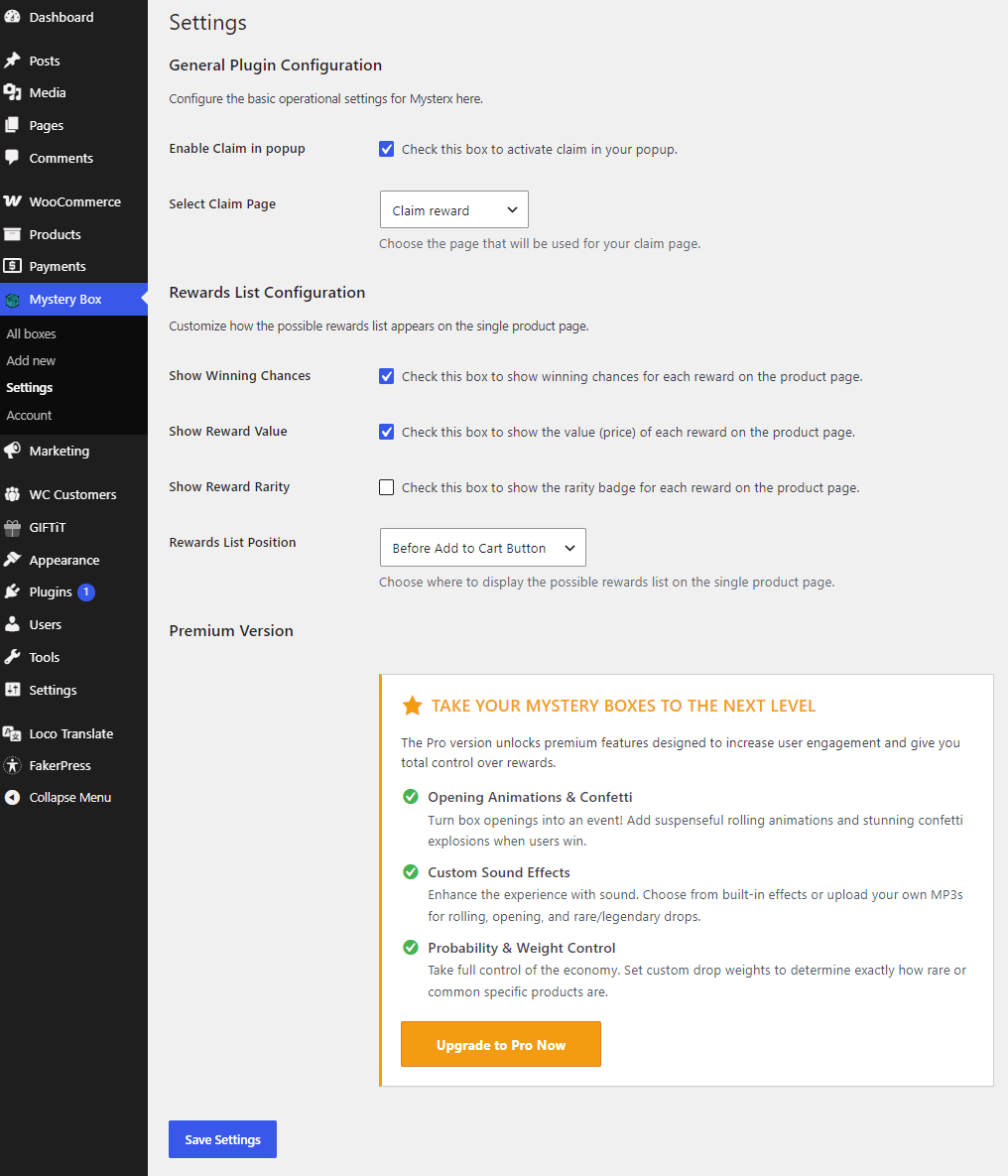
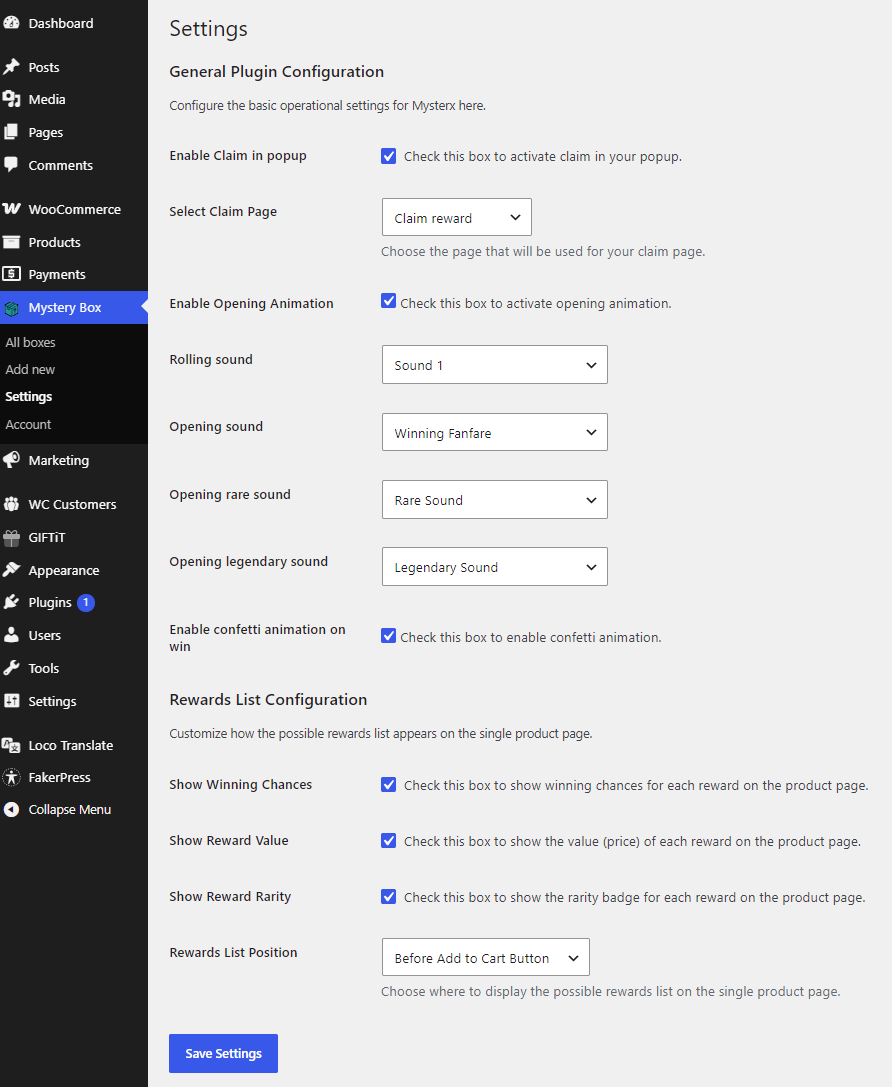
A new “Mystery Box” menu is added to the main WP Admin menu, and through it you can access Mysterx settings.
There is an option to activate claim popup and select a claim page. There are also options to customize how the list of possible items appears on the single product page. You can choose to display the value (price) of each item included in the box, as well as control the position of the items list: before or after the Add to Cart button, or before or after the product summary.
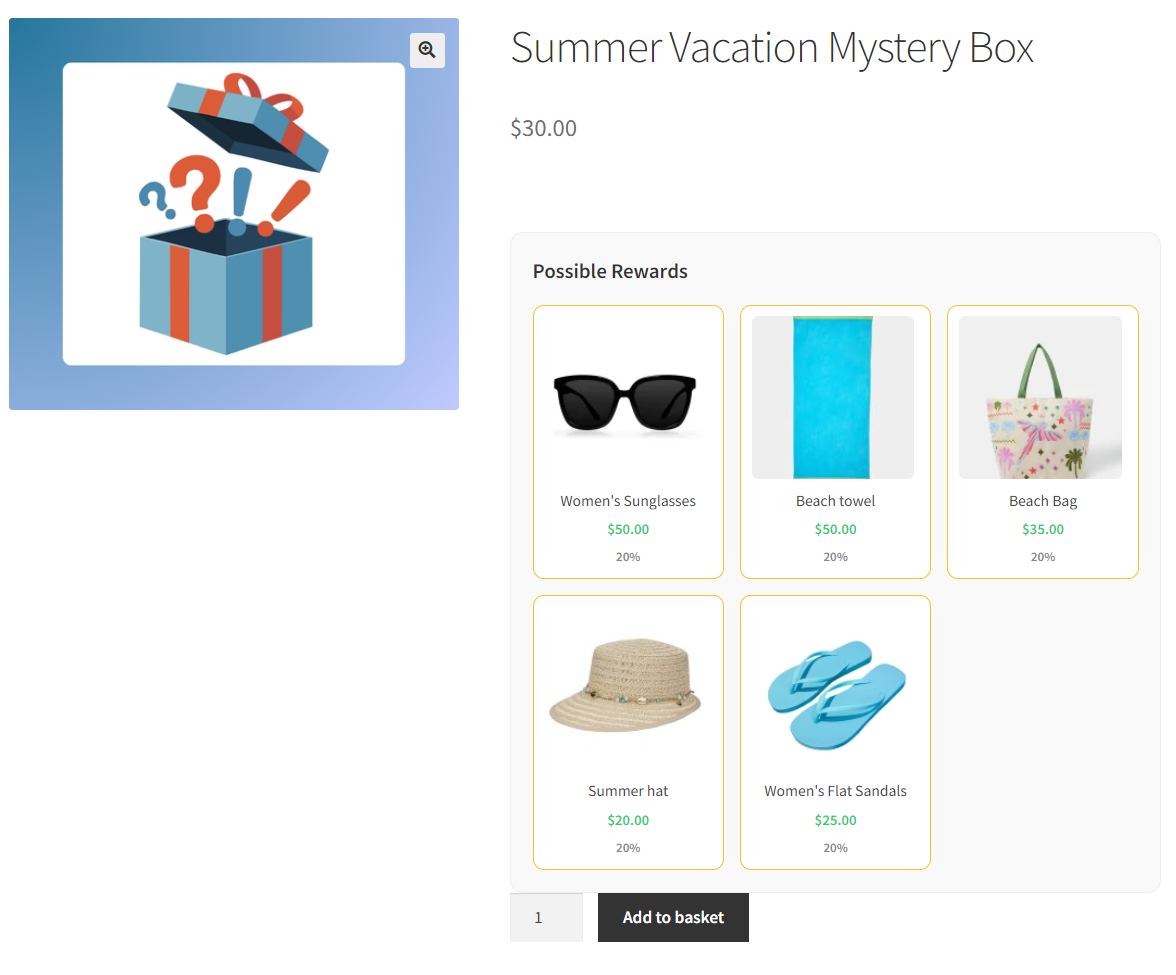
On the frontend, customers can see the list of possible items in the box, and there’s also an option to show them the value (price) of each product in the box.
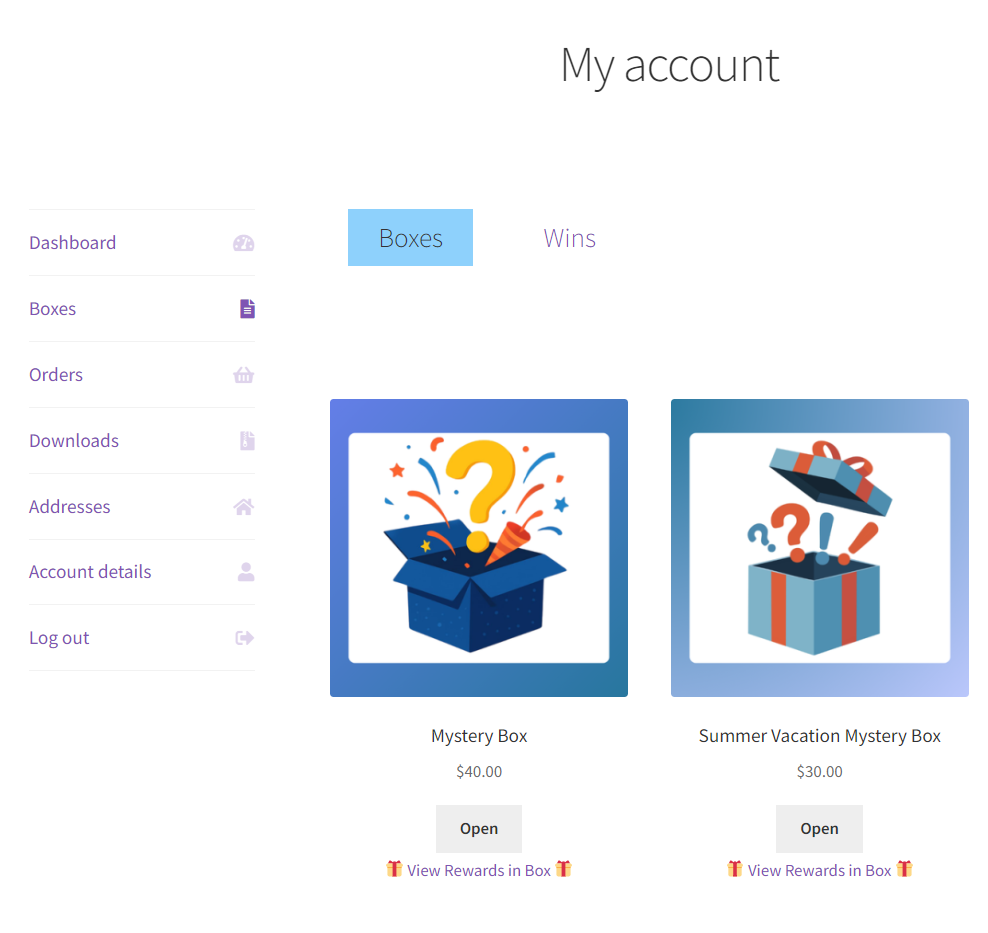
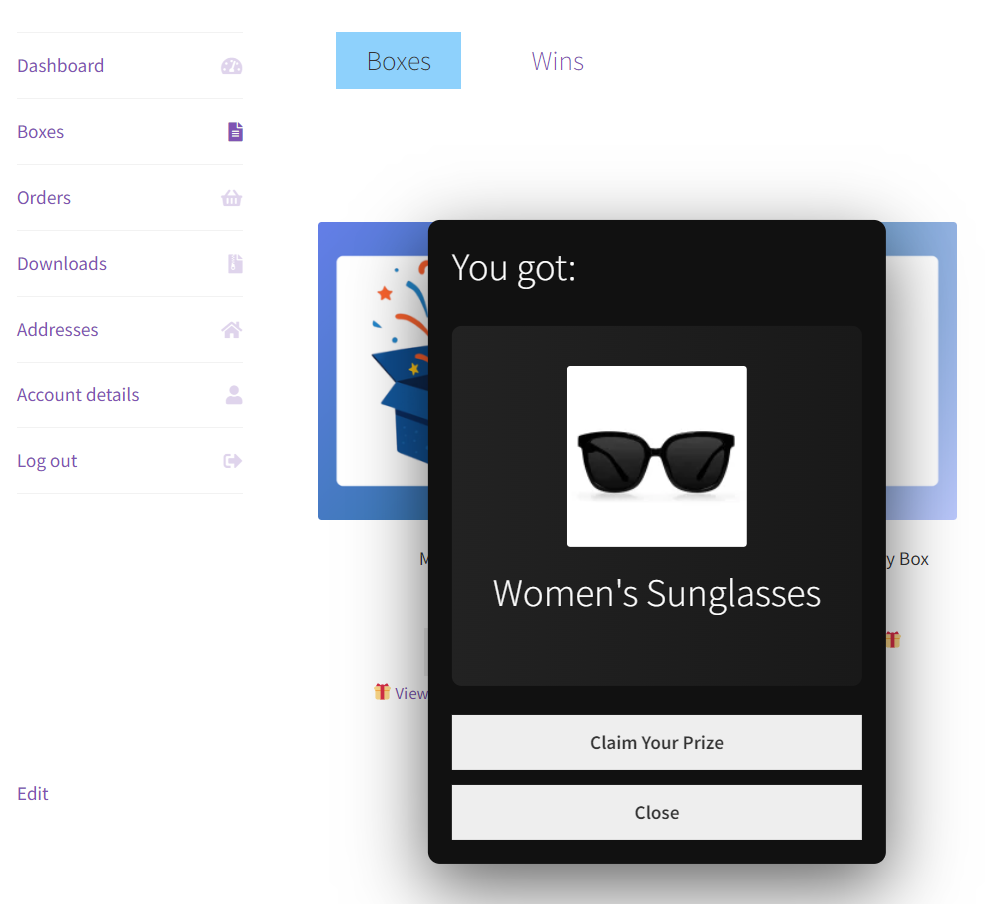
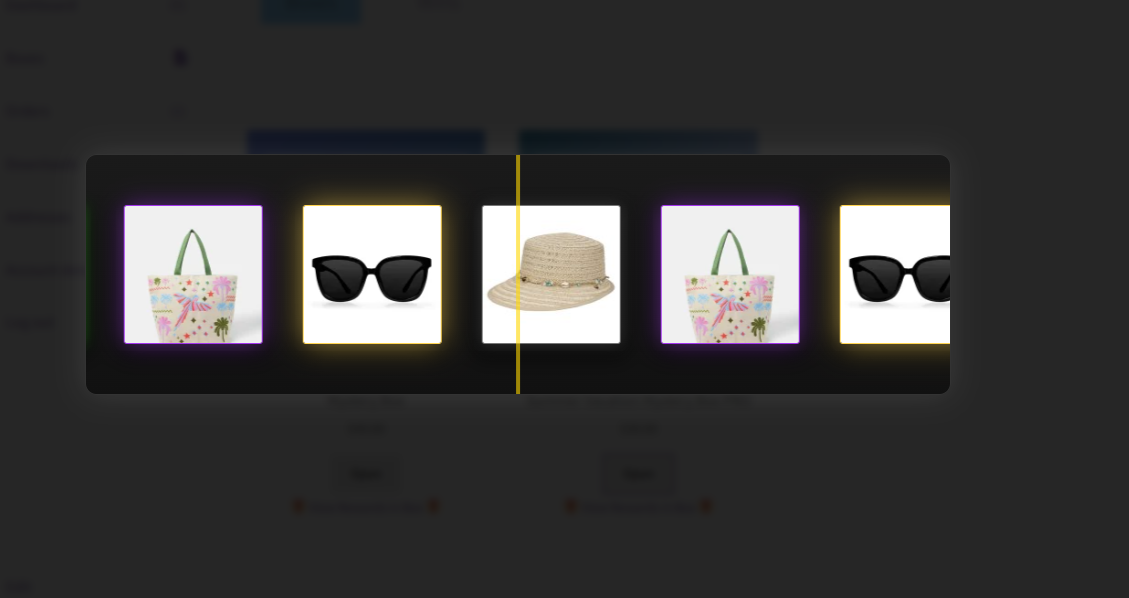
Customers buy an instant-reveal mystery box, and after the order is completed they get an “Open your Mystery Boxes” link on the order thank-you page, which takes them to My Account > Boxes. From there, customers can instantly open their box and find out which product they got.
For one mystery box purchase only one product can be received. This product is chosen at random from the items in the box. Mysterx handles the random selection automatically and deducts the correct item from stores actual inventory.
In My Account > Boxes, customers can also track unopened boxes and view all the products they’ve received.
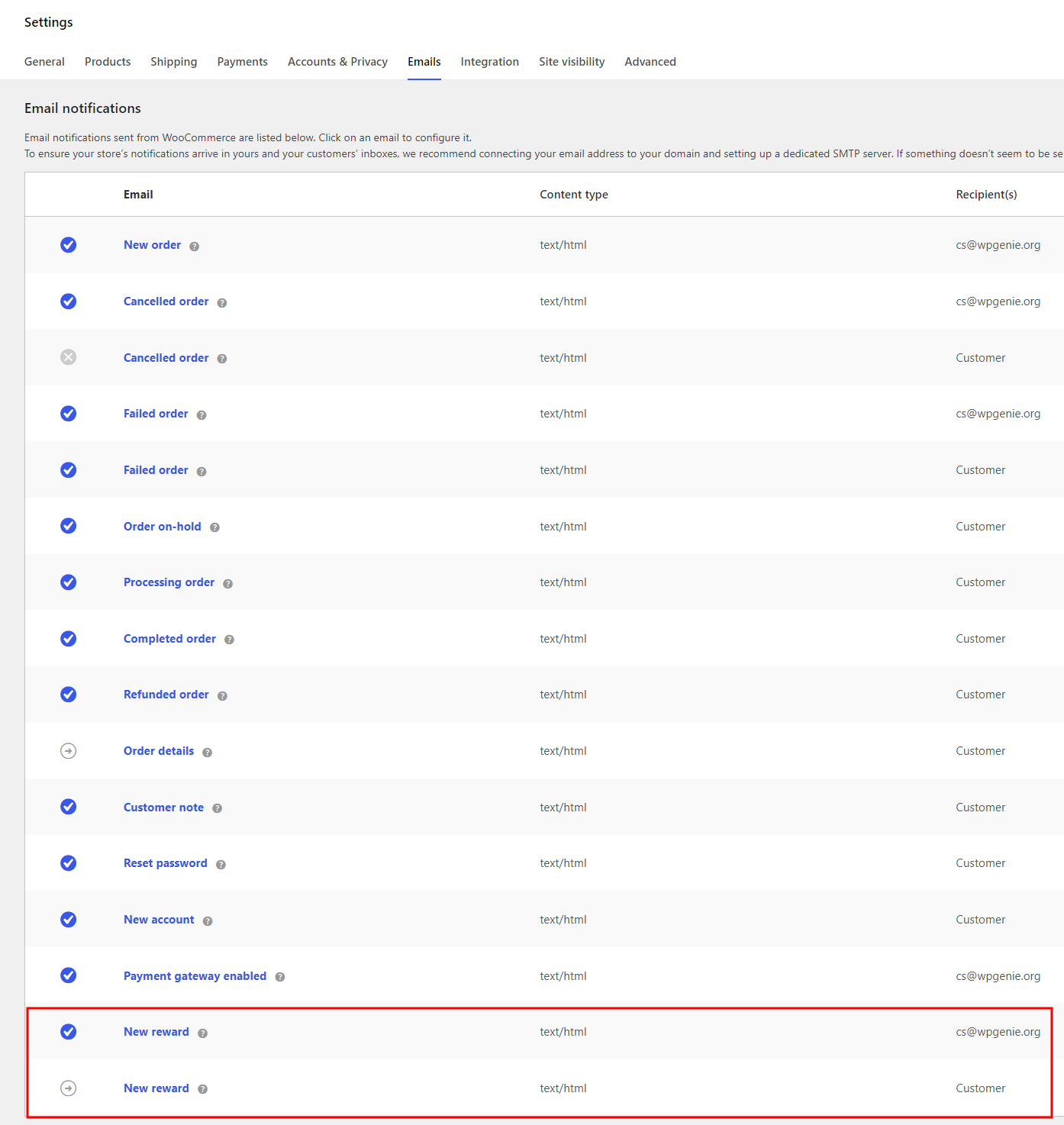
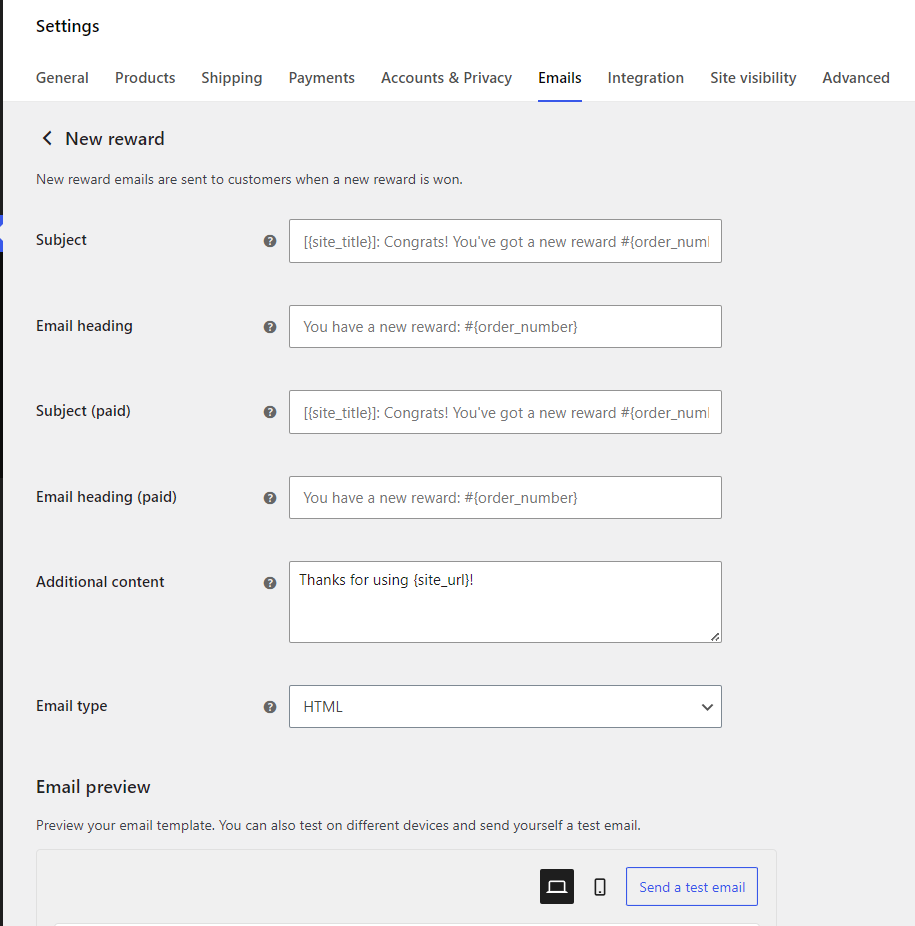
Mysterx also sends email notifications when a box is opened, one to the customer confirming what they got, and one to the store admin.
PRO version features
The PRO version offers additional features for user engagement and probability control:
- Opening Animation & Confetti On Win
Adds game-style reveal animation for the opening and fun confetti animation when the prize is revealed.
- Custom Sound Effects
Chooses from built-in effects or upload your own audio for spinning, opening, rare item reveal, and legendary item reveal.
- Probability & Weight Control
Sets custom item weights to control exactly how “rare” or “common” specific products are. Weight determines the relative chance of getting a product: higher weight means a customer has a bigger chance of getting it.
- Premium Support Direct access to the WPGenie ticket support system at wpgenie.org/support.
Instant-Reveal Mystery Box as a Gift to Customers
A free gift is one of the simplest ways to make a purchase feel special.
An instant-reveal mystery box makes an especially good gift because the gift itself is an experience: the customer gets to open a box and discover their reward, which adds a moment of genuine fun to the end of their purchase.
You can set this up by combining Mysterx with the Free Gift for WooCommerce plugin.
Create a mystery box as you normally would, then set it as a free gift that’s added to the customer’s order when they meet your conditions, for example, spending over a certain amount.
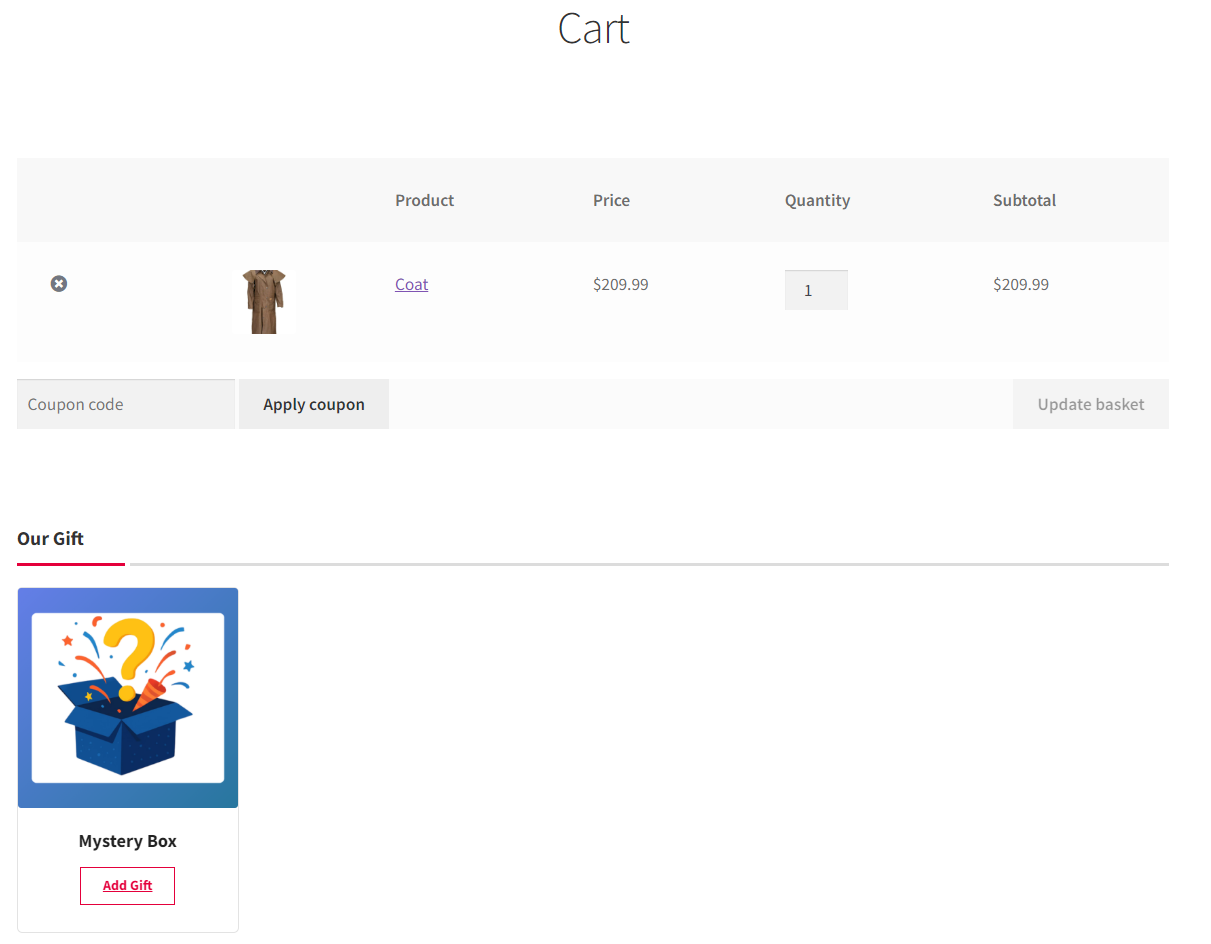
A few ideas for using this:
- Reward orders above a spending threshold (great for raising order value)
- Thank first-time customers with a small welcome box
- Add a surprise box to orders during holiday campaigns
Conclusion
Instant-reveal mystery boxes combine anticipation, surprise, and instant digital unboxing into a single shopping experience. They’re a highly effective, low-effort strategy for WooCommerce stores to drive customer excitement and repeat interest.
With Mysterx – Mystery Boxes for WooCommerce plugin, you can add instant-reveal boxes to your store in a few minutes.
The free version of Mysterx is available on WordPress.org. For spinner animations, custom sounds, and item weight control, install the free version and then upgrade to PRO version.
FAQ
What is an instant-reveal mystery box?
An instant-reveal mystery box is a gamified shopping experience where you pay a set price for a box of possible items, and you don’t know which one you’ll get until you open it digitally. It combines video game loot boxes and physical mystery boxes into one format.
How do I add an instant-reveal mystery box to WooCommerce store?
The easiest way is with a dedicated plugin like Mysterx – Mystery Boxes for WooCommerce, which adds a “Mystery Box” product type to your store. You select the products that can be inside the box, set the price, and customers open the box on screen after purchase to see which item they got. Mysterx comes in a free and a PRO version.
Do customers know the value of products inside mystery box?
It depends on how the store owner sets up the box. Mysterx – Mystery boxes for WooCommerce lets store owners choose whether to display the value (price) of each possible item on the product page, so customers can see exactly what’s inside and what it’s worth before buying.
Are mystery box contents random, or does the store owner choose them?
The store owner chooses them. When setting up an instant-reveal mystery box with Mysterx, the store owner creates the list of products that appear inside the box.
How does the plugin pick the winning item?
When a customer opens a box, the plugin randomly selects one product from the items the store owner added. In the free version, every item has an equal chance of being picked. In the PRO version, store owners can assign weights to make some items rarer than others.
Can I set the winning probability for each product in a mystery box?
PRO adds weight control, which determines the relative chance of winning a product: a higher weight means a customer has a greater chance of getting it. This way, you can make a high-value item appear less often than everyday items and protect your margins. In the free version, every item in the box has an equal chance of being won.
Can I gift a mystery box to customers?
Yes, you can offer an instant-reveal mystery box as a free gift. It’s an excellent way to make a purchase feel special, reward loyal customers, and add a moment of fun to the checkout. To set it up, you’ll need the Mysterx plugin plus a free gift plugin for WooCommerce, such as Free Gift for WooCommerce.
Looking for other ways to improve your WooCommerce store? Check the complete list of our plugins that can help you bring your clients the best online shopping experience!