A great way to attract customers’ attention to your store is through a Dutch auction (or a decreasing-price sale), where buyers wait for the next price drop, knowing that waiting too long may mean losing the item they want.
In 2022 Samsung Electronics Australia ran an excellent Black Friday “Reverse Auction” campaign, which involved starting a product listed at full retail price and letting the price drop until all available items had been sold, or the price reached $1. The campaign generated significant attention: more than 51,600 people registered to participate, and Samsung reported a 270% year-on-year increase in Black Friday revenue.
The real potential of this type of campaign was not simply telling shoppers that “the price will drop.” It was turning the price drop into an event. A limited number of products, automatically decreasing prices, countdowns, real-time updates, and the possibility of securing a premium product at a great price all created urgency and FOMO.
In e-commerce, this tactic is usually called a Dutch auction; Samsung’s “reverse auction” label was catchy, but technically a reverse auction is something quite different (more on that below).
In this article, we’ll explain what a Dutch auction is, how to set it up in your WooCommerce store, and how to use it to gamify the shopping experience, clear inventory faster and attract new customers.
Table of Contents
What is a Dutch auction (or a decreasing-price sale)
A decreasing-price sale is a marketing strategy that creates psychological urgency (FOMO) by lowering product price at set intervals.
What makes this tactic particularly effective is that the decreasing price itself becomes part of the urgency mechanism. Buyers face a classic trade-off: wait longer for a lower price, or buy now before someone else buys it.
In e-commerce, a decreasing-price sale is commonly called a Dutch auction. While they aren’t exactly the same thing, a traditional Dutch auction and a decreasing-price sale share the same core mechanic: the price systematically drops until a buyer makes a purchase.
Note: Although Samsung called its 2022 Black Friday campaign a “reverse auction,” it was actually a Dutch auction. A reverse auction is a format in which one buyer posts a project, service or product they need, and multiple sellers compete by lowering their prices to win the contract.
If you want to set up a reverse auction, check out our WooCommerce Simple Auctions plugin. For more details on all auction types, see our auction guide.
The top benefits of running a Dutch auction in WooCommerce
When used as a sales tactic, a Dutch auction serves as a powerful promotional strategy:
How to add a Dutch auction to your WooCommerce store
You can add a Dutch auction to your WooCommerce store with Drop Prices for WooCommerce, a free WooCommerce price drop plugin by WPGenie.
In this type of auction there is no traditional bidding process; instead, the price of the product is gradually reduced until a buyer accepts the currently displayed price.
Drop Prices for WooCommerce plugin integrates seamlessly with the standard WooCommerce Product Data metabox, enabling per-product configuration. This means you can choose any simple or variable product from your store, and offer it to your customers through a Dutch auction.
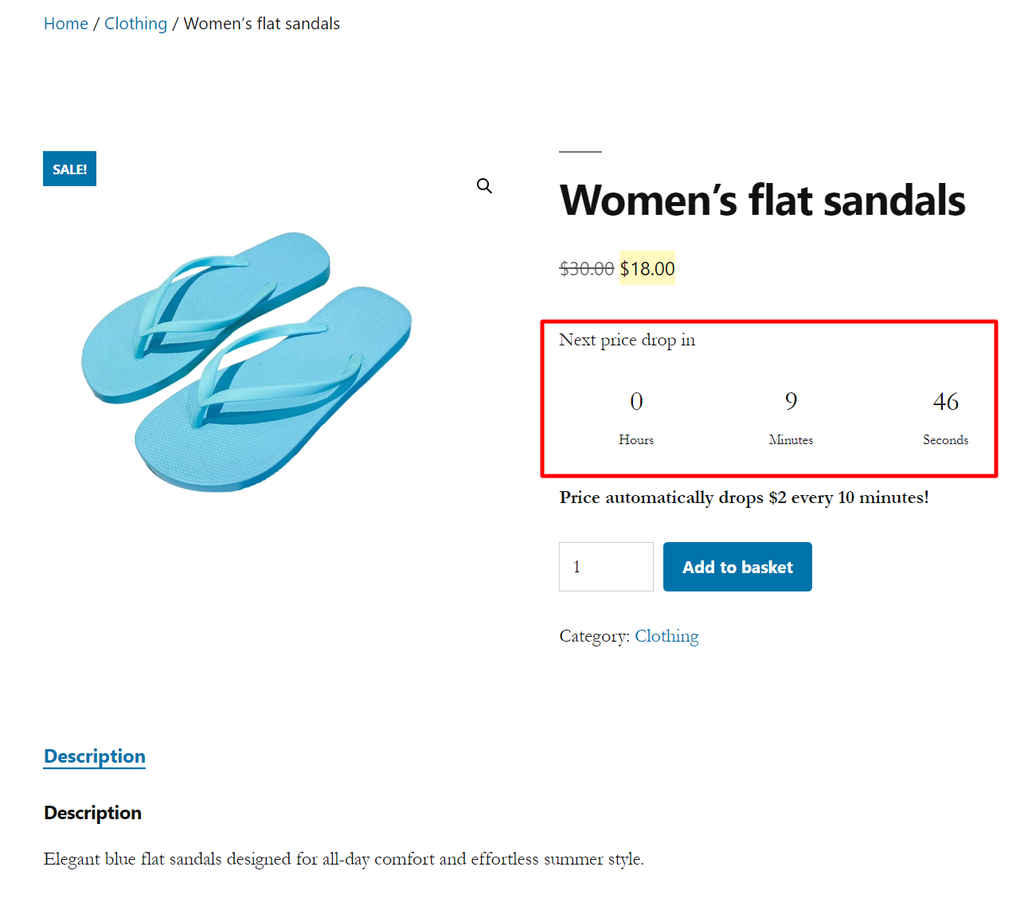
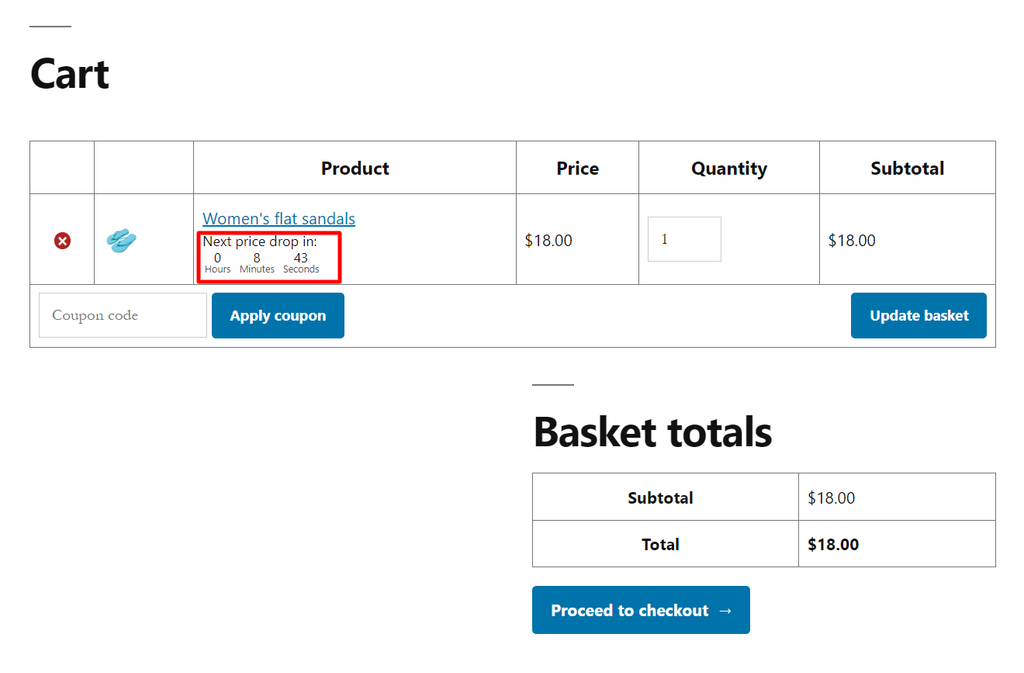
Once you’ve set up the price drop settings, the plugin will drop the product price automatically at the interval you set, with live countdown and an automatic price update on single product page and at checkout whenever a new price drop happens.
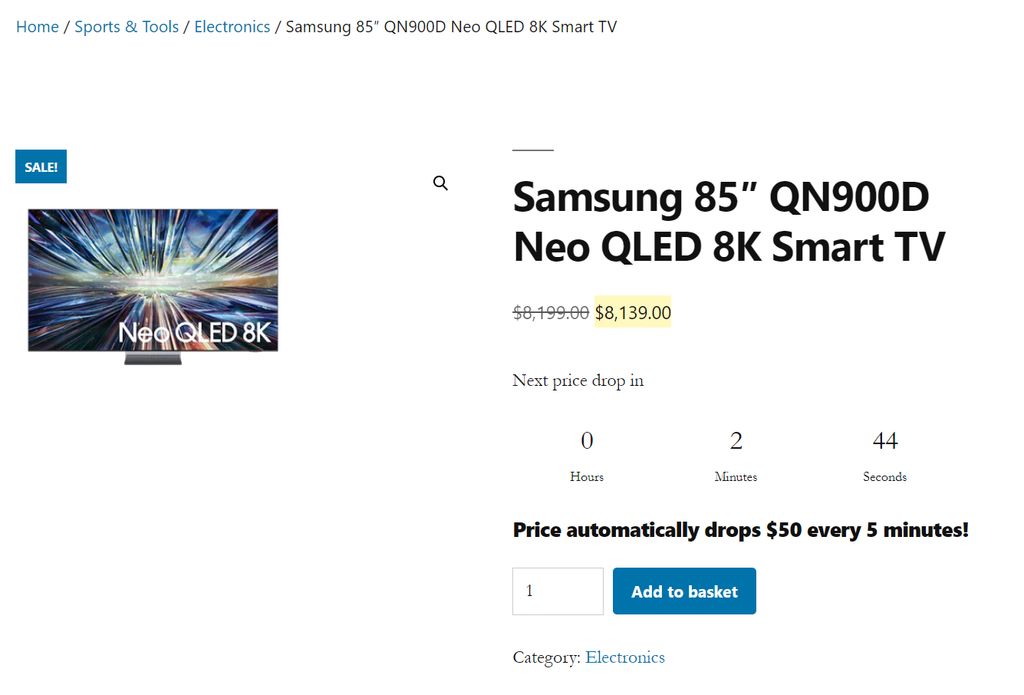
Drop Prices for WooCommerce plugin
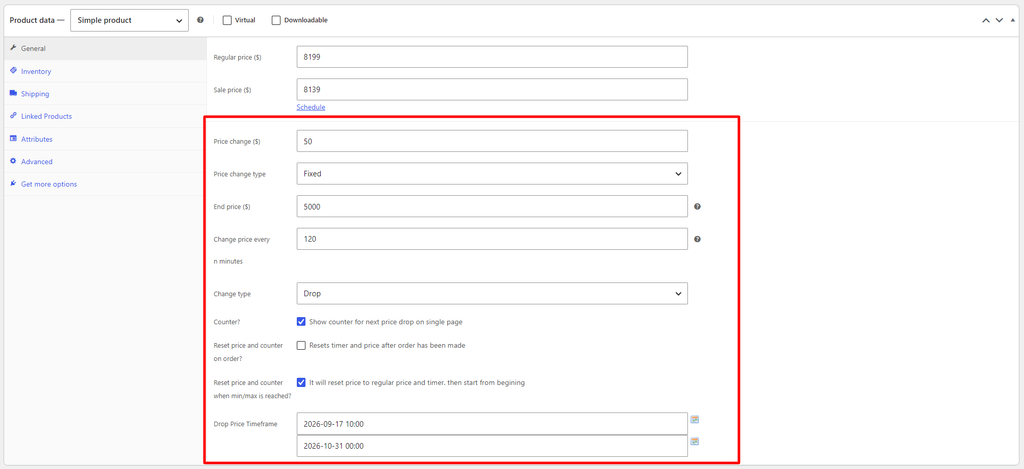
When editing a product, you’ll find several new fields under the General tab:
- Price Change (Amount & Type): Define exactly how much the price drops using either a fixed amount or a percentage.
- Intervals & Limits: Set a minimum price so you never sell below cost, and specify how often the price changes with the “Change price every n minutes” interval.
- Automation & Schedule: Enable a live countdown timer on the product page and in the cart to create FOMO, and use the calendar picker to schedule the campaign’s exact timeframe.
- Auto-Reset Options: Automatically reset the price and countdown timer and start from beginning after an order has been made, or after minimum price has been reached.
Use Cases
With Drop Prices for WooCommerce, you can run a Dutch-style auction for any product from your store: whether it’s a slow-moving product you want to give one more chance, or a best-selling product you know will attract the most attention.
Here are the top use cases for implementing this strategy in a WooCommerce store:
1. High-Demand, Limited-Quantity Drops (FOMO Marketing)
When launching exclusive items (e.g., limited-edition merchandise, rare collectibles, event tickets, or artisan goods), setting up a decreasing price builds immense psychological pressure.
2. Inventory Clearance
Instead of running a standard static clearance sale (e.g., “Everything 30% Off”), a descending price mechanism clears non-moving inventory much faster while preserving higher margins.
3. Gamified Promotional Campaigns (Flash Sales)
Use a decreasing-price auction as a high-engagement marketing tactic during major shopping holidays (Black Friday, Cyber Monday, Anniversary Sales). If a high-value item price drops in price, it will definitely drive high user engagement, and keep visitors on your site longer
4. Price Discovery for Unique or Custom Products
When introducing a completely new product where you aren’t sure how much customers are willing to pay, setting a high starting price and letting it drop helps establish true market value.
Conclusion
Whether you want to clear slow-moving stock, find out what customers are willing to pay for a new product, or create buzz around your Black Friday campaign, a Dutch auction works for almost any product in your store.
With WPGenie’s Drop Prices for WooCommerce, you can set up a Dutch auction for any product in your store in just a few minutes.
Ready to try it?
Download Drop Prices for WooCommerce from WordPress.org
If the plugin helps your store, we’d really appreciate it if you left us a review 🙂
What Users are Saying
⭐⭐⭐⭐⭐ The Best Reverse Auction Plugin & Developer
This plugin is the best and the developer is awesome. They should be charging for this one. I cannot believe its still free.
⭐⭐⭐⭐⭐ Great Plugin
Does exactly what it says. Would be great to have an option to change the price based on the time of the day. Kudos to the dev!
FAQ
Can I set up a Dutch auction in WooCommerce for free?
Yes. Drop Prices for WooCommerce is a free plugin available on WordPress.org. It lets you configure price drops for each product individually.
Does the plugin work with variable products?
Yes. Drop Prices for WooCommerce works with both simple and variable products.
How often should the price drop?
It depends on the length of your campaign. For a sale that runs a few days, hourly or daily drops work well. For a short, event-style sale, you can drop the price every few minutes to keep shoppers watching.
Will shoppers always see the current price?
Yes. The price updates live on the product page and in the cart, so shoppers always see the current price without refreshing the page.
What happens after someone buys the product?
If you’re selling a single item, the sale ends when it’s sold. If you have more units in stock, the price keeps dropping for the remaining units. Or you can enable auto-reset so the price and timer return to the starting price for the next buyer.
Do I need to set up anything on my server?
Yes. To make sure prices drop exactly on time, you need to set up a 1-minute cron job in your hosting control panel. If your host doesn’t support 1-minute intervals, you can use an external service like EasyCron. See our documentation for step-by-step instructions.
Is a decreasing-price sale a good idea for Black Friday?
Yes. Black Friday shoppers are already hunting for deals, and a falling price with a countdown adds urgency that a standard discount doesn’t. It works especially well for limited-stock or premium products.
Looking for other ways to improve your WooCommerce store? Check the complete list of our plugins that can help you bring your clients the best online shopping experience!