
Sequential Auctions
Choose Sequential Mode in Lot Details. The sale progresses through the item order rather than opening every auction at once.
Timing mode
Section titled “Timing mode”| Setting | Operation |
|---|---|
| Fixed Duration per Product | Each active item has the configured duration in minutes. The duration must be greater than zero. |
| Manual Close by Staff | Staff closes the active item and advances the sale. |
The lot finishes when its auctions have ended. In sequential mode, a planned lot end is not a substitute for processing the remaining items.
No-bid handling
Section titled “No-bid handling”Choose Auto-Advance to Next Product to continue after an item without bids, or Pause Sequence for Manual Intervention to let staff decide what to do next.
Staff controls
Section titled “Staff controls”The lot administration provides state-dependent controls including Start Auction, Pause Sequence, Resume Sequence, and Close & Advance.
- Confirm the correct active item before using a control.
- Check the result message and updated status.
- Verify the next item before continuing.
Closing an auction is a result-changing operation. Use a test sale to rehearse the process before operating a live event.
Timing changes
Section titled “Timing changes”Extensions, pauses, and manual closing can change when later items start. Review the current schedule and storefront console instead of treating the original estimate as fixed.
Screen example
Section titled “Screen example”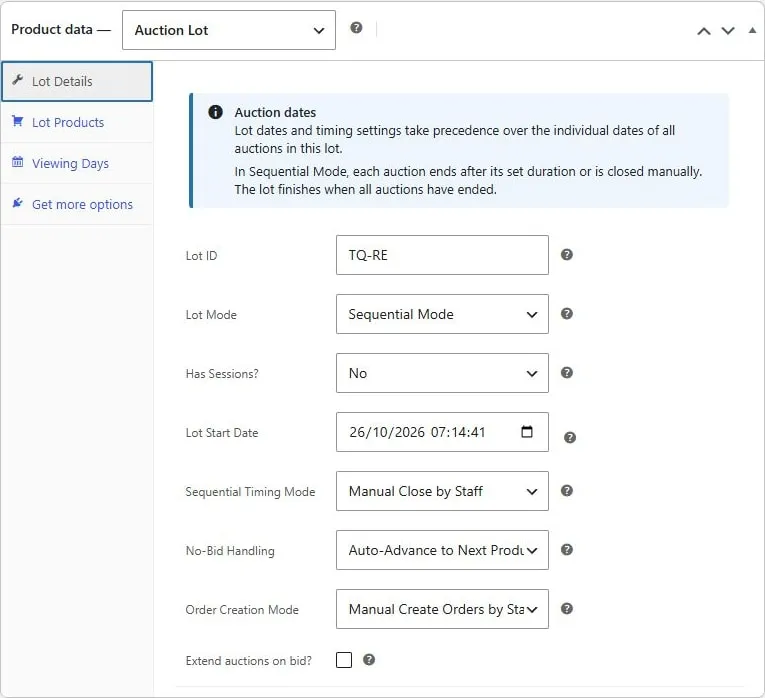
Saved Roadside Edit sequential lot with manual closing, no-bid handling, and order creation settings. Captured from a saved demo lot. Example values are not recommended defaults.